You can apply themes to sites in SharePoint – but what actually happens when you do? Continue reading “What happens when a Theme is applied?”
SP2007 Branding
Setting up your content types and templates…
I received a good link in one of the comments on the blog, and I thought I’d bump this up – Sensible Document and Template Management.
I’m with Mads on this – to me the killer feature of SharePoint is how it works with Offices, and template functionality is key in that. Demos of document properties, quick parts and then the list columns in Sharepoint have a very high wow-factor (rightly so – I think it’s pretty neat too!)
However, templates are something rarely used in my experience, or not use properly anyway. Often it’s seen as an unnecessary effort, and usually everyone just starts creating their own documents from blank, or deleteing the contents from an existing document and using that one, or copying and pasting across – none of which are pretty scenarios.
Then again, often the guys actually making these templates need a good course of ‘How to use Word’. No so much with Excel – I think that people accept you need a bit of training to use it – but Word seems to be an issue.
Anyway, the point is, do try and plan building templates into your project. And that there is probably a consultancy opportunity in trying to generate these…
Feature Receiver to apply master pages to normal or meeting sites
As noted previously, Meeting Workspaces use a different master page to the ‘normal’ master pages in SharePoint. This is a little annoying – if I need to apply a new master page, how would I do this?
Well, you can activate a new master page in a Feature Receiver. And we can detect the type of site we’re dealing with. Why not combine the two techniques Continue reading “Feature Receiver to apply master pages to normal or meeting sites”
Applying Themes
Themes have a couple of big advantages over Master Pages:
- Any type of site will let you change the theme.
- They style the Site Admin pages too.
…but there are some pain points too:
- You can’t apply a Theme to a site and all subsites – well, not unless you write you own code to apply them programmically, or do something like extend STSADM.
- You have to use feature stapling to automatically apply a Theme on site creation.
It’s certainly worth considering how your theme will be applied up front – although you could using the Alternate CSS url to ‘apply’ your theme. Personally, I think I like the idea of using a Feature.
Corrupt Breadcrumbs in the in PageAreaTitleFrame
I was tempted to call this “The incredible case of the bust rendering of SharePoint pages”, but it seemed a bit long, to be honest. This is a bit of a detective story (and if I’d the developer who built this in the first place, there’d be a murder) so stick with me… Continue reading “Corrupt Breadcrumbs in the in PageAreaTitleFrame”
Where should I store the images for my theme?
Hmm. So I’ve built a theme for SharePoint, and it seems to be working, but I’ve a bit of a puzzle – where should I store the images for it? It seems to me that there are some options… Continue reading “Where should I store the images for my theme?”
Putting a web part zone below the quick navigation menu
Previously, I’d been asked to put a web part zone below the quick nav for SharePoint pages. As it transpires, you can’t put web part zones on master pages – but there is no reason why you shouldn’t put one in an asp:Content control (indeed, that’s how you have to place them on pages). And I’d noticed this PlaceHolderLeftActions content placeholder. So I figured, why not put my web part zone into that?
To do this, I need to modify the page that I want this zone to appear for. It could be a Page Layout for publishing pages, or just a normal default.aspx on a team site. I’m using a blank site for this. I simply added a Content control, and dropped a web part zone into it:
<asp:Content ContentPlaceHolderId="PlaceHolderLeftActions" runat="server">

<WebPartPages:WebPartZone id="g_5AD648BF053647678E80875B48A60593" runat="server" title="Zone 1">

</WebPartPages:WebPartZone>

</asp:Content>
I saved the changes, and now when I go to edit that page I see:

Great! I can drop in web parts – here I’ve used a summary links web part:

But you may find the styling leaves something to be desired – but you can design that in!
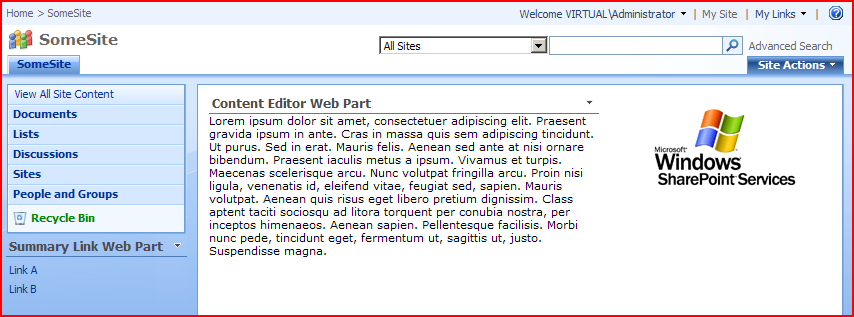
Sure, you could find that you have to do this a lot of times if you want to do this for many pages, but if you’re using the publishing features, you only have to modify each Page Layout once, which is very handy.
How to find out what type of site a site is…
I’ve built a feature to active branding on a site including master page, navigation and themes, which I’ve been talking about a bit over the last few weeks. One issue, though is that meeting workspaces have a different master page to ‘normal’ master pages, so I need to set them to use a different ‘custom’ master page when the feature is activated. This means that my feature receiver has to ‘know’ if the site it’s being activated on is a Meeting Workspace, or some other site.
What defines the ‘type’ of a site is the template that was used in it’s creation. Continue reading “How to find out what type of site a site is…”
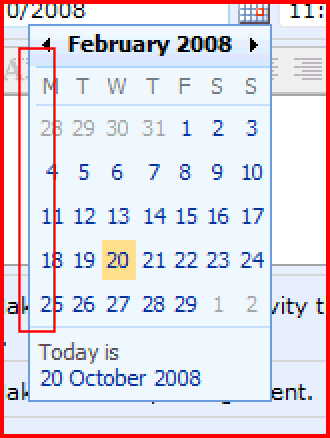
DatePicker contains a gap on the left
The DatePicker control contains a ‘gap’ of a couple of pixels on the left:
How SharePoint Pages are associated with a Master page
So, yesterday’s discussion of the problems with master pages for Publishing and Meeting sites raised a bit of a question with my colleagues. If a site (SPWeb object in the code) has both MasterUrl and CustomMasterUrl properties, how does a page ‘know’ which one to use? Why do publishing pages use the value in CustomMasterUrl, and other pages use MasterUrl?
Well, to find the answer to that, you’ve got to look in the code of the .aspx content page. Here’s the top of one in SharePoint Designer:

Yup, there is a MasterPageFile as per standard ASP.NET. However, the value of this isn’t normal – it’s not the URL itself, but rather a token that gets replaced at runtime.
- ~masterurl/default.master is resolved to the value of the MasterUrl property (i.e. the ‘System Master Page’ on a publishing site).
- ~masterurl/custom.master is resolved to the value of the CustomMasterUrl property (i.e. the ‘Site Master Page’ on a publishing site).
If you look in, say, the default.aspx page on a team site, you’ll see that it uses ~masterurl/default.master.
If you look in, say, the default.aspx page on a meeting workspace, youll see that it uses ~masterurl/custom.master.
If you look in publishing pages, though, you have to look at the page layouts (which are the actual .aspx pages being used). These don’t have a have a MasterPageFile defined – what gives? Well, they inherit from the Microsoft.SharePoint.Publishing.PublishingLayoutPage class, which sets the master page file internally during OnPreInit! You can see in Reflector that it’s using CustomMasterUrl though.
 Andy Burns' Blog