What the heck is going on with SharePoint Breadcrumbs?

Like many web applications, SharePoint uses ‘Breadcrumbs’ for navigation. This is a set of links that both tell you where in a hierarchy you are, and were you can go to. SharePoint, though, uses two:
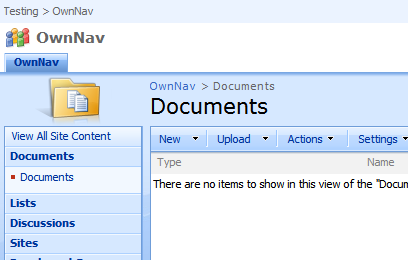
WSS-Breadcrumbs-OwnNav

You can see them here at the top left, and then above the word ‘Documents’. But wait, the master page shows us two breadcrumbs? You’re only in one hierarchy, so how does that work? The Planning & Architecture documentation on Technet says:

The default.master master page, which displays form and view pages, includes two breadcrumb controls, a global breadcrumb which contains sites only, and a content breadcrumb, which contains sites and the current page. Some collaboration site templates, such as the Team Site template, also include two breadcrumbs on all Web pages

However, this isn’t quite the complete story. Continue reading “What the heck is going on with SharePoint Breadcrumbs?”

What the heck is going on with SharePoint Breadcrumbs?

Site Definitions vs Site Templates

I have some curious blanks in my memory when dealing with SharePoint, such as the meaning ‘ghosted’ and ‘unghosted’ – please use ‘customized’ or ‘uncustomized’. (I don’t see where the undead enter into it all). One such blank is Site Templates vs Site Definitions. It’s discussed a bit on MSDN (for 2003, but the same applies for 2007) where the bottom section is most useful, and Robert Bogue has written a very good article. The short of it:

Site Templates Site Definitions
+ Simple to create – Requires actual development
+ Doesn’t require administrator – Requires administrator
– Risk of customization, and so worse performance + Better performance
– Can’t define list templates + Deep and full control

Must have a go at doing some of this sometime

Site Definitions vs Site Templates

Geo-Replication in MOSS with Syntergy

Last night was the SharePoint UK User Group meeting, and they had a number of vendors in to discuss their wares.

One that I’d not seen before, and set my toes tingling was about Geo-replication in MOSS, by Syntergy. They talked about a number of their products (and their Sharelink product – for integrating SharePoint and Livelink – was interesting), but the main part of the demo was Geo-replication. Basically, you can select (at a broad or narrow level) what you want to replicate, where you want to replicate to, what events you want to replicate, and it does so – including scheduling, and dealing with collisions of changes and resolving them.

Geo-Replication in MOSS with Syntergy

Georeplication in SharePoint

More for my benefit than anyone else, but there is blog post on Joris Poelman’s (JOPX) blog about georeplication in SharePoint. The crux of it is, SharePoint 2007 doesn’t really do it. But you could implement your own using the Content Migration APIs – which Stefan Gossner goes into in parts 1,2,3,4.

However, if you are considering a system using georeplication, please remember you must have enough bandwidth. If your network can’t handle the traffic needed over it already, before adding georeplication, then you are buggered. Georeplication might reduce cross site traffic, but you still need the bandwidth to actually do the replication. And you’ll have to be able to live with slow replication. And, as mentioned above (and by Joris), it is a significant development exercise.

I’m sure someone will do it though. And I’m confident that Microsoft will do it for a future version of SharePoint. It’s too powerful a feature to not have in an enterprise app.

Georeplication in SharePoint

SharePoint Licensing

Found on Cornelius Van Dyk’s blogSharePoint Licensing Information. Interesting stuff. No, wait, the other thing – tedious. Still, quite how you license your Internet facing WCM site did strike me as an interesting issue, especially as one of my colleagues kept going on about having external sites as ‘read only’. What, no feedback forms? Comments? Survey submissions? Well, it seems that the definition is one of accessibility – so long as everyone can access these features, you can use an Internet access license. I wondered how they’d deal with that.

(For content accessible to employees/partners only, I presume it’d be a normal client access license).

Update: See the Logical Architecture Model: Corporate Deployment document for details on this, and dealing with partners. That’s quite interesting – you can host partners sites on Internet or Intranet farms.

SharePoint Licensing