Hooking into Sitecore’s Logging

Sitecore uses Log4Net for it’s logging framework, so it comes with a whole slew of different ‘appenders’, suitable for logging to various repositories. That’s nice, but what if there’s a target you want to use that doesn’t exist?

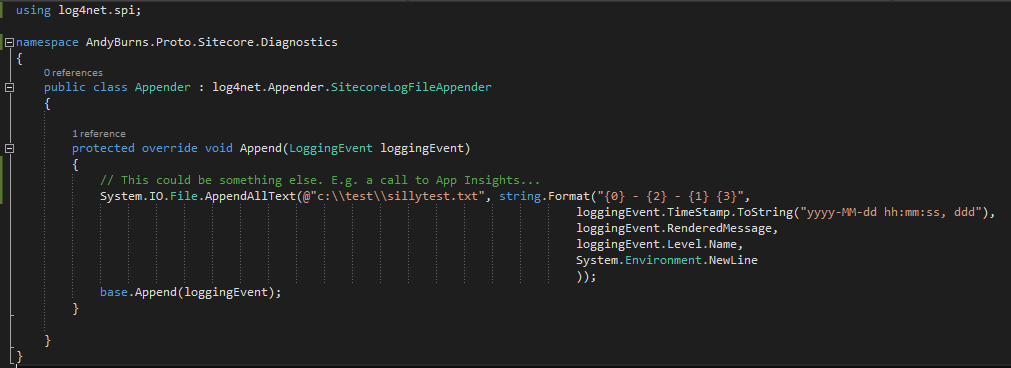
Well, you can override the SitecoreLogFileAppender and write your own output:

What else could you do with this? Well, writing to App Insights seems like a good bet.

Hooking into Sitecore’s Logging

Reset your Sitecore Admin password to ‘b’ when using SHA512 hashing

Okay, this this relates to my recent post on password hashing in Sitecore, and why we should move away from SHA1. Let’s say you’ve decided to use SHA512 for a brand new instance like Sitecore recommend…

When you create a new website, you must change the weak default hash algorithm (SHA1) that is used to encrypt user passwords to a stronger algorithm.

To change the hash algorithm:

  • Open the web.config file and in the node, set the hashAlgorithmType setting to the appropriate value. We recommend SHA512.

Okay, funky, but how do I make the existing admin’s password work? Continue reading “Reset your Sitecore Admin password to ‘b’ when using SHA512 hashing”

Reset your Sitecore Admin password to ‘b’ when using SHA512 hashing

Password Strength Estimation with zxcvbn

Following up my last post about Troy Hunt and breached passwords, I thought I’d look at something it mentioned – zxcvbn password strength estimation. Password strength estimators are, as a rule, crap. Usually it’s simply “is there a number, is there a capital”, etc., so passwords like “P@ssword1234” can come out as being ‘strong’, which is clearly wrong.

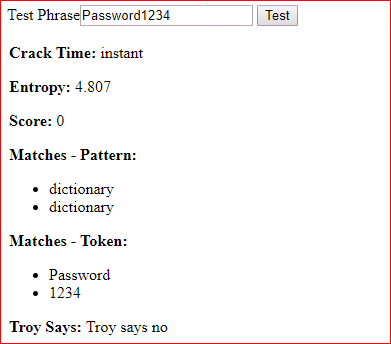
zxcvbn (awful name) attempts to make a smarter estimate of password strength. Basically, it looks at your password, and tries to estimate its strength based on appearances in dictionaries, structure, and entropy. It’ll then give an estimated “time to crack”, and tell you any matches that were achieved. For example (and neither of these are good passwords – score goes up to 4, and you want to get at least 3):


Yup, that’s pretty cool.

It’s available as a Nuget package (and is implemented in some form in most frameworks). The original zxcvbn was intended to run solely within the browser – but it still had a 0.5 Mb of dictionary files to download. That’s built into the assembly for the Nuget.

Testing a password – that’s simple:

var result = Zxcvbn.MatchPassword(“Squeamish Ossifrage”);

Neat. Worth considering if you’re implementing a password change or registration feature.

Bonus observation: http://gavinmiller.io/2016/a-tale-of-security-gone-wrong/

Password Strength Estimation with zxcvbn

Check Users Passwords during Registration/Login

Troy Hunt has published the hashes of 306,000,000 passwords that have been breached. And exposed it as a web service.

https://www.troyhunt.com/introducing-306-million-freely-downloadable-pwned-passwords/

Awesome!

This lets you tell a user if a given password has appeared in a breach. You send the service a hash of the password, and Troy’s web service responds if that hash has appeared in a breach.

Why is that useful? You can pro-actively inform users if their password has been breached (and recorded in haveibeenpawned) at either registration or login. You may want to block users from using that password, or you could just warn them.

Continue reading “Check Users Passwords during Registration/Login”

Check Users Passwords during Registration/Login

Sitecore Express Upgrade Tool 2.0 Issue

So, you’re doing an upgrade. You copy the live system, run through the upgrade, and test it, before repeating the ‘upgrade’ bit during content freeze with the latest data. So far, so normal; it’s a sensible way to check your system before the big update.

Picture this, if you will. You’ve done the upgrade with a snapshot of the data. It’s taken months. You tested, fixed, tested, fixed, and you’re happy to start the content freeze, run the express migration tool, and go live. So you run the Express Migration tool 2.0, and then try logging in as Admin to check it worked…

Continue reading “Sitecore Express Upgrade Tool 2.0 Issue”

Sitecore Express Upgrade Tool 2.0 Issue

NullReferenceException in Sitecore.ExperienceExplorer.Business.Pipelines .HttpRequest.EnableExperienceModePipeline.Process

Recently I was upgrading a site to Sitecore 8.2.1, and I received the following error:

Okay, WTF? There’s not a lot of information about this error, and I’d never seen it before. I ended up doing my usual trick – decompiling Sitecore to see what this method does. Here’s what I found…

…and the bit underlined in red set my “stupidity radar” screaming. This line is:

string database = SiteContext.GetSite(Settings.Preview.DefaultSite).SiteInfo.Database;

If GetSite() returns null, you’ll get a null reference exception, because they didn’t bother to check the returned variable before trying to use its ‘SiteInfo’ property.

It does offer a clue, though. Our upgraded system lacks a site called ‘website‘. That is, in our config, under the <sites> node, there is no <site ... > called ‘website‘. However, the DefaultSite setting in Sitecore.config still had its default value of ‘website‘.

We changed it to the name of our site, and this error was resolved.
NullReferenceException in Sitecore.ExperienceExplorer.Business.Pipelines .HttpRequest.EnableExperienceModePipeline.Process

This server could not prove that it is … its security certificate is from [missing_subjectAltName]

Yesterday, I had a working development site suddenly start throwing SSL errors:

The error message was:

This server could not prove that it is [Server Name] its security certificate is from [missing_subjectAltName]

Huh? What broke this?

Well, it turns out that Chrome had updated to Chrome 58, which removed support for the “Common Name” field. Instead, we’re supposed to use the “Subject Alternative Name” (SAN) field. That’s unfortunate; the IIS ‘Create Certificate Request‘ option we’d used resulted in a certificate with no Subject Alternative Name field. That could be a result of how it was handled – I didn’t create the certificate – but it looks like Windows MakeCert doesn’t handle Subject Alternative Names, so I wouldn’t be surprised if this is a general Windows issue.

The SSL cert continued to work without a SAN just fine in IE, but Firefox and Chrome now demand it, and so were throwing SSL errors.

Now, it seems that the Subject Alternative Name is what we’re actually supposed to use, and that publicly trusted certs have used both fields for years – but in our development server, using our own CA, that wasn’t the case.

See How to Request a Certificate With a Custom Subject Alternative Name.

Or Create a self-signed certificate for development.

This server could not prove that it is … its security certificate is from [missing_subjectAltName]

Sitecore shell wouldn’t work over HTTPS

I was working at a customer recently who’s Sitecore instance wasn’t accessible over HTTPS. It was a single server, and the site itself was working just fine over HTTPS, so that begged the question – why?

The error we were getting was:

Sitecore.Context.ContentDatabase returns null.

We were using HTTPS, and it’s worth noting that rather than redirecting all HTTP traffic to HTTPS with IIS, they were using C# code and a Response.Redirect() call in their page itself, which is… unusual. It also means that HTTP traffic to Sitecore shell is not redirected – the content page layout isn’t loaded, so their redirect wouldn’t happen.

Eventually, I found the following in a patch file:

<site name="shell">
<patch:attribute name="port">80</patch:attribute>
</site>
<site name="login">
<patch:attribute name="port">80</patch:attribute>
</site>

Interesting. Shell and login were being tied to port 80 – but HTTPS uses 443.

I removed this patch, and suddenly Sitecore was available over HTTPS again.


Sitecore shell wouldn’t work over HTTPS