Pre-filling fields on EditForm.aspx

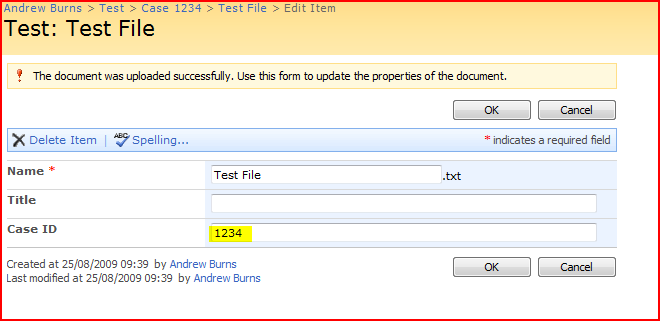
I’ve just been looking at an interesting problem that a colleague has had. We’ve a customer who wants to ‘inherit’ metadata values from Folders in a SharePoint Document Library to Documents uploaded to within it. For example, if the Folder has column ‘Case ID’, they want the value of the ‘Case ID’ column of any Document within it to be automatically set to the same value. And another twist – we won’t know the columns beforehand.

The problem is, they want this value to be pre-populated before the EditForm.aspx page is displayed.

AutoPopulated Field

Here, for example, the Case ID is autopopulated from the parent folder. So, what’s the best way of doing that? Continue reading “Pre-filling fields on EditForm.aspx”

Pre-filling fields on EditForm.aspx

ASP Charting Settings for SharePoint

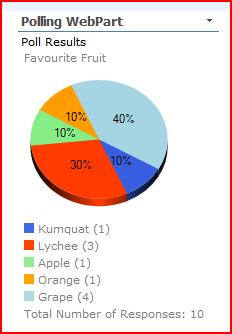
So, we’ve a customer who wanted a cheap and cheerful Polling web part. I’d seen one before on Codeplex by Phil Wicklund, and more recently I’d noticed the SPUserPoll by Edwin Vriethoff web part also on Codeplex. (I might try to review it at some point soon).

results

Both these web parts look kind of similar. They should do – they use the same control to display the charts – the ASP Chart control in System.Web.UI.DataVisualization.Charting library. Continue reading “ASP Charting Settings for SharePoint”

ASP Charting Settings for SharePoint

WSPBuilder and CAS Policies

Recently I wrote a web part using the WSPBuilder Visual Studio add-ins. I wanted to deploy it to the BIN directory and not have to elevate the trust level of my farm, so I was going to have to write a Code Access Security Policy (CAS Policy).

Others have written good descriptions of what CAS Policy is (here is a good description by Bamboo), but the short description is that it tells your application (SharePoint) to give certain additional rights to an assembly (in our case, the web part). These rights are things like being able to access the disc, the network, or even the SharePoint Object Model!

Yup, that’s right – under default Code Access Security, my assembly wouldn’t even be able to access the SharePoint APIs. Continue reading “WSPBuilder and CAS Policies”

WSPBuilder and CAS Policies

Adding CSS links to your SharePoint pages or code…

I love Twitter – you get some though provoking questions on it. Thomas Resing asked the other day:

How are you applying styles to your custom web parts in #SharePoint? using CSSClass property, stuck on deploying css <Link> tag in the head

Well, for pages themselves you have the CSSRegistration control. It’s an ASP.NET control, and looks something like:

<SharePoint:CssRegistration name="/_layouts/myBrand/SomeStyle.css" runat="server"/>

This control registers the URL with the page, but doesn’t emit anything. That’s controlled by the CssLink control:

<Sharepoint:CssLink runat="server" />

It actually outputs the <link> elements, and this means that you can have a CSSRegistration control low down in the page (in a Content control, for example) and you can still output it in the <head> of your page. There’s a good post about this on CleverWorkarounds.

So, could we use that control? Well, we should be able to instantiate one – except it turns out that we don’t have to. We can just use the CSSRegistration.Register() static method – something like:

protected override void CreateChildControls(){
CssRegistration.Register("/_layouts/myBrand/SomeStyle.css");
}

Job done…
Adding CSS links to your SharePoint pages or code…

Relating BDC entities for Search Indexing?

I think I might have come across a problem with using the BDC to index entity data in legacy systems. I’m sure I can’t be the first person to have hit this problem, but I can’t find a solution. Thus, I thought I’d blog it so other folks might be aware of it, and to open the problem up to suggestions.

I’m not sure I can describe the system I’m actually working on, so I’m going to use a slightly contrived example… Continue reading “Relating BDC entities for Search Indexing?”

Relating BDC entities for Search Indexing?

Programmatically figure out the Email address of a list

I like mail enabled lists – they’re not perfect, but they are nice, and most folks can handle working email.

Sometimes, though, you want to programmatically create and enable these lists. That’s cool – but how do you figure out the email address of the list afterward?

You can get the first part of the address from the SPList object’s EmailAlias property. But that’s only the bit before the ‘@’ sign – what about the end of the address? Well, you get that from the farm:

emailAlias = list.EmailAlias + "@" + SPFarm.Local.Services.GetValue<SPIncomingEmailService>("").ServerDisplayAddress;

This gets the rest of the address (in my case ‘sharepoint.virtual.local’). Job done.

Programmatically figure out the Email address of a list

Control the RSS Feed Settings on an SPList via the API

Tobias Zimmergren tweeted today asking

Anyone got recommendations to how you modify RSS-Settings for an SPList object using the API?

Good question. The SPList object does have a property EnableSyndication that gets or sets whether an RSS feed is available. There is also an property ‘AllowRssFeeds’, but it is, apparently, read only.

So, you can set whether one is allowed or not – but there are a lot more settings. What about controlling them programmatically? Continue reading “Control the RSS Feed Settings on an SPList via the API”

Control the RSS Feed Settings on an SPList via the API

Rounded Corners on Web Parts

The Holy Grail of SharePoint branding – at least as far as I’m concerned – is rounded corners on Web Parts. Every design that comes in has this at first. As mentioned yesterday there are examples of doing this for the web part’s title – I’ve done this using Madalina’s instructions and Heather Solomon has some instructions too.

However, as far as I know nobody has yet figured out a way of putting rounded corners on the bottom corners of web parts. The HTML they have does not suit them to do this via CSS. The only idea I’ve had previously was to use ControlAdapters to modify the output of of the Web Part itself. And I’m pretty sure you’d have to write an adapter per web parts. That kind of sucks; no customer is going to be in a hurry to pay for that.

Well, when I was looking at putting borders around an entire web part zone, I had a thought. What we really need to do is insert elements into our page. jQuery can do that sort of thing. Could I use jQuery to find each web part and wrap some tags around it? Continue reading “Rounded Corners on Web Parts”

Rounded Corners on Web Parts

Rounded Corners on Web Part Zones

Curiously, one of my more popular blog posts is about putting rounded corners on things in SharePoint. It does seem that this is a pretty popular question. As a side note, Heather Solomon has a post about doing this for web part titles, though I followed Madalina’s instructions.

Anyway, one design requirement that come up repeatedly is rounded borders on Web Parts. I swear, it comes up with every design – and it isn’t possible (although I have an idea – more on that tomorrow). What you can do, though, is have a rounded border about the entire web part zone… Continue reading “Rounded Corners on Web Part Zones”

Rounded Corners on Web Part Zones