Right, so I’m finally taking a lunchtime to write up about the SUGUK Meeting in London last Thursday. The topic was Business Intelligence in SharePoint 2010, and the main presentation was by Ben Robb, with a discussion afterwards. It covered a lot of technologies – there are a lot you can use – but the bit that I think will be interesting is the methodology and management. Continue reading “SUGUK Meeting on the 11th March”
SharePoint
Breadcrumbs in Central Admin and Application Pages
This is a reminder of a couple of problems that I’ve come across a few times – that the breadcrumbs in LAYOUTS pages and central admin are a bit tricky.
Breadcrumbs in Layouts pages are driven by an XML file in your IIS web app. Now, you can add entries which are merged into that – a described by Jan Tielens’ Adding Breadcrumb to application pages in SharePoint – the easy way. However, this doesn’t cover the whole problem – he goes on to describe dealing with Central Admin too.
However, the really tricky bit of this that though we can define our own sitemap.xml file, it’s kind of hard to merge with the existing one. Specifically, the problem is that to merge ‘our additions’ and the ‘existing file’, we have to call a function ApplyApplicationContentToLocalServer, and as brilliantly described by Sean McDonough, the word ‘local’ is a problem in this method – it only forces a merge of the files on one server. Not much use in a server farm.
Sean’s article describes his attempt at a fix – using a one-time timer job, and a fair bit of reverse engineering of the ApplyApplicationContentToLocalServer function. Also, it seems like Vince Rothwell has come up with a similar solution, so it’s likely that this is a good approach.
A real pain to have to build so much to do such a simple task, though.
Application Master Page Changer Project
The product of many evenings in hotels recently, I’m proud to present, my Application Master Page Changer.
Application master pages are tricky – out of the box in SharePoint 2007, there is no way of changing the master page used for ‘administrative’ pages. Unfortunately, those administrative pages include things like the recycle bin, file upload, and the ‘View all site content’ pages – things that users will likely see.
Well, folks have found a solution to this – using an HTTPModule to intercept pages using the normal application.master and redirecting it to use your custom one. This works pretty well, but I was always a bit uncomfortable – what if you only want this to happen for particular site collections, or specific sites within a Web Application? I’d tried knocking up an HTTPModule to do this, but matching against URLs – bit it was awkward to configure, complex, and adding new sites/site collections could be a bit annoying – basically, a nightmare to configure.
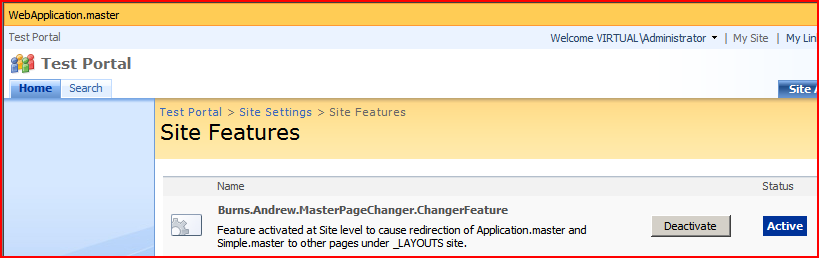
What we really need, I thought, is some way of just turning on/off the master pages being used with Features. And that’s what I’ve built. Check it out here…
Adding and removing Web config modifications
When building an application for SharePoint, if you’re making changes to the Web.config, they should be deployed SPWebconfigModifications. This isn’t that easy, really, but works well enough, and there are good articles about how to add them – but my code looks like:
SPWebConfigModification modification = new SPWebConfigModification(
     "add[@name='MyNavProvider']",
     "configuration/system.web/siteMap/providers");
modification.Value = "<add name="MyNavProvider" type="{Assembly info here!}" />";;
modification.Sequence = 0;
modification.Type = SPWebConfigModification.SPWebConfigModificationType.EnsureChildNode;
modification.Owner = "MyConfigModification;

webApp.WebConfigModifications.Add(modification);
webApp.Update();
That works, but what about removing them? It’s important to do this – otherwise you can cripple a system. Continue reading “Adding and removing Web config modifications”
More Problems with SharePoint Audit
Right, more problems with Audit, in addition to problems mentioned previously. Although Updates to Documents have version numbers, updates to ListItems do not:

Interestingly, Deletes still have a version number. But there really is no version number recorded for updates… Continue reading “More Problems with SharePoint Audit”
Using the PortalSiteMapProvider
I recently had a customer who wanted a simple web part that just listed the subsites of a site – something like what you see in SharePoint’s “View All Site Content” page, but for a couple of levels, rather than just one. Obviously, this would be quite simple to do directly by traversing the SPWeb object and it’s children, but it struck me that there must be a better, standard way – ideally one that uses a bit of caching or optimisation.
I found myself looking at the PortalSiteMapProvider for the first time. I’ve written my own NavigationProviders before now, and I’ve used some of the out of the box ones, but the PortalSiteMapProvider is an object I’ve never really used, or become familiar with. Here’s what I found… Continue reading “Using the PortalSiteMapProvider”
System.Web.UI.WebControls.WebParts in ONET.xml
Came a cropper on this one today – using web parts based on System.Web.UI.WebControls.WebParts.WebPart in a Site Definition. Unlike the Microsoft.SharePoint.WebPartPages base web part, ASP.NET 2.0 ones need a <webParts /> tag around your <webPart> tag – other wise you get the error:
Cannot recognize the xml namespace of this web part
Joris Poelmans has a good description of the problem, and that was where I read the solution – it saved me a tonne of time.
Weird toolbar on Custom Document Library
I’ve been writing a custom document Library Definition. Well, I say I was writing – I actually created it in SharePoint, and used the Solution Generator in the Visual Studio Extensions for WSS3 to produce the CAML and .aspx files.
Having done this, however, one of the views in my document library was a bit strange. Somehow, for this one view, the ‘New’ and ‘Upload’ menus were missing:

They were there for other views, just not this one. After examining the CAML (which sounds like some sort of euphemism) I found that the problem seemed to relate to the BaseViewID for the view. Continue reading “Weird toolbar on Custom Document Library”
Having many content types on a list
The question came up the other day – what happens if you have a lot of content types attached to a SharePoint list. Say, for example, a hundred? The ‘New’ menu might get a little, um, large. Well, I used the code for programmatically creating a content type from the other day to create and attach lot of content types. Continue reading “Having many content types on a list”
Programmatically Create Content Types
This is an example of programmatically creating a content type (based on the Document content type) and adding it to a list. I’ve not added any extra columns or anything – but we could have.
string name = ...

SPList list = ...

SPContentType baseContentType = web.ContentTypes[SPBuiltInContentTypeId.Document];

SPContentType type = new SPContentType(baseContentType,web.ContentTypes,name);

list.ContentTypes.Add(type);

list.Update();
 Andy Burns' Blog