So after having had the discs sat on my desk for months, I finally had a go at installing ForeFront on a VM. Here are my first impressions. Continue reading “First impressions of Forefront for SharePoint 2007”
Author: Andy Burns
Personalization Sites, Links, and Two Tabs
I came across an interesting problem today. I’m building a demo, and I wanted to use personalization site to ‘push’ a dashboard page to a certain set of users. I created a Personalization site (using the Personalization Site tempate), and then went to my SSP to set up a Personalization Link to it:

I then logged in as a user who belongs to the audience it was configured to show for:

Everything looked good – I had my ICT link that I’d just set up, so the audience was working correctly. However, when I clicked on it, things didn’t work so well…

Yup, two tabs were being shown. One was my Personalization Site link that I’d configured in the SSP, and the other was the navigation tab for the site itself. I only noticed ‘cos the name on the tab I’d added in the SSP (ICT) and the name of the site (ICT Dashboard) were different. Also, the Site’s own tab gave me the ‘Pin/Unpin Site’ option.
It’s a bit of a digression, but what’s the pin/unpin site stuff about then? Well, you don’t have to push personalization site links out to users (via the SSP). Instead, users can go to a personalization site and choose to add it to their My Site tabs; this is ‘pinning’ the site. After they’ve done this, they can remove the link (‘unpinning’).
However, that’s not what I wanted – I want the ICT audience to always have that link, and I don’t want another tab, or any pin/unpin options. So how do I get rid of that? There must be a way; it’s obvious that if I’m pushing a personalization site to a bunch of users that they shouldn’t get those options.
After much head scratching, I figured it out. My personalization site link in the SSP only pointed to the site, not to the actual page. I changed it to point to the page (default.aspx).
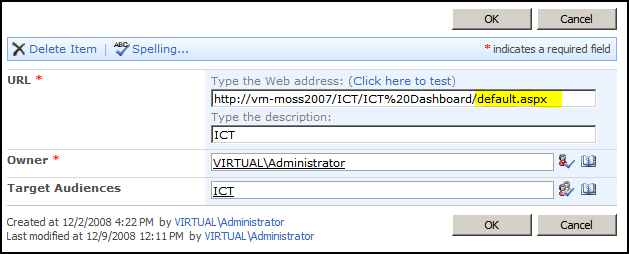
When I then navigated via that tab, I was shown only one tab – with no pin/unpin options:

Hurrah! What I think happens, then, is that the top navigation compares the URL of the current page in the personalization site with the URLs for the tabs in the user’s My Site. If none of them exactly match, then it adds a tab for the site itself, including the pin/unpin menu. Although my personalization site’s url did resolve to the same page (default.aspx) the URLs were not the same – and hence I was getting two tabs!
WSS3 Pages – what's with all the sucky layouts?
Okay, so I’m not a huge fan of the out-of-box publishing layouts. I’ll be honest – I reckon that there should be about half of the layouts, and I don’t like the ‘Welcome Page’ as a description. ‘Generic Page’ perhaps?
Anyway, some of them have pretty cacky layouts, often with Summary Links built into the page (why? Can’t I just add a web part?) – but as a rule, they keep the left hand navigation for the site. This is good – users get confused when their navigation isn’t how they expect.
New WSS Pages, however, do not keep the left hand navigation.

This has led to more than one customer asking “where has my left hand nav gone?” Not an unreasonable question – after all, did someone think that users wouldn’t need standard navigation in team site pages? Don’t get me wrong, I like that you can get rid of the left navigation menu if you want – but I think this will be the exception, not the rule.
You can get the left navigation back using SharePoint Designer (and some cynics might suggest it’s a ploy to set SPD licenses, though I don’t think so). However, I shouldn’t have to! Can’t I have a couple of out-of-box layouts that are like, well, the one used in Default.aspx on my team sites? Is there a Codeplex project for such a thing, maybe?
Even better would be if Default.aspx existed inside a library like any newly created pages I build are. I don’t like that it is separate to the other pages in a WSS3 site.
Navigation from a 'My Site' back to a Site Collection
I don’t normally do much with My Sites to be honest – usually I’m building applications, and they’re not usually in My Sites. One of our customers asked me ‘How do users navigate back to the Intranet?’ and I’ve got to admit, I was baffled.
Well, SharePoint’s My Sites have a site-collection setting for ‘Portal Site Collection’. This setting modifies the Global Breadcrumb, and inserts another link there – so you can have a link back to your site-collection.
There a number of issues with that, though… Continue reading “Navigation from a 'My Site' back to a Site Collection”
Merged Data Sources for the DataView web part
I’d a question from a reader (gee, I have readers!) about doing content rollup using the DataView web part. He was asking if he could use the DataView web part even though the things he was pulling into his Data Source didn’t all have the same columns. Would this work? Well, one way to find out… Continue reading “Merged Data Sources for the DataView web part”
How to get an SPWeb object from a URL
One of the problems with SharePoint is that it’s very difficult to figure out what site is specified by a URL. After all, the URL to a particular page contains:
- the Server
- possibly (but not necessarily) a managed path and site collection
- possibly (but not necessarily) a site
- possibly (but not necessarily) a folder (such as ‘/lists/’)
- possibly (but not necessarily) a list/library name
- possibly (but not necessarily) a folder in a Library
- the item itself.
Suffice to say, with all those optional bits, decomposing a URL to find the site is really hard. There is, however, a slightly obscure way of find this. You can create a site collection (SPSite) with a full URL, and then simply call OpenWeb() without any parameters to return you the site (SPWeb):
string path = "http://example/examplesite/_layouts/settings.aspx";

try

{

using (SPSite siteCollection = new SPSite(path))

{

using (SPWeb site = siteCollection.OpenWeb())

//Do something with the site

}

}

}
I found this when looking at the MSDN docs for SPSite.OpenWeb(). Check out the examples in there.
It’s a little weird that the SPSite object remembers information about how it was opened like that. But it is useful to know.
WinSxS folder – WTF?
So, I’ve been using Vista quite happily for a fair while now. All the doomsayers complaining about how it would use so much more resources were wrong – provided your turn off the transparent borders on windows it still runs just the same (it seems to me) as XP. I guess I’ve always said to friends that it’s alright – I wouldn’t pay to upgrade to it (it doesn’t seem to offer much), but if I was buying a new PC, I’d be okay with it. The only problem I had doing just that was with blackhole detection in the new TCP/IP stack, and that was… exotic.
However, I think I’ve just found my first big gripe. Performing standard system maintenance on my desktop, which is used pretty much exclusively as a VM host, I noticed that my primary drive was using 40Gb. That seemed rather high for Vista, Office ’07, SharePoint Designer and Adobe Reader. Naturally, I broke out Treesize:
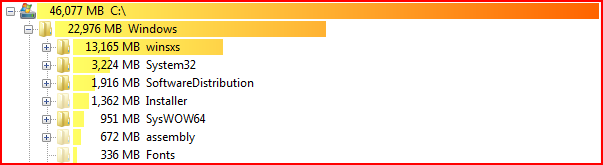
So, 28% of my drive is being taken up by the winsxs folder. What the hell is that? Continue reading “WinSxS folder – WTF?”
Another day, another master page
Well, I’ve just built a lovely little HTTP Module that lets us redirect the application pages for a site or site collection to a new master page. I’m quite pleased, to be honest. Anyway, I noticed that the error pages in the site I was testing on were not using my new master page, so I started to examine this. I found that the error page (_layouts/error.aspx) is busy using simple.master. WTF?
It makes sense, I guess. You do need a master page which doesn’t run in an authenticated context, and a brief check shows that this is the master pages for the out-of-box Forms authentication page.
I decided to check out if there were other master pages in Layouts – and there were. My list of master pages is now:
- Default.master – used in normal sites. Often replaced for publishing sites.
- MwsDefault.master – use in Meeting Workspaces. Awkward to replace, but can be done through code or SharePoint designer.
- Application.master – used in ‘administration’ pages, and sometimes pages such as ‘View all site contents’, Recycle bin, and uploading a file.
- Simple.master – used in pages that need to run in an unauthenticated context – such as error pages, or forms authentication pages.
- sspadmin.master – seems to be used editing audiences, in excel services configuration, in profile administration, and handful of other places.
- layouts.master – no idea what this is for. Can’t find where it is used!
- dialog.master – used in the little pop-up dialogs, such as when you’re adding or editing a Hyperlink.
- pickerdialog.master – used in pop-up dialogs such as the web part gallery, or selecting users.
The master pages in italics are comparatively easy to replace; the rest are much more difficult. And try as I might, I couldn’t change the master page for Errors in my HTTP Module. I guess what I’ll do is write another one to redirect errors to my own custom-branded error page.
Error: CQWP – RSS feed of non-documents doesn't work
This is a pretty weird error. I was doing content roll-up of Announcements lists, to give a unified news channel for our intranet. Naturally, I decided to do this using the Content Query Web Part. I added one, and selected that I wanted to query for the contents of Announcements lists. As I like RSS feeds, I enabled one, and I added it to my favorite feed-reader.
It worked – but the links to the announcements themselves didn’t work. The short summary is that is that it appears RSS feeds from Content Query Web Parts don’t work when you query for certain types of list. Continue reading “Error: CQWP – RSS feed of non-documents doesn't work”
People Picker shows Disabled user accounts
Something I didn’t know about – the people picker shows disabled user accounts – and ‘Tales from the field’ has a solution (on a per web app basis). Just in case the blog ever goes down:
This default behavior can be changed on a per web application basis to return only enabled user accounts. In the example below I have configured this for the web application http://moss using stsadm. This command configures MOSS 2007 to use a custom LDAP query.
stsadm -o setproperty -pn peoplepicker-searchadcustomfilter -url http://moss -pv (!userAccountControl=514)If you are interested in putting together more granular filters I strongly recommend the following guide on LDAP, LDAP Query Basics – http://technet.microsoft.com/en-us/library/aa996205(EXCHG.65).aspx
Nice one Brendan
 Andy Burns' Blog
