Secure your ASP.NET Viewstate

This is just a short reminder for myself – when configuring ASP.NET websites, don’t forget to Secure the viewstate. If you don’t, then the ViewState is just base64 encoded – and can be decoded.

Securing this involves:

  • Setting a machine key in the web.config. In a load balanced environment, this machine key should be the same on all front-end servers; it’s used in encryption and decryption of the viewstate, and so has to be the same on all webservers. If it is not, and a user’s session skips to another server, then decryption of the viewstate will fail.
  • Make sure the the validation algorithm is set to ‘AES’
  • Make sure that the ‘decryption’ algorithm is set to auto.

That seems to be it. I did see instructions that said that I should:

  • On the <pages> node, add the attribute viewStateEncryptionMode=”Always”

… but I didn’t seem to have to do this. Actually, in the end I did have to set this too.

Edit: How to generate your machineKey easily


Secure your ASP.NET Viewstate

Lock down your HTTP Verbs

Something that has come up in some of our testing recently is that some of our websites have HTTP verbs allowed that probably should be blocked – and with IIS they can be.

To recap, we’re use to the idea of GET or POST requests, but there are a lot more… Continue reading “Lock down your HTTP Verbs” →

Lock down your HTTP Verbs

Lockdown Sitecore Administration

The Sitecore security hardening guide 6.0 (or version 7.5 here) describes:

You should prevent anonymous users from accessing the following folders:

  • /App_Config
  • /sitecore/admin
  • /sitecore/debug
  • /sitecore/shell/WebService

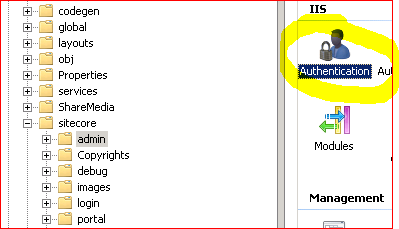
And then goes on to describe removing anonymous access to those areas in IIS.

Authentication Settings

The version 7.5 document goes on to say… Continue reading “Lockdown Sitecore Administration” →

Lockdown Sitecore Administration

Configuring a Content-Security-Policy

I’ve talked about how to how to remove HTTP Headers that you don’t need from IIS – but there are some that you probably will want. This particular post is about the Content Security Policy (CSP).

I’m not going to describe what one is. @Scott_Helme has already described what a Content Security Policy is far better than I can. Rather, I’m going to describe how to figure out what your policy should be… Continue reading “Configuring a Content-Security-Policy” →

Configuring a Content-Security-Policy

Removing Chatty IIS Headers

IIS is, by default, a bit too damn chatty, which isn’t what you want if you’re trying to harden your server:

Capture

You can check this with a site like SecurityHeaders.io, which will review all your HTTP Headers for you. It’s very good, I recommend it.

Why would I need to tell the world what ASP version, webserver, etc. that I’m using? Isn’t this just helping potential attackers? Well, yes. How do you remove these headers, though? Continue reading “Removing Chatty IIS Headers” →

Removing Chatty IIS Headers

You’re checking your HTTP Headers, right?

In the rush to build a website, it’s pretty easy to overlook something as mundane as HTTP headers – until someone runs an automated pen-test against the site you’ve built and starts asking about why you’re not using them – or why you are. Then you have to run around quickly trying to fix this – and some of these tasks aren’t so easy.

All of this can be fixed with a little testing beforehand, and there is a nifty site called SecurityHeaders.io…

Capture

This will tell you:

What headers you’re using and probably shouldn’t. IIS seems determined to include lots of HTTP Headers that you don’t need. This just leaks information to someone who is potentially malicious, and wastes a little bandwidth.

What headers you should use. There are a number of slightly obscure security related headers, and some new (and good) ones, such as a Content Security Policy, or HTTP Public Key Pinning.

Also, for what it’s worth, SecurityHeaders.io is by a chap called Scott Helme – https://scotthelme.co.uk/ (@Scott_Helme). He’s written about a lot of this stuff quite extensively, and also has written report-uri.io, which as we’ll see is fantastically useful.

Other ways of seeing your HTTP Headers…

  • Fiddler (Of course)
  • Browser Developer tools – such as Chrome’s – can show the response headers
  • Chrome’s HTTP Headers plugin – there are other plugins (and plugins for other browsers), but I find it very good for just doing what it says.


You’re checking your HTTP Headers, right?

Configuring SSL/TLs made easy

I’ll admit, I find the configuration of SSL and TLS something of a mystery – I like to leave that stuff to the admin guys and get on with the coding. It’s something of a black art, and there seem to be so many obscurely named vulnerabilities that it’s a bit difficult to handle without being a specialist. (Heartbleed? Bar Mitzvah? Lucky 13? Poodle? I mean, seriously, POODLE?)

However, I was recently given a PowerShell script and told to ‘fix these servers’ – and it was very easy. Continue reading “Configuring SSL/TLs made easy” →

Configuring SSL/TLs made easy

Don’t forget that Robots.txt Sitemap entries need to be absolute

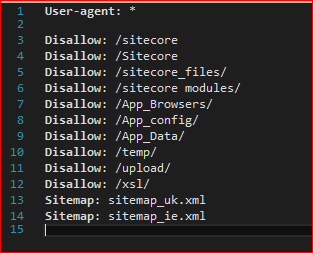
Robots.txt files tells visiting robots – such as Google’s crawler – what they should and should not crawl. Part of this should be a Sitemap directive:

Sitemap

The Sitemap element(s) points to an XML file of all your pages of content, and when they were last updated. That way, the crawler can quickly and efficiently find new content.

Technically, the URL to the sitemap(s) must be absolute. Yes, there’s no earthly reason why this must be so, but that’s what the specification says. Fortunately, Google will handle relative URLs – so the definition shown above should work for Google – but it might not work for other robots. Continue reading “Don’t forget that Robots.txt Sitemap entries need to be absolute” →

Don’t forget that Robots.txt Sitemap entries need to be absolute