I had a call from a colleague today. He’d created a SharePoint site collection inside an existing and working web-app, using the standard ‘sites’ managed path (e.g. http://server/sites/newSiteCollection). It seemed to have created it okay, but if he went to it he got a HTTP 404 – yup, “Page not found”.
This seemed a bit weird, so I went to see what he’d done wrong. I looked in Central admin – it showed his site collection as existing, but going to it, I got a 404 too. So I created my own – and after it was create, if I went to it, it 404’d too.
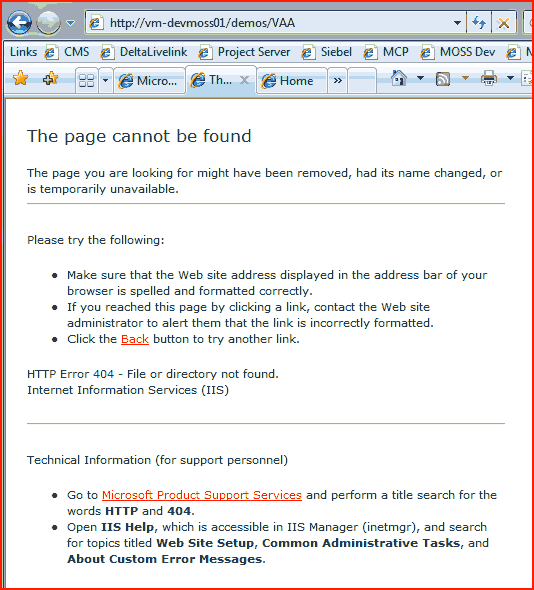
(The examples below use the managed path ‘demos’ – I took the screenshot when I was reproducing the problem, having apparently fixed it for the ‘sites’ managed path already. Trust me, this happens just the same if the items involved are using the text ‘sites’).

If you look at the screenshot you’ll see that I’m trying to go to the site collection ‘vaa’ inside the ‘demos’ managed path.
Well, at this point I tried using some other managed paths to create a site collection, and they worked fine – no 404s when you try going to them just after creation. I began to wonder if it was something about this path, so I opened IIS Manager to see if anything was going on.
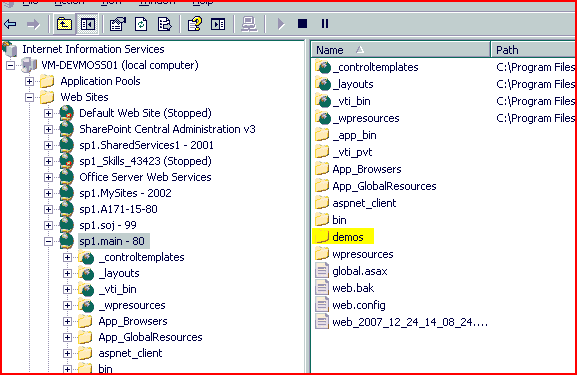
Inside my virtual directory for my web app, I found a ‘sites’ folder (or ‘demos’ in this screenshot):
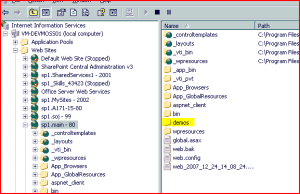
That was a bit strange – normally I wouldn’t expect to see ‘sites’ folder. It seemed empty, so I deleted it, and then I could access my new site collection without getting a 404. I then created a folder to interfer with one of my working managed paths (I created a folder called ‘demos’), and suddenly I started getting 404 errors if I tried going to it.
I don’t know why there was a ‘sites’ folder in that virtual directory, but it was definitely causing problems. I guess I won’t be using a managed path of ‘bin’ or ‘aspnet_client’ then 🙂


 Andy Burns' Blog