Clearing the CA0068 Error in Code Analysis

This error was appearing in the code analysis for one of my SharePoint projects. It reads:

Warning 1 CA0068 : Debug information could not be found for target assembly ‘Something.exe’. For best analysis results, include the .pdb file with debug information for ‘Something.exe’ in the same directory as the target assembly.

Annoyingly, it didn’t seem to allow you to suppress it, and I was doing a Release build – so I didn’t expect to have a .pdb file. Continue reading “Clearing the CA0068 Error in Code Analysis”

Clearing the CA0068 Error in Code Analysis

Check Permissions in JavaScript Client Object Model

I had a need to check the rights a user had on a particular item in SharePoint. Unfortunately, this had to be done entirely client side. Naturally, I turned to the client object model – but it took a little time to figure out.

I wanted to query for a particular item, some (though not all) of it’s properties, and I wanted to get it’s permissions. This post by Henrik Andersson gave me a good clue, though it didn’t explicitly mention getting the properties. To get the item, with it’s properties and it’s permissions:

//var clientContext = new SP.ClientContext(.... ;
clientContext.load(listItem, 'EffectiveBasePermissions', 'ID', 'Title', 'Owner', 'Active', 'Modified', 'Editor');
clientContext.executeQueryAsync(Function.createDelegate(this, this.OnItemQueryCompleted), Function.createDelegate(this, this.OnItemQueryFailed)); 

That performs the query to get the item and permissions – but how do you check them? Well, you need to to use the SP.ListItem.get_effectiveBasePermissions() method. (Note: there are SP.List.get_effectiveBasePermissions() and SP.Web.get_effectiveBasePermissions() methods too, for those tiers of the hierarchy).

function OnItemQueryCompleted(sender, args) {
	var perms = listItem.get_effectiveBasePermissions();

	if (perms.has(SP.PermissionKind.editListItems)) {
	      // ....
	}
}

The permissions are retrieved into an SP.BasePermissions object, which has the .has() method that you can use to check the permissions (returns true if the user does have that permission). The Permissions mask is defined by the values in the SP.PermissionKind enumeration.
Check Permissions in JavaScript Client Object Model

Handle Exceptions in Client Object Model callbacks

A note to myself, of something I found on MSDN – for the ‘failed’ function on an asynchronous JavaScript call in the SharePoint Client Object Model:

function OnItemQueryFailed(sender, args)
{
   alert('Error:n' + args.get_message() + 'n' + args.get_stackTrace());
}

Note that these details are from the SP.ClientRequestFailedEventArgs class. There are other properties too.

Handle Exceptions in Client Object Model callbacks

Working with the TaxonomyClientService: Part 2 – Get the TermSet (and understand it!)

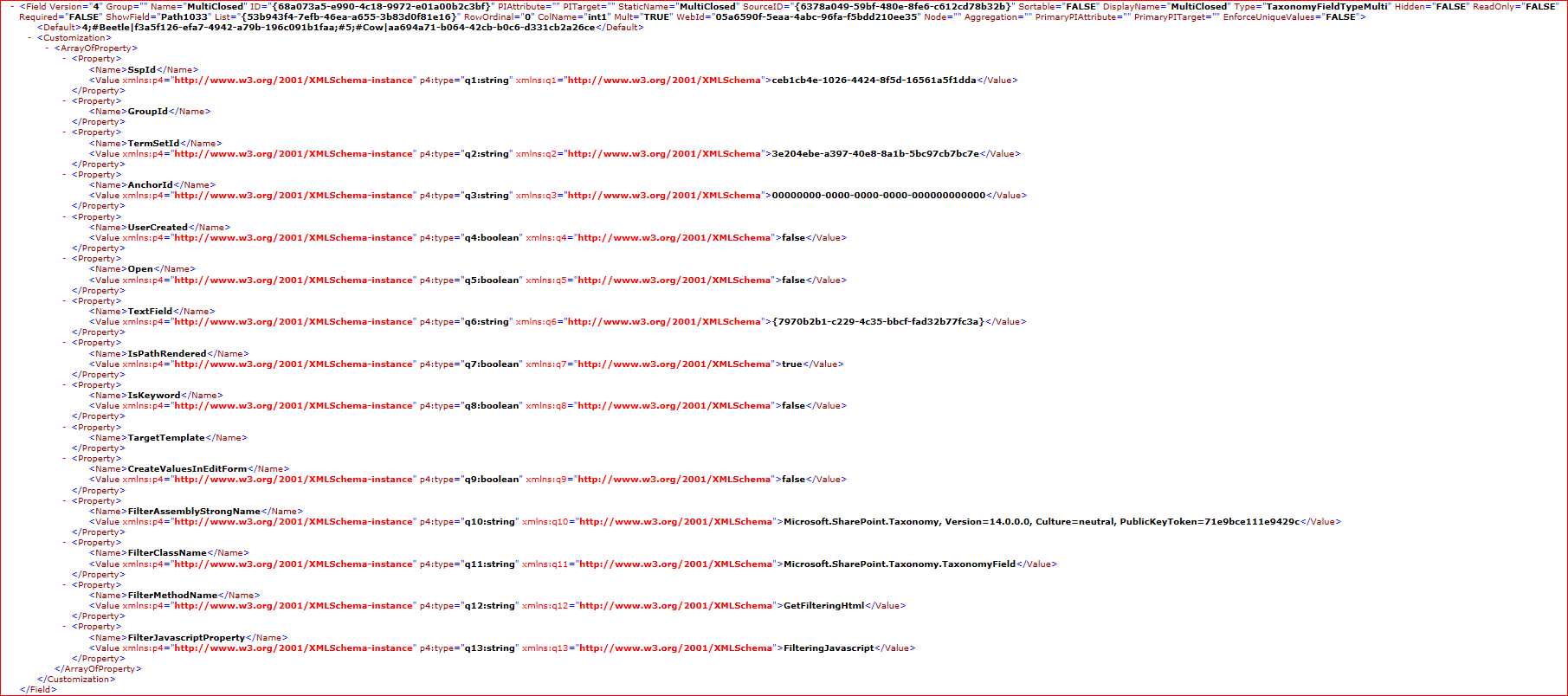
In Part 1 I looked at the structure of our Taxonomy field – which is in fact two fields. We also saw how the TaxonomyField definition has an array of properties related to it too. As a reminder, here’s a screenshot of the XML for it:

These properties are quite important, as they tell us what we need to know to get the correct TermSet for our field. Continue reading “Working with the TaxonomyClientService: Part 2 – Get the TermSet (and understand it!)”

Working with the TaxonomyClientService: Part 2 – Get the TermSet (and understand it!)

Working with the TaxonomyClientService: Part 1 – What fields are there?

I have been working on an integration that needs to read terms from SharePoint’s Managed Metadata service, for a particular field, and then populate that field with those values. All this has to be done via SharePoint’s web services – so the relevant ones here are the TaxonomyClientService, and Lists web service.

This has proved particularly bloody hard. Continue reading “Working with the TaxonomyClientService: Part 1 – What fields are there?”

Working with the TaxonomyClientService: Part 1 – What fields are there?

SafeControls Entries in Manifest can be changed during deployment

I had a slightly unusual situation. We’ve a customer who has using the Telerik RadEditor version 4.5.6 for SharePoint 2007. They’re upgrading to SharePoint 2010, and want their existing content to continue to work.

They’ve using the Telerik RadEditor web part quite a lot, so we had to keep that working. We’ve put in Assembly Binding Redirects using an SPWebConfigModification (more on that in a later post).

However, we also needed to put in the SafeControl entry for the old assembly. Continue reading “SafeControls Entries in Manifest can be changed during deployment”

SafeControls Entries in Manifest can be changed during deployment

Attaching Visual Studio 2010 to Outlook 2010 plugin for Debugging

I was trying to attach a debugger to an Outlook plugin I was working on. It was originally written for Outlook 2003, but has been progressively upgraded to 2010. However, I couldn’t breakpoint my code, or rather, the breakpoints weren’t being hit.

Found the answer on Stack Overflow:

So it turns out that Outlook doesn’t load the CLR on startup (it must be loaded shortly thereafter when it becomes necessary), which apparently confuses the VS debugger and causes it to only debug native code. To force it to load the CLR immediately, create an OUTLOOK.EXE.config file in the same folder with:

<configuration> <startup> <supportedRuntime version="v2.0.50727"/> </startup></configuration>

which is from this blog post. Then, even when VS starts attached, it will debug CLR code

Attaching Visual Studio 2010 to Outlook 2010 plugin for Debugging

Run SPDisposeCheck as part of your build process

As mentioned before, I’ve been automating the building and analysis of our SharePoint code, and this led me to ask, can you run SPDisposeCheck as part of a TFS build process?

Yes we can. Richard Fennell has a concise and simple description of how to do it. It’s best to read that, but in case that site goes down, the short of it is – use InvokeProcess to run SPDisposeCheck, and it’ll return a value that is the number of errors/warnings it finds. I find that that’s enough to choose whether to write a warning to the output of the build, and I don’t then parse and write the individual warnings into the build. These should be captured by the build log, and they’re pretty obvious, so it doesn’t seem worth the hassle. You could do it if you really wanted to.

Don’t forget you can use attributes to prevent false positives – though I still have issues with anonymous delegates that are false positives (how do you add the attributes?), and that’s what’s causing the two warnings above.

Run SPDisposeCheck as part of your build process

Editing a XAML build process

So, we’ve been working on putting our SharePoint solutions through a proper build process in Team Foundation Server 2010 (TFS), and I hit a bit of a snag.

I had been given a build definition that had a build process – a Workflow Foundation workflow – that I wanted to alter. The problem was that while I had the XAML file for that workflow, and the DLL that defined some custom code activities that the process used, I didn’t have a full Visual Studio project for it. No problem, I thought, I’ll just open the XAML up in Visual Studio and edit it.

Wrong.

Continue reading “Editing a XAML build process”

Editing a XAML build process