Rounded Corners on Web Parts

The Holy Grail of SharePoint branding – at least as far as I’m concerned – is rounded corners on Web Parts. Every design that comes in has this at first. As mentioned yesterday there are examples of doing this for the web part’s title – I’ve done this using Madalina’s instructions and Heather Solomon has some instructions too.

However, as far as I know nobody has yet figured out a way of putting rounded corners on the bottom corners of web parts. The HTML they have does not suit them to do this via CSS. The only idea I’ve had previously was to use ControlAdapters to modify the output of of the Web Part itself. And I’m pretty sure you’d have to write an adapter per web parts. That kind of sucks; no customer is going to be in a hurry to pay for that.

Well, when I was looking at putting borders around an entire web part zone, I had a thought. What we really need to do is insert elements into our page. jQuery can do that sort of thing. Could I use jQuery to find each web part and wrap some tags around it? Continue reading “Rounded Corners on Web Parts”
Rounded Corners on Web Parts

Rounded Corners on Web Part Zones

Curiously, one of my more popular blog posts is about putting rounded corners on things in SharePoint. It does seem that this is a pretty popular question. As a side note, Heather Solomon has a post about doing this for web part titles, though I followed Madalina’s instructions.

Anyway, one design requirement that come up repeatedly is rounded borders on Web Parts. I swear, it comes up with every design – and it isn’t possible (although I have an idea – more on that tomorrow). What you can do, though, is have a rounded border about the entire web part zone… Continue reading “Rounded Corners on Web Part Zones”

Rounded Corners on Web Part Zones

Find the Version and Edition of a SQL instance

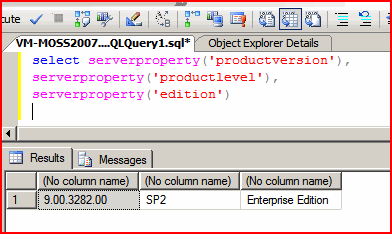
I’ve got a lot of Virtual Machines for development, and that means a lot of SQL installs. They’re not all the same edition, though, or versions, or service packs. It can be a bit confusing knowing which one I’m dealing with. And I can never remember how to find out – so here is the reminder…

capture

So:

select serverproperty('productversion'), serverproperty('productlevel'), serverproperty('edition')

Find the Version and Edition of a SQL instance

Using jQuery to fix the removal of the Title column of a list

SharePoint List items all have a Title column (although it’s display name might be changed to something else). This Title column is a string, which is unfortunate as sometimes you really don’t need a string column on a list; this was the need I faced.

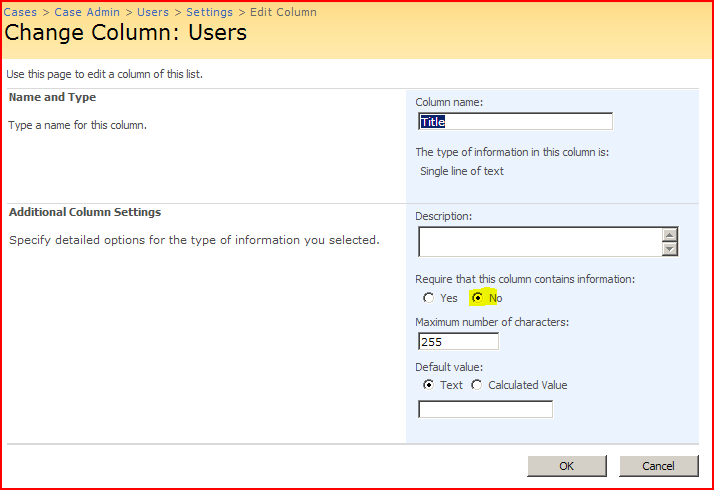
You can make a Title column not required:

turn-off-title-requirement

Also, if you go to the ‘Advanced Settings’ page of your list and ‘Allow management of Content Types’ you can then go into your content types and Hide the Title column. This is okay – but the Title column is still there – it’s just being displayed with “(no title)”… Continue reading “Using jQuery to fix the removal of the Title column of a list”

Using jQuery to fix the removal of the Title column of a list

Clean up SharePoint's UI with jQuery

So, the case management system I’m working on has a ‘Mailbox’ library. Really, it’s just an email enabled document library, with the address set to the name of the case. Anyway, when emails are received into this list, we’d like to show the subject, sender, cc, to addresses, and so on. It turns out that email enabling a document library does in fact add columns for those properties (but they’re not automatically added to the default view).

mailbox-page-default

Neat! Until you start looking at the code itself – then it sucks… Continue reading “Clean up SharePoint's UI with jQuery”

Clean up SharePoint's UI with jQuery

Use jQuery to populate and hide fields in an EditForm.aspx

We’ve got an interesting requirement. We’re using a SharePoint list to store documents which are related to K2 SmartObjects. One of my colleagues is building a custom user control that’s going to show information from this SmartObjects, and associated documents. We want to allow users to

  • click to add a document to our smart object entity
  • upload a file to a library
  • fill in some details
  • automatically associate that file by a GUID

Sounds complicated? Actually, it’s not so hard! Continue reading “Use jQuery to populate and hide fields in an EditForm.aspx”

Use jQuery to populate and hide fields in an EditForm.aspx

Get query string parameters with Regular Expressions (in JavaScript)!

I’ve said it before, but not quite so explicitly – it’s easiest to get query string parameters with a regular expression. I keep seeing big JavaScript functions looping through and splitting the parameters up, and that might be fine if you want to store those and use them repeatedly – but if not, regexes are your friend.

This function will return the value of a parameter. If the parameter requested isn’t in the query string, it returns null.If the parameter doesn’t have a value (e.g. debug in ...&debug&...) it returns an empty string.

function GetQueryParam(parameter){
var p = escape(unescape(parameter));
var regex = new RegExp("[?&]" + p + "(?:=([^&]*))?","i");
var match = regex.exec(window.location.search);
var value = null;
if( match != null ){
value = match[1];
}
return value;
}

Get query string parameters with Regular Expressions (in JavaScript)!

Notes on the Microsoft.SharePoint.WebControls.DateTimeControl

It’s quite nice that this control is available to use in my own pages/web parts, but there are issues:

Here we have in microcosm my problems with Microsoft and date/times – an assumption of the local region, and date time controls that would never be empty, right? I had exactly these same problems when writing an Outlook 2003 to SharePoint 2007 integration too. Makes me a bit annoyed! Especially as we have nullable types! Quit screwing around with DateTimes being structs, make them objects and just return me a bloody null if nothing has been selected!

Notes on the Microsoft.SharePoint.WebControls.DateTimeControl

RSA SecurID and SharePoint

I’d an interesting question from a customer the other day – they wanted Forms Authentication on extranet access to SharePoint, but using two factor authentication. The product mentioned was RSA SecurID, and this means that to authenticate yourself you need:

  • Your Username
  • A hardware device that shows a pseudo-randomly generated PIN number which changes every minute or so.

‘Cos the PIN is a pseudo-random sequence, if the token and a server are in sync, you can validate that someone has read that token inside the last minute. It’s an expensive technology – but neat!

The idea is the same as, say, a credit card. More than just saying who I am and that I have some piece of knowledge (e.g. my PIN number), I also have to have a physical object which is hard to duplicate (my credit card). This should make my identity more certain.

Anyway, how does this fit with SharePoint? Continue reading “RSA SecurID and SharePoint”

RSA SecurID and SharePoint