Sitecore LastActivityDate is updated by the act of trying to view it.

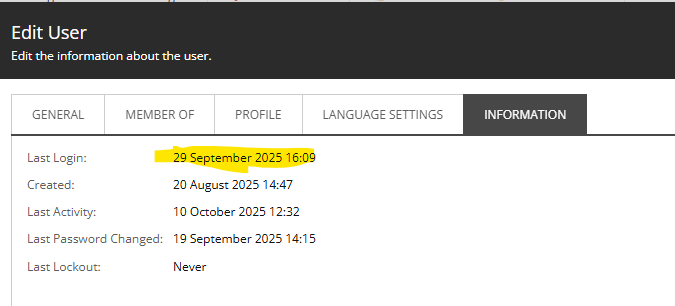
Okay, to go with my LastLoginDate frustrations, I also noticed that when I opened up a User’s Information tab, it always showed the current date and time. Even when I know that user is not in use. E.g.:

This is a test user, and hasn’t been used in the last few days. So, what gives?

Continue reading “Sitecore LastActivityDate is updated by the act of trying to view it.”
Sitecore LastActivityDate is updated by the act of trying to view it.

Sitecore LastLoginDate not updated when using OWIN Auth

While demoing to a customer I noticed that the LastLoginDate for one of the test users I was using had an incorrect Last Login Date as shown in User Manager. E.g. This…

I knew this was wrong. But why? Well, for once I tried Copilot, and it returned the exciting news that the ‘Last Login’ does not update for user when logging in when using Owin.

Continue reading “Sitecore LastLoginDate not updated when using OWIN Auth”
Sitecore LastLoginDate not updated when using OWIN Auth

Sitecore’s ID parsing is crazy

EDIT: I contacted Sitecore support about this one, and it turns out that it is fixed in Sitecore 10.4. (Number 91923 on https://developers.sitecore.com/downloads/Sitecore_Experience_Platform/104/Sitecore_Experience_Platform_104/Release_Notes). I missed that. Of course, there are still a lot of pre-10.4 instances out there, but over time this should cease being an issue)

Sitecore IDs – They’re just Guids, right? I mean, they look like a guid, their string representation is that of a Guid – so they must be Guids, right? Nope! It seems not. Get a load of this:

So here I’m trying to parse a SearchResult “topic”. It’s name is a Guid as a string, in “N” format.

  • Guid.Parse() gives you a Guid. Fine.
  • ID.Parse() gives you an ID. Fine.
  • ID.TryParse() returns false. Apparently it’s not an ID.

What the hell is going on?

Continue reading “Sitecore’s ID parsing is crazy”
Sitecore’s ID parsing is crazy

Why Sitecore is so slow at first request…

I’ve noticed that Helix projects – while offering a lot – do seem to be slow to respond to the first request. Painfully slow. Like “Application Initialization is required” slow. I knew that this was due to view compilation at runtime (something that could be handled by compiling your views at, you know, compile time) – but I’d always wondered why it was so slow.

Well, I think I’ve found the answer – Hundreds of renderings? Your first-page-load could be sloooow by Chris Perks.

Continue reading “Why Sitecore is so slow at first request…”
Why Sitecore is so slow at first request…

Understanding Sitecore’s Cache-Control for Media Items

So, one of my colleagues contacted me with a simple question – why was Azure Front Door not caching his pages and images. Well, I think there were two different reasons; one for pages (discussed there) and one for images (discussed here).

This is a bit simpler than the problem with pages, but highlights that, if you’ve a problem and you dig through the <settings> section of Sitecore’s config, you’ll eventually come across some kind of setting that relates to your problem.

Continue reading “Understanding Sitecore’s Cache-Control for Media Items”
Understanding Sitecore’s Cache-Control for Media Items

Spurious Pragma Header in Sitecore Page Responses

So, one of my colleagues contacted me with a simple question – why was Azure Front Door not caching his pages and images. Well, I think there were two different reasons; one for pages (discussed here) and one for images (discussed there).

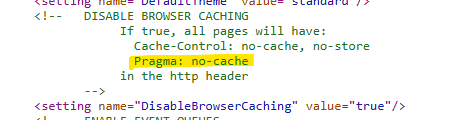
The short answer for pages was “Because the setting DisableBrowserCaching was set to true”. This appears to be a default for Sitecore (and is probably appropriate for Analytics and tracking reasons – though not all of our customers use analytics). I mean, the setting in ShowConfig.aspx is pretty well described.

But wait… what’s this mention of Pragma: no-cache?

Continue reading “Spurious Pragma Header in Sitecore Page Responses”
Spurious Pragma Header in Sitecore Page Responses

Changing a Azure SQL Database Name

I had to rename an extant database in SQL Azure. Here’s what I did:

Using Powershell – Install the tools you need. Connect to the tennant. Then rename the DB! Simples!:

Install-Module -Name Az.Sql -AllowClobber
Connect-AzAccount -TenantId <Tenant ID>
Set-AzSqlDatabase -DatabaseName <sourceDbName> -NewName <targetDbName> -ServerName <server1> -ResourceGroupName <resgroup1>

Job Done

Changing a Azure SQL Database Name

Improved resetting your Sitecore Admin password to ‘b’ when using SHA512 hashing

Previously I’ve posted how to do this – but it was a bit hacky. You had to know your Admin’s UserID, which can change between instances now. So, here’s the SQL to do it for any Sitecore\Admin user…

Update membership 
    set [Password] = '2hwfEqtM7gDFekQaV/IOkog5DFmxRtywvUsRJqRf7j82Ns3pUkiu/WohjLk8mIV2+7MjXdMeO9MgAUjildTLtg==', 
	[PasswordSalt] = 'ETJOU1+PX4CwEOw/eN3F6Q==',
	[IsLockedOut] = 0,
	[Comment] = 'Sitecore Administrator (512)'
from [aspnet_Membership] membership
INNER JOIN [aspnet_Users] users ON membership.UserId = users.UserId
WHERE users.UserName = 'sitecore\Admin'
Improved resetting your Sitecore Admin password to ‘b’ when using SHA512 hashing