While demoing to a customer I noticed that the LastLoginDate for one of the test users I was using had an incorrect Last Login Date as shown in User Manager. E.g. This…
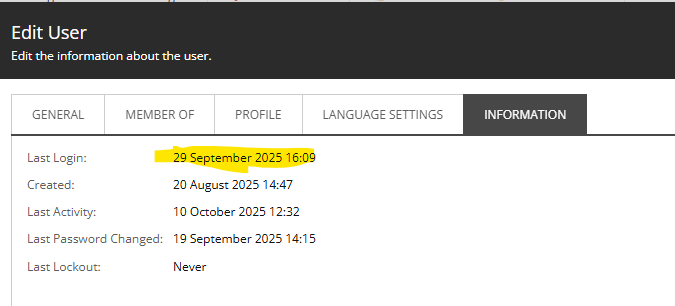
I knew this was wrong. But why? Well, for once I tried Copilot, and it returned the exciting news that the ‘Last Login’ does not update for user when logging in when using Owin.
Okay. That’s weird, but unfortunate bugs happen. And in this instance, Sitecore support had already created a patch. It’s here if you’re interested. But this is for Sitecore 9. It was released in 2019. I’m seeing this issue in Sitecore 10.1.2, with cumulative updates. It was released in 2021. So 2 years later this wasn’t fixed in the base product? I don’t think I need to comment further on that.
The patch itself is a bit of a band-aid. It adds a pipeline processor to the end of the owin.cookieAuthentication.signedIn pipeline to update the LastLoginDate. Ideally, this would be built in already, but okay, a band-aid is fine. Rather than use the support package – which was using a different version of .NET Framework – I just lifted and dropped the code.
public class UpdateLoginDate : SignedInProcessor
	{
		private IMembership _membership;

		public UpdateLoginDate(IMembership membership)
		{
			Assert.ArgumentNotNull(membership, nameof(membership));

			_membership = membership;
		}

		public override void Process(SignedInArgs args)
		{
			var user = _membership.GetUser(args.User.UserName);
			if (user == null)
			{
				return;
			}

			// here we can change  user last login statistics and so on.
			user.LastLoginDate = DateTime.Now;
			_membership.UpdateUser(user);
		}
	}
