How to get an SPWeb object from a URL

One of the problems with SharePoint is that it’s very difficult to figure out what site is specified by a URL. After all, the URL to a particular page contains:

  • the Server
  • possibly (but not necessarily) a managed path and site collection
  • possibly (but not necessarily) a site
  • possibly (but not necessarily) a folder (such as ‘/lists/’)
  • possibly (but not necessarily) a list/library name
  • possibly (but not necessarily) a folder in a Library
  • the item itself.

Suffice to say, with all those optional bits, decomposing a URL to find the site is really hard. There is, however, a slightly obscure way of find this. You can create a site collection (SPSite) with a full URL, and then simply call OpenWeb() without any parameters to return you the site (SPWeb):

string path = "http://example/examplesite/_layouts/settings.aspx";
try
{
using (SPSite siteCollection = new SPSite(path))
{
using (SPWeb site = siteCollection.OpenWeb())
//Do something with the site
}
}
}

I found this when looking at the MSDN docs for SPSite.OpenWeb(). Check out the examples in there.

It’s a little weird that the SPSite object remembers information about how it was opened like that. But it is useful to know.


How to get an SPWeb object from a URL

Another day, another master page

Well, I’ve just built a lovely little HTTP Module that lets us redirect the application pages for a site or site collection to a new master page. I’m quite pleased, to be honest. Anyway, I noticed that the error pages in the site I was testing on were not using my new master page, so I started to examine this. I found that the error page (_layouts/error.aspx) is busy using simple.master. WTF?

It makes sense, I guess. You do need a master page which doesn’t run in an authenticated context, and a brief check shows that this is the master pages for the out-of-box Forms authentication page.

I decided to check out if there were other master pages in Layouts – and there were. My list of master pages is now:

  1. Default.master – used in normal sites. Often replaced for publishing sites.
  2. MwsDefault.master – use in Meeting Workspaces. Awkward to replace, but can be done through code or SharePoint designer.
  3. Application.master – used in ‘administration’ pages, and sometimes pages such as ‘View all site contents’, Recycle bin, and uploading a file.
  4. Simple.master – used in pages that need to run in an unauthenticated context – such as error pages, or forms authentication pages.
  5. sspadmin.master – seems to be used editing audiences, in excel services configuration, in profile administration, and handful of other places.
  6. layouts.master – no idea what this is for. Can’t find where it is used!
  7. dialog.master – used in the little pop-up dialogs, such as when you’re adding or editing a Hyperlink.
  8. pickerdialog.master – used in pop-up dialogs such as the web part gallery, or selecting users.

The master pages in italics are comparatively easy to replace; the rest are much more difficult. And try as I might, I couldn’t change the master page for Errors in my HTTP Module. I guess what I’ll do is write another one to redirect errors to my own custom-branded error page.

Another day, another master page

Error: CQWP – RSS feed of non-documents doesn't work

This is a pretty weird error. I was doing content roll-up of Announcements lists, to give a unified news channel for our intranet. Naturally, I decided to do this using the Content Query Web Part. I added one, and selected that I wanted to query for the contents of Announcements lists. As I like RSS feeds, I enabled one, and I added it to my favorite feed-reader.

It worked – but the links to the announcements themselves didn’t work. The short summary is that is that it appears RSS feeds from Content Query Web Parts don’t work when you query for certain types of list. Continue reading “Error: CQWP – RSS feed of non-documents doesn't work”

Error: CQWP – RSS feed of non-documents doesn't work

People Picker shows Disabled user accounts

Something I didn’t know about – the people picker shows disabled user accounts – and ‘Tales from the field’ has a solution (on a per web app basis). Just in case the blog ever goes down:

This default behavior can be changed on a per web application basis to return only enabled user accounts. In the example below I have configured this for the web application http://moss using stsadm. This command configures MOSS 2007 to use a custom LDAP query.

stsadm -o setproperty -pn peoplepicker-searchadcustomfilter -url http://moss -pv (!userAccountControl=514)

If you are interested in putting together more granular filters I strongly recommend the following guide on LDAP, LDAP Query Basics – http://technet.microsoft.com/en-us/library/aa996205(EXCHG.65).aspx

Nice one Brendan

People Picker shows Disabled user accounts

CQWP: XSL to show you the fields on an item

A modification on the XSL I’d used previously – this gives a more readable presentation, and displays the values:

<xsl:template name="ShowFields" match="Row[@Style='ShowFields']" mode="itemstyle">
<div style="border:1px #aaa solid;background-color:#eee;margin:5px;padding:5px">
<xsl:for-each select="@*">
<xsl:value-of select="name()" /> = <xsl:value-of select="." /><br />
</xsl:for-each>
</div>
</xsl:template>

CQWP: XSL to show you the fields on an item

Where to put CSS when branding?

I’ve recently come to the conclusion that I’m unlikely to use Themes in SharePoint again in a hurry. Why?

  • Themes allow you to provide a bunch of CSS styles. So does the AlternateCssURL.
  • Themes have to be applied site-by-site (unless you do some programming, or extend STSADM). Alternate CSS or Master Pages can be changed for a site and subsites, for a Publishing site anyway (although with some limitations).
  • Alternate CSS can be provisioned from a single URL – so benefiting from browser caching just like images.
  • The Alternate CSS can style the DatePicker. Themes can’t.
  • The Alternate CSS can style Application Pages, just like Themes (but unlike Master Pages).
  • No problems with ‘Style Merging’ when the Theme is provisioned.
  • Style can be updated in one location.
  • Themes can be changed through the UI for any site. Only Publishing sites have a user interface for changing the Alternate CSS.

Yes, many of the same distinctions between Master Pages and Themes still exist, and the same sort of analysis and choice of approach should be done. However, it means that we can kind of ignore Master Pages, and just focus on Alternate CSS vs Themes – and it seems to me that apart from the last point above, the Alternate CSS approach seems to equal or better than Themes.

Regarding the last point, well, to apply my theme I’d set the Alternate CSS in a Feature Receiver. This is okay, though, as I’d probably be writing one anyway to apply the correct master page to different types of site.

So, the answer I’ve come to now – I’d use the _layouts directory – create a sub-directory for your brand, and put your CSS and images in there.

Where to put CSS when branding?

What is MSOLayouts_MakeInvisibleIfEmpty()

I was looking through the code of SharePoint’s Blank Web Part page layout, and I kept finding elements called _invisibleIfEmpty. Now, I’d noticed that some page layouts, such as the Splash page layout had borders on their web part zones which were only shown if the zone contained a web part. I was interested in how this might work. People keep asking for web parts with borders, preferrably ones with rounded corners. Continue reading “What is MSOLayouts_MakeInvisibleIfEmpty()”

What is MSOLayouts_MakeInvisibleIfEmpty()

My Sites links HoverCellActive doesn't show the top border

This has caught me out three times now – I build style, but the top border for the global links ‘My Links’ link didn’t show:

I checked my style, and there it was. So I tried adding a margin, or padding in the cell that contained it.

Wrong. It needs it’s height to be set to 100%.

.ms-globalbreadcrumb .ms-HoverCellActive,
.ms-globalbreadcrumb .ms-HoverCellInctive,
.ms-globalbreadcrumb .ms-HoverCellActiveDark{
height:100%;
padding-top:1px;
}

My Sites links HoverCellActive doesn't show the top border

Calendar and Gantt views have nothing to do with Calendar or Project Lists

I know this sounds obvious, but I had a moment of understanding the other day – Calendar views and Gantt views have nothing to do with Calendar lists and Project lists!

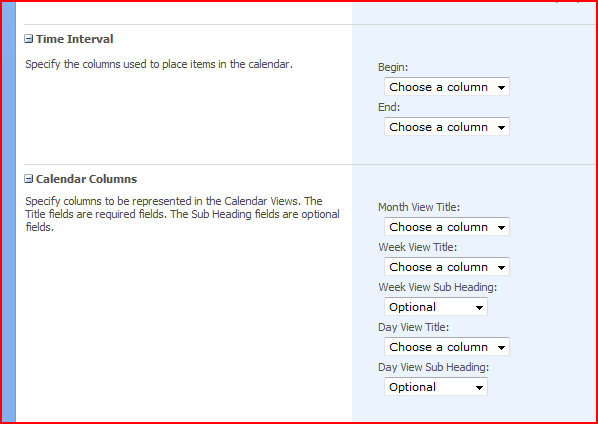
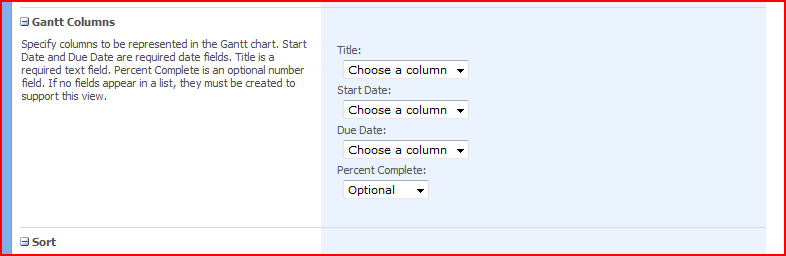
They’re just views that happen to use date columns…

So you can configure the relationship between your list columns and the views…

That’s an interesting concept. We can use this with any list! For example, the start and end dates for help desk calls, or for displaying when things happened. Neat! I can’t think why I didn’t realise this before!

Calendar and Gantt views have nothing to do with Calendar or Project Lists