Date Picker controls have variable width

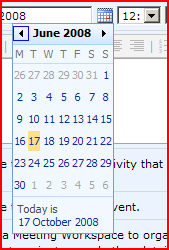
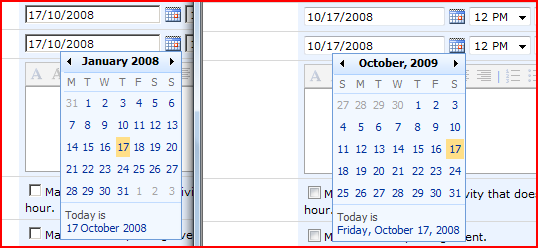
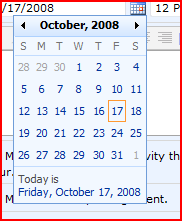
I’m beginning to hate the SharePoint DatePicker control. It displays with different widths:

What defines the width of this control? Damned if I can see – it appears to be the widest element within it. This means either:

  • the length of the date link at the bottom of the control
  • the length of one of the week rows

This is probably less of an issue for Americans (right) than the British (left) – I presume that other Europeans will have the same issue.

Certainly, this will result in some squashed looking calendars on certain months. Yet try as I might, I couldn’t get the calendar to fill an entire area.

And why does the American format give the day and the normal format not?

Date Picker controls have variable width

Setting a Site Master on a Publishing site breaks Meeting Workspaces

So, yesterday I was wondering about custom master pages for Meeting Workspaces. I found that Meeting Workspaces use their own master page (mwsdefault.master), which is referred to in the CustomMasterUrl property of the SPWeb object. As I noted, that sounds a lot like SharePoint publishing sites (i.e. sites with the Publishing Features enabled, like a Publishing Portal or a Collaboration Site).

This rang a bell with one of my colleagues, so he dug out some details. The publishing features let you select a Site Master Page and a System Master PageContinue reading “Setting a Site Master on a Publishing site breaks Meeting Workspaces”

Setting a Site Master on a Publishing site breaks Meeting Workspaces

SUGUK Meeting: WCM Best Practices

So, I went to the SUGUK meeting last week on the 16th at LBi’s Truman Brewery building on Brick lane. I was looking forward to it, though was disappointed to find that the brewery is now offices. Anyway,the subject was WCM best practices with Chris O’Brien and Riaz Ahmed, who’re always entertaining speakers. Continue reading “SUGUK Meeting: WCM Best Practices”

SUGUK Meeting: WCM Best Practices

Custom Master Pages for Meeting Workspaces

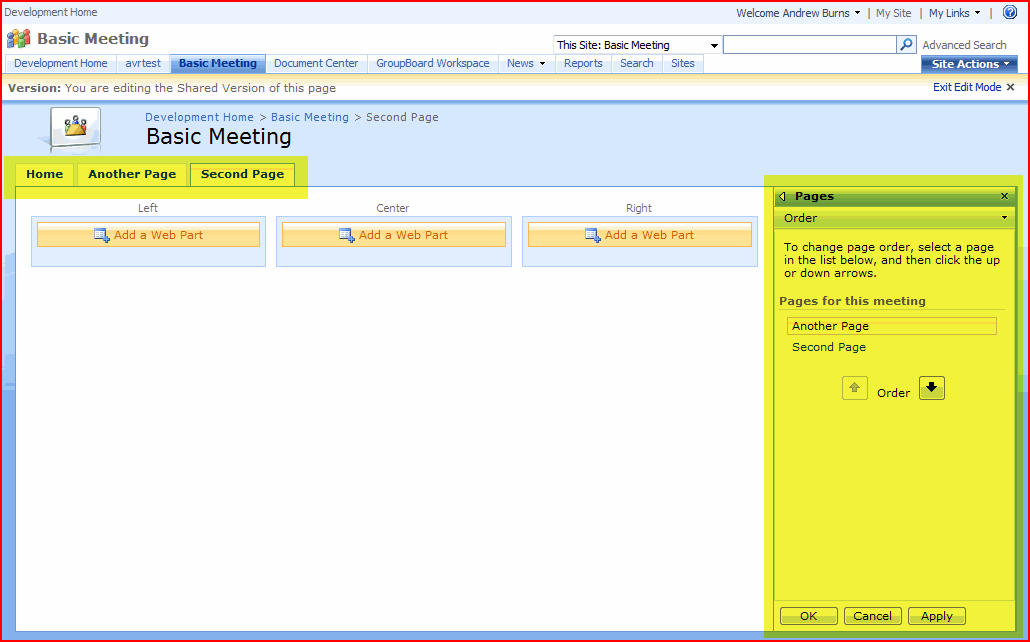
Irritatingly, in SharePoint Meeting Workspaces have a different master page to most sites (mwsdefault.master and default.master respectively). The differences are actually quite minor – the Meeting has a ‘Custom Tool Pane’ control, so you can add new pages, and a tab bar:

In the code, the pages are very similar, which makes it all the more irritating that they’re not simply the same. As far as I can see, there is no need for this – at least, nothing that can’t be dealt with by content placeholders – which is what they’re using to get rid of the left navigation. Anyway, I digress – the real question is can we customise them, and provide consistent branding on them? Continue reading “Custom Master Pages for Meeting Workspaces”

Custom Master Pages for Meeting Workspaces

SharePoint throws unhandled exceptions by design

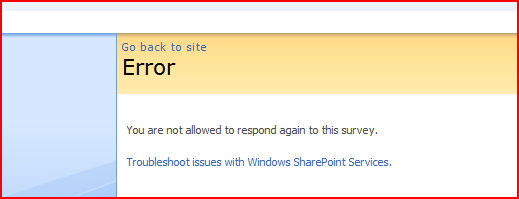
So, I was doing some testing of some branding, and I took a look at the Survey list. I tried filling out a survey and was shocked by a yellow screen of death:

This was because I’d set SharePoint up for debugging during development. The SharePoint error page appears:

Well, the error is right – I was trying to fill in the survey twice. But it’s not like this is an unexpected error – it certainly shouldn’t be an unhandled exception!

What are the problems with this? Well, it kicks us out of the branding experience I’ve built, which is annoying. It doesn’t allow the user to navigate anywhere. And, dammit, it’s just bad practice! I mean, do these errors appear in the logs?

Don’t get me wrong, no code is perfect and exceptions will happen. That’s fine. But who the hell thought unhandled exceptions was a good bit of deliberate functionality?

Anyone else found other deliberately unhandled exceptions?

SharePoint throws unhandled exceptions by design

Style the DatePicker using an Alternate CSS

A while back I posted about the how daft that the datepicker control isn’t styled by themes, and is in the _layouts directory, so you shouldn’t edit them.

Well, a while later Michelle posted with a good idea of how to brand them – use an alternate CSS URL. I must confess, this tip passed me by until my recent branding efforts, and I discovered her tip.

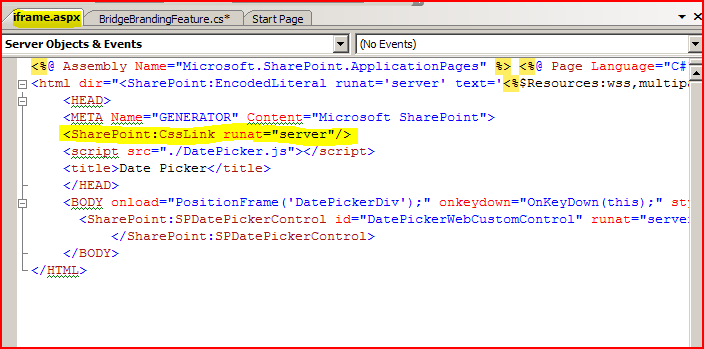
So why does this work? Well, if we crack open the file iframe.aspx (which I still think is a bloody stupid name. I mean, the defining feature is the DatePicker control, not the bloody iframe it uses) we can see the code:

There we go – code to insert the alternate CSS url (but not themes – obviously).

So, I gave this a go:

Tada! Styled date picker, nice one Michelle. However, she notes that it has to be applied to a publishing site, or to a publishing site and all sites below it. Site collections based around a team site would be tricky. Normally, this page is used to set the alternate CSS…

[image of site]

… and, well, Team sites don’t give you that page.

However, we can achieve this in code! All the admin page does is change the SPWeb.AlternateCssUrl property for a site or set of sites. We could have a feature receiver (a bit of code that is run when a feature is activated or deactivated) to do this:

public override void FeatureActivated( SPFeatureReceiverProperties properties ) {

SPWeb site = properties.Feature.Parent as SPWeb;

site.AlternateCssUrl = "[Your URL here]";

site.update();

}

More evidence that brands are best applied by feature receivers. Maybe I should make an example of this…

Style the DatePicker using an Alternate CSS

STSADM Error: Object not set set to an instance of an object

I’d built a .wsp (Web Solutions Package) for a customer, containing the branding I’ve been working on. However, when they tried the command:

stsadm -o addsolution -filename branding.wsp

they got the error:

Object reference not set to an instance of an object. c:branding.wsp: The Solution installation failed.

Interesting – works on my machine. They were running the command as the ‘Administrator’ user on the SharePoint system. A bit of digging, though, showed that the problem was due to either:

  • Not running under a Farm Admin account (which I understand the ‘Administrator’ user was)
  • Not having rights to the Central Admin Content Database on SQL server.

Well, we tried running the STSADM command as the service account, and that appeared to work. ‘Course, this is all over the phone so I’m not certain what permissions that account has, but it appeared to run.

STSADM Error: Object not set set to an instance of an object

Programmatically apply a Default Theme in SharePoint

As I’ve mentioned before, I’ve written a brand that is a combination of Theme and Master Page, and is designed to be activated by a feature receiver. When the feature is deactivated, it should restore the previous Master Page and Theme – but it wasn’t doing this for the default theme. Weird.

Well, here’s another good tip from Madalina you have to apply a theme of none, not Default.

web.ApplyTheme("none");

That’s the second tip of hers I’ve found on Google and used in the last 2 weeks. Maybe I should start watching that blog. Anyway, I guess that ‘none’ makes sense when you look in 12/TEMPLATES/LAYOUTS/1033/SPTHEMES.xml – the default theme has a TemplateID of ‘none’.

‘Course my next problem for my feature receiver is that Meeting Workspaces use master pages (MWSDefault.master) that are significantly different to other pages – thanks guys, that’s helpful…

Programmatically apply a Default Theme in SharePoint

Updating the Navigation Settings in a Publishing Site

I’ve got a brand that I’m activating via a Feature Receiver – it’s a theme and masterpage combination, and I want it to work on Team sites too, so it does actually make sense to do it this way!

Part of the brand is that the tabs have rounded corners, and these don’t work very well with the dynamic drop down menus. You can turn this off in the master page for the site pages, but not for the applications pages. Instead, I figured I’d use a feature receiver to turn off the ‘Show Subsites’ and ‘Show Pages’ in a publishing site.

So, the code I had was this:

if (PublishingWeb.IsPublishingWeb(site))
{
PublishingWeb pwSite = PublishingWeb.GetPublishingWeb(site);
site.Properties[ORIG_PUB_SITES] = pwSite.IncludeSubSitesInNavigation.ToString();
site.Properties[ORIG_PUB_PAGES] = pwSite.IncludePagesInNavigation.ToString();
site.Properties.Update();

pwSite.IncludePagesInNavigation = false;
pwSite.IncludeSubSitesInNavigation = false;
pwSite.Update();
pwSite.Close();
}

However, this didn’t work. To describe the code, first, we check to see if the page is a PublishingWeb. If it is, I record original settings in the site properties (so I can restore them when the feature is deactivated). I turn off those navigation check boxes, update the record on the server and close the object.

After much investigation, I realised that updating the properties was invalidating the PublishingWeb object, somehow, and that my changes weren’t being recorded. In the end I had to change my code to:

if (PublishingWeb.IsPublishingWeb(site))
{
PublishingWeb pwSite = PublishingWeb.GetPublishingWeb(site);
bool showPages = pwSite.IncludePagesInNavigation;
bool showSub = pwSite.IncludeSubSitesInNavigation;

pwSite.IncludePagesInNavigation = false;
pwSite.IncludeSubSitesInNavigation = false;
pwSite.Update();
pwSite.Close();

site.Properties[ORIG_PUB_SITES] = showPages.ToString() ;
site.Properties[ORIG_PUB_PAGES] = showSub.ToString() ;
site.Properties.Update();
}
This worked nicely!
Updating the Navigation Settings in a Publishing Site

What's wrong with Scunthorpe?

A requirement that I’ve seen appear a few times recently is for:

Automatic filtering of content that is deemed to be harmful, threatening, unlawful, defamatory, infringing, abusive, inflammatory, harassing, vulgar, obscene, fraudulent, invasive of privacy or publicity rights, hateful, or racially, ethnically or otherwise objectionable is filtered.

Yes, we all love a good jolt of lawyerspeak that is completely unconnected with what is possible for a computer to do ‘automatically’. I mean, let’s ignore that the court cases for what counts as, well, any of those things can be less than clear cut – if they were, cases would be short, and lawyers would earn less.

(As it happens, I am legally an ethnic minority in England – which I object to!)

Anyway, obviously complex decisions that require the judgement of human intelligence (let alone Judges) are beyond the wit of a computer program – hell, if it can’t find my printer, how’ll it find a bit of text ‘defamatory’? Continue reading “What's wrong with Scunthorpe?”

What's wrong with Scunthorpe?