A modification on the XSL I’d used previously – this gives a more readable presentation, and displays the values:
<xsl:template name="ShowFields" match="Row[@Style='ShowFields']" mode="itemstyle">

<div style="border:1px #aaa solid;background-color:#eee;margin:5px;padding:5px">

<xsl:for-each select="@*">

<xsl:value-of select="name()" /> = <xsl:value-of select="." /><br />

</xsl:for-each>

</div>

</xsl:template>
Author: Andy Burns
Where to put CSS when branding?
I’ve recently come to the conclusion that I’m unlikely to use Themes in SharePoint again in a hurry. Why?
- Themes allow you to provide a bunch of CSS styles. So does the AlternateCssURL.
- Themes have to be applied site-by-site (unless you do some programming, or extend STSADM). Alternate CSS or Master Pages can be changed for a site and subsites, for a Publishing site anyway (although with some limitations).
- Alternate CSS can be provisioned from a single URL – so benefiting from browser caching just like images.
- The Alternate CSS can style the DatePicker. Themes can’t.
- The Alternate CSS can style Application Pages, just like Themes (but unlike Master Pages).
- No problems with ‘Style Merging’ when the Theme is provisioned.
- Style can be updated in one location.
- Themes can be changed through the UI for any site. Only Publishing sites have a user interface for changing the Alternate CSS.
Yes, many of the same distinctions between Master Pages and Themes still exist, and the same sort of analysis and choice of approach should be done. However, it means that we can kind of ignore Master Pages, and just focus on Alternate CSS vs Themes – and it seems to me that apart from the last point above, the Alternate CSS approach seems to equal or better than Themes.
Regarding the last point, well, to apply my theme I’d set the Alternate CSS in a Feature Receiver. This is okay, though, as I’d probably be writing one anyway to apply the correct master page to different types of site.
So, the answer I’ve come to now – I’d use the _layouts directory – create a sub-directory for your brand, and put your CSS and images in there.
What is MSOLayouts_MakeInvisibleIfEmpty()
I was looking through the code of SharePoint’s Blank Web Part page layout, and I kept finding elements called _invisibleIfEmpty. Now, I’d noticed that some page layouts, such as the Splash page layout had borders on their web part zones which were only shown if the zone contained a web part. I was interested in how this might work. People keep asking for web parts with borders, preferrably ones with rounded corners. Continue reading “What is MSOLayouts_MakeInvisibleIfEmpty()”
My Sites links HoverCellActive doesn't show the top border
This has caught me out three times now – I build style, but the top border for the global links ‘My Links’ link didn’t show:

I checked my style, and there it was. So I tried adding a margin, or padding in the cell that contained it.
Wrong. It needs it’s height to be set to 100%.
.ms-globalbreadcrumb .ms-HoverCellActive,

.ms-globalbreadcrumb .ms-HoverCellInctive,

.ms-globalbreadcrumb .ms-HoverCellActiveDark{

height:100%;

padding-top:1px;

}

Calendar and Gantt views have nothing to do with Calendar or Project Lists
I know this sounds obvious, but I had a moment of understanding the other day – Calendar views and Gantt views have nothing to do with Calendar lists and Project lists!


They’re just views that happen to use date columns…

So you can configure the relationship between your list columns and the views…
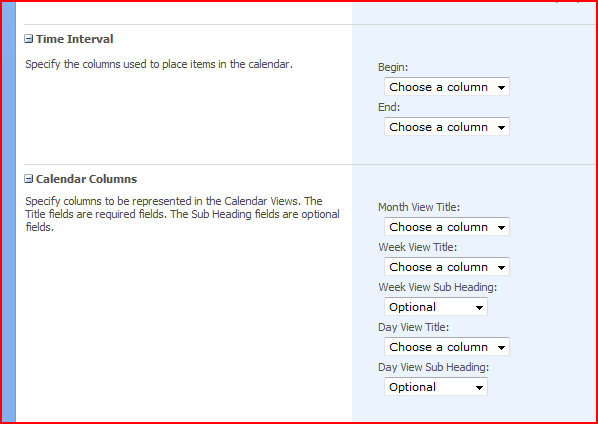
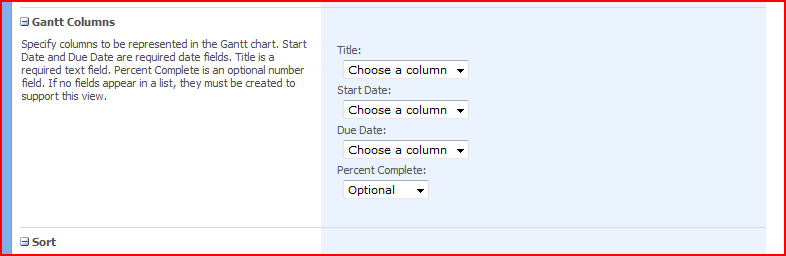
That’s an interesting concept. We can use this with any list! For example, the start and end dates for help desk calls, or for displaying when things happened. Neat! I can’t think why I didn’t realise this before!
Get Recent Comments
The “Get Recent Comments” widget on my WordPress blog gets screwed up sometimes – to fix it:
Go to Settings > Recent Comments and hit Update Recent Comment Options. ‘Nuff said.
When to Dispose of SPWeb and SPSite objects
Knowing when to dispose of SPWeb or SPSite objects is confusing as hell. Well, Roger Lamb has an excellent page showing patterns that can leak memory, and how to avoid them. This should be mandatory reading for SharePoint devs. (Previously mentioned here – but this is a better link)
Stuff I forgot to style
SharePoint has a lot of page elements, and it’s hard to brand it all without missing things. Lists of Page elements like Heather Solomon’s CSS Reference Chart and her “Oh crap, I missed that” list help, but I still found a few that weren’t mentioned. So, I guess this is my “Thank God my testing found I’d missed that” list:
 |
Advanced Search Page – nice grey. |
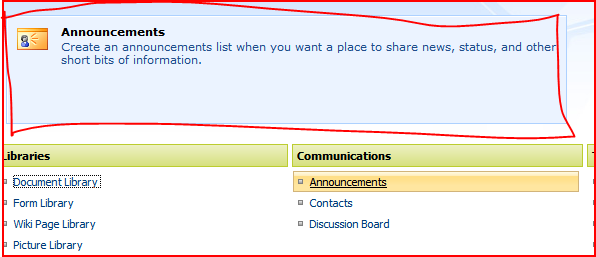 |
Creation Information Panel – when you hover over an item on the ‘Create’ page, you’ll see this. |
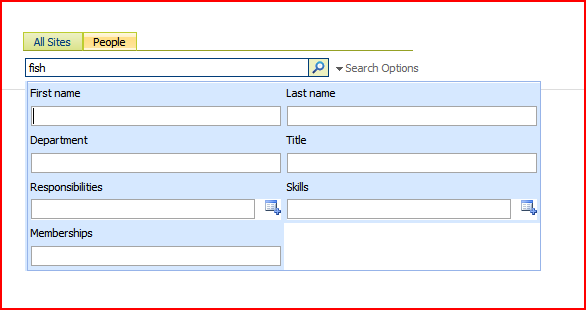 |
People Search Options – shown dynamically when you click the link. |
 |
Gantt views – as used in projects |
 |
Repeating Meeting Left Nav |
 |
WSS Search results page – just ‘cos you’re using it doesn’t mean it isn’t there – or that it won’t be seen… |
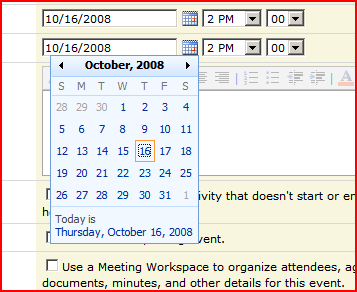 |
The Date Picker – and all the problems inherent in that… |
What happens when a Theme is applied?
You can apply themes to sites in SharePoint – but what actually happens when you do? Continue reading “What happens when a Theme is applied?”
Setting up your content types and templates…
I received a good link in one of the comments on the blog, and I thought I’d bump this up – Sensible Document and Template Management.
I’m with Mads on this – to me the killer feature of SharePoint is how it works with Offices, and template functionality is key in that. Demos of document properties, quick parts and then the list columns in Sharepoint have a very high wow-factor (rightly so – I think it’s pretty neat too!)
However, templates are something rarely used in my experience, or not use properly anyway. Often it’s seen as an unnecessary effort, and usually everyone just starts creating their own documents from blank, or deleteing the contents from an existing document and using that one, or copying and pasting across – none of which are pretty scenarios.
Then again, often the guys actually making these templates need a good course of ‘How to use Word’. No so much with Excel – I think that people accept you need a bit of training to use it – but Word seems to be an issue.
Anyway, the point is, do try and plan building templates into your project. And that there is probably a consultancy opportunity in trying to generate these…
 Andy Burns' Blog