Hide a custom field from the Document Information Panel

So, I’ve been working with a custom field type recently. It’s quite a complicated one – I’ll not go into details – but we did hit a problem with it. When a Word document was opened it would try to display our field in the Document Information Panel, which isn’t really possible, and caused Word to die in a horrible fashion. I forget the exact error we were getting, but it was something to do with the XSN being invalid.

What we really needed was a way to set that the property wasn’t to be shown in the Document Information Panel. However, there is no easy way of doing this with a purely programmatically created column. There are properties on the SPField object that can be accessed programmatically, and the CAML for a FieldRef can set ShowInFileDlg – but there isn’t an obvious way to set this value from C# code.

Naturally, that’s what we wanted to do. Well, there is a combination approach – the SPField.SchemaXml property allows us to get/set the CAML that defines the field.

So, I came up with this static function:

static void SetShowInFileDlg(SPField f, bool value)
        {
            XmlDocument fieldSchemaXml = new XmlDocument();
            fieldSchemaXml.LoadXml(f.SchemaXml);
            XmlAttribute attr = fieldSchemaXml.CreateAttribute("ShowInFileDlg");
            attr.Value = value.ToString().ToUpper();
            XmlNode fieldXmlNode = fieldSchemaXml.SelectSingleNode("Field");
            XmlAttributeCollection fieldAttributes = fieldXmlNode.Attributes;
            fieldAttributes.Append(attr);

            f.SchemaXml = fieldXmlNode.OuterXml;
            f.Update(true);
        }

I’m not sure what happens if you’re trying to update an already widely used column – will it update all content types that that column – but this worked for us.

Hide a custom field from the Document Information Panel

Date Formats in XSL with ddwrt

Previously I’ve blogged about using ddwrt to format dates and datetimes. Well, today, I found myself trying to figure it out again, so here is a reminder. Remember, one of the big advantages of this (in the UK at least, where we are UTC time half the year) is that the DateFormat function accounts for daylight savings (i.e. the difference between GMT and BST)

Add this to the xsl:stylesheet tag at the top:

xmlns:ddwrt="http://schemas.microsoft.com/WebParts/v2/DataView/runtime"

Then you can use something like the following (where item_date is an XSL variable with our date in it):

<xsl:value-of select="ddwrt:FormatDate(string($item_date), 2057, 15)" />

Here the FormatDate function is taking the string of the date, formating it for Great Britain’s locale (2057), and specifying an output format (15). Output formats vary by locale, and not all seem to be valid. I found that when I tried a format of ‘2’, for example, that I got an XSL error.

This is a particularly useful with the Content Query Web Part and the RSS Feed Web Part

Date Formats in XSL with ddwrt

Curious case of Microsoft.Office.Server.ServerContext.Current

So, this is the weirdest bug I’ve seen in quite some time. I’d inherited some code, which includes a settings page in the _layouts directory. It’s a pretty normal page – nothing particularly bad about it, and it seemed to work nicely. Then I received a call about an error with it:

Now, here is the weird thing. When I started to examine it, I tried to replicate the problem. And I realised that the page worked when I accessed it from the server, but threw an ArgumentNullException when I accessed it from a client.

Yes, you read that right. What machine you browsed to the page on mattered. The browsers were the same. The code worked when viewed on the server, and failed when viewed from the client. When I eventually fixed it, I swapped between the broken and fixed code a few times to prove it – this really was the behaviour! Continue reading “Curious case of Microsoft.Office.Server.ServerContext.Current”

Curious case of Microsoft.Office.Server.ServerContext.Current

Breadcrumbs in Central Admin and Application Pages

This is a reminder of a couple of problems that I’ve come across a few times – that the breadcrumbs in LAYOUTS pages and central admin are a bit tricky.

Breadcrumbs in Layouts pages are driven by an XML file in your IIS web app. Now, you can add entries which are merged into that – a described by Jan Tielens’ Adding Breadcrumb to application pages in SharePoint – the easy way. However, this doesn’t cover the whole problem – he goes on to describe dealing with Central Admin too.

However, the really tricky bit of this that though we can define our own sitemap.xml file, it’s kind of hard to merge with the existing one. Specifically, the problem is that to merge ‘our additions’ and the ‘existing file’, we have to call a function ApplyApplicationContentToLocalServer, and as brilliantly described by Sean McDonough, the word ‘local’ is a problem in this method – it only forces a merge of the files on one server. Not much use in a server farm.

Sean’s article describes his attempt at a fix – using a one-time timer job, and a fair bit of reverse engineering of the ApplyApplicationContentToLocalServer function. Also, it seems like Vince Rothwell has come up with a similar solution, so it’s likely that this is a good approach.

A real pain to have to build so much to do such a simple task, though.

Breadcrumbs in Central Admin and Application Pages

Application Master Page Changer Project

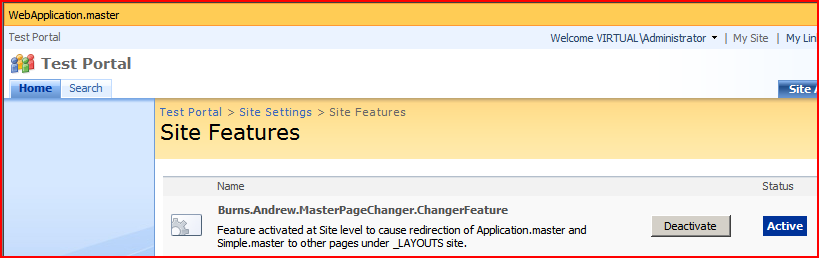
The product of many evenings in hotels recently, I’m proud to present, my Application Master Page Changer.

Application master pages are tricky – out of the box in SharePoint 2007, there is no way of changing the master page used for ‘administrative’ pages. Unfortunately, those administrative pages include things like the recycle bin, file upload, and the ‘View all site content’ pages – things that users will likely see.

Well, folks have found a solution to this – using an HTTPModule to intercept pages using the normal application.master and redirecting it to use your custom one. This works pretty well, but I was always a bit uncomfortable – what if you only want this to happen for particular site collections, or specific sites within a Web Application? I’d tried knocking up an HTTPModule to do this, but matching against URLs – bit it was awkward to configure, complex, and adding new sites/site collections could be a bit annoying – basically, a nightmare to configure.

What we really need, I thought, is some way of just turning on/off the master pages being used with Features. And that’s what I’ve built. Check it out here…

Application Master Page Changer Project

Adding and removing Web config modifications

When building an application for SharePoint, if you’re making changes to the Web.config, they should be deployed SPWebconfigModifications. This isn’t that easy, really, but works well enough, and there are good articles about how to add them – but my code looks like:

SPWebConfigModification modification = new SPWebConfigModification(
     "add[@name='MyNavProvider']",
     "configuration/system.web/siteMap/providers");
modification.Value = "<add name="MyNavProvider" type="{Assembly info here!}" />";;
modification.Sequence = 0;
modification.Type = SPWebConfigModification.SPWebConfigModificationType.EnsureChildNode;
modification.Owner = "MyConfigModification;

webApp.WebConfigModifications.Add(modification);
webApp.Update();

That works, but what about removing them? It’s important to do this – otherwise you can cripple a system. Continue reading “Adding and removing Web config modifications”

Adding and removing Web config modifications

Using the PortalSiteMapProvider

I recently had a customer who wanted a simple web part that just listed the subsites of a site – something like what you see in SharePoint’s “View All Site Content” page, but for a couple of levels, rather than just one. Obviously, this would be quite simple to do directly by traversing the SPWeb object and it’s children, but it struck me that there must be a better, standard way – ideally one that uses a bit of caching or optimisation.

I found myself looking at the PortalSiteMapProvider for the first time. I’ve written my own NavigationProviders before now, and I’ve used some of the out of the box ones, but the PortalSiteMapProvider is an object I’ve never really used, or become familiar with. Here’s what I found… Continue reading “Using the PortalSiteMapProvider”

Using the PortalSiteMapProvider

System.Web.UI.WebControls.WebParts in ONET.xml

Came a cropper on this one today – using web parts based on System.Web.UI.WebControls.WebParts.WebPart in a Site Definition. Unlike the Microsoft.SharePoint.WebPartPages base web part, ASP.NET 2.0 ones need a <webParts /> tag around your <webPart> tag – other wise you get the error:

Cannot recognize the xml namespace of this web part

Joris Poelmans has a good description of the problem, and that was where I read the solution – it saved me a tonne of time.

System.Web.UI.WebControls.WebParts in ONET.xml

Weird toolbar on Custom Document Library

I’ve been writing a custom document Library Definition. Well, I say I was writing – I actually created it in SharePoint, and used the Solution Generator in the Visual Studio Extensions for WSS3 to produce the CAML and .aspx files.

Having done this, however, one of the views in my document library was a bit strange. Somehow, for this one view, the ‘New’ and ‘Upload’ menus were missing:

Weird View (BaseType 3)

They were there for other views, just not this one. After examining the CAML (which sounds like some sort of euphemism) I found that the problem seemed to relate to the BaseViewID for the view. Continue reading “Weird toolbar on Custom Document Library”

Weird toolbar on Custom Document Library
