Filtering App Insights Client-Side successful dependencies

So, I found that our client JavaScript was recording quite a lot of successful dependency messages for loading 3rd party scripts:

These are all analytics tools, and to be honest, I don’t care about them. Sure, it can be useful to know how long they take to load, but these are loaded after the page is ready, so even if they are slow they shouldn’t impact performance. And I don’t really think I need to know every time a user loads these analytics tools.

Therefore, I wrote a telemetry filter to block sending them. I could just use sampling – but I’d prefer to have none.

onInit: function (sdk) {
	/*	Once the application insights instance has loaded and initialized this method will be called 
	    This filter will block successful remote dependency requests being logged. */
	sdk.addTelemetryInitializer(function(envelope) {
		if (envelope.baseType === 'RemoteDependencyData')
		{
			if (envelope.baseData.success)
			{
				return false;
			}
		}
	});
},

From my testing, if the user blocks loading of a remote dependency I don’t see any kind of message being returned – even a failure, which is good.

Filtering App Insights Client-Side successful dependencies

Filtering App Insights Client Exceptions from 3rd party JavaScript

So, we are using App Insights, and when we moved the client side script for recording JavaScript errors to our integration test instance we started to get a lot of errors of the form:

Script error: The browser’s same-origin policy prevents us from getting the details of this exception. Consider using the ‘crossorigin’ attribute.

There were a lot of these errors:

… and investigating them showed that the problems came from 3rd party JavaScript. All of these are inserted by Google Tag Manager, and aren’t in the site, or local development.

Well, I’m not going to be able to fix JavaScript written by 2 third-parties, and that isn’t even loaded directly by my page – so instead I’m going to ignore that error…

Continue reading “Filtering App Insights Client Exceptions from 3rd party JavaScript”
Filtering App Insights Client Exceptions from 3rd party JavaScript

Logging client actions near page Unload

I had an interesting problem; we wanted to log stuff that was happening on a client’s browser. Fair enough, we can use AJAX to do that. However, this had a twist – we wanted to log events that were happening immediately before the page might be redirected to a new location. In other words, the page might unload, and a new page load. What I found was the messages from just before the page unloaded might not be sent to the server; as the page was unloading, the AJAX requests were not being performed. I wondered what I could do about this. Continue reading “Logging client actions near page Unload”

Logging client actions near page Unload

Hooking into Sitecore’s Logging

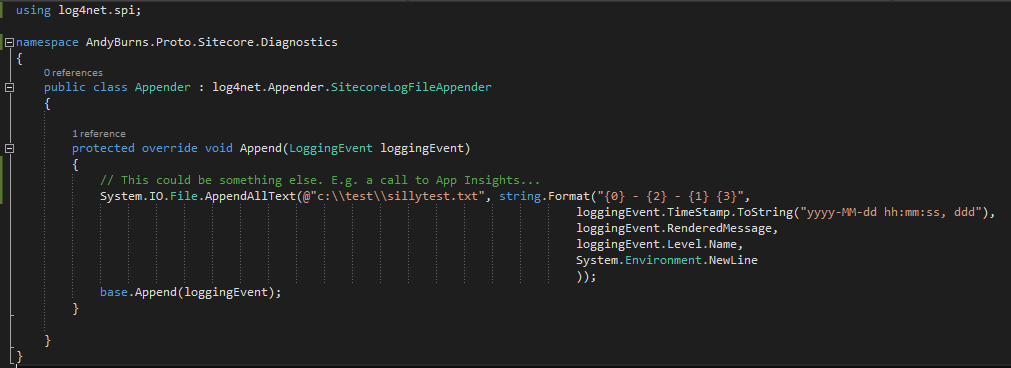
Sitecore uses Log4Net for it’s logging framework, so it comes with a whole slew of different ‘appenders’, suitable for logging to various repositories. That’s nice, but what if there’s a target you want to use that doesn’t exist?

Well, you can override the SitecoreLogFileAppender and write your own output:

What else could you do with this? Well, writing to App Insights seems like a good bet.

Hooking into Sitecore’s Logging

Minifying JS – Skip removing line numbers?

I’m a big fan of App Insights, and I’m loving it’s increasing integration with Visual Studio. To me, it’s just great.

However, I did find myself laughing a bit at this. App Insights was recording JavaScript errors from a (third party’s) .JS file.

appinsights

This is showing an error on Line 93. The thing is, the file has been minified – and all the code in the file is on line 93.

Hmm. All this would save is a couple of hundred bytes over the wire. I’m just not sure it’s worth it for most of the projects I work on. I think having the new-lines still in (albeit otherwise minified).

To be honest, we’d save more space by stripping out the 92 lines of Licensing information above the code. I’m not sure that that shouldn’t reside in a text file, and just have a comment referencing the licence information.

Minifying JS – Skip removing line numbers?

App Insights Visual Studio Integration is Fantastic

So, I do love App Insights, but I just realised that it’s even better than I’d thought. They’ve integrated it more closely with Visual Studio.

In the code you can see things at the top of each method – how many references it has, who last edited it, how long ago it was edited,, etc.

Well now you can also see the exceptions that were recorded by App Insights for that method in the last 24 hours:

appinsights-in-visual-studio

Fantastic!

(And all those are expected exceptions. If anyone works out a way of doing a Response.Redirect() without a ThreadAbortException and still killing the page processing, let me know)

App Insights Visual Studio Integration is Fantastic

Make Sitecore record the class writing to the logs

I’m a big fan of writing into your logs the class and method that is currently executing – it makes fault finding so much easier. Typically I’d do this with reflection – but it turns out that you can do this with a small change to Sitecore’s configurationContinue reading “Make Sitecore record the class writing to the logs”

Make Sitecore record the class writing to the logs