Error: 'b' is null or not an object

This error has caused me so much pain when trying to use SharePoint’s JavaScript client-side object model (CSOM), so, in case I have it again:

  1. Check that the function exists.
  2. Check that the function is named correctly.
  3. Make sure that you’re not using “this” in the call to createDelegate, as detailed here.
    • Right: Function.createDelegate(this, onSuccessMethod)
    • Wrong: Function.createDelegate(this, this.onSuccessMethod)

    I don’t know why this difference should cause this error, but I’ve proved it true.

If you know of other causes of this error, let me know, I’ll add it to the list. I love the experience of debugging JavaScript…

Error: 'b' is null or not an object

New Web Application returns HTTP 503

For some reason a new web application on my development VM always returns a 503 Service Unavailable when you go to it.

It turns out that this is due to the app pool supporting 32 bit applications! Change the setting in IIS (App Pool > Advanced Settings > Enable 32 Bit applications should be false)

New Web Application returns HTTP 503

Allowing logging for a particular app pool

I had a problem that one of our development machines had been configured in a ‘Least Privileges’ configuration – and it was a bit too least. The content app pool could not write to the logs. OWSTimer and WebAnalytics both could, but there was nothing from W3WP for that web app.

Just a reminder to myself…

Well, the solution was to add the app pool account to the ‘Performance Log Users’ group in AD. You find it under BUILTIN. Reset ISS. Voila!

Allowing logging for a particular app pool

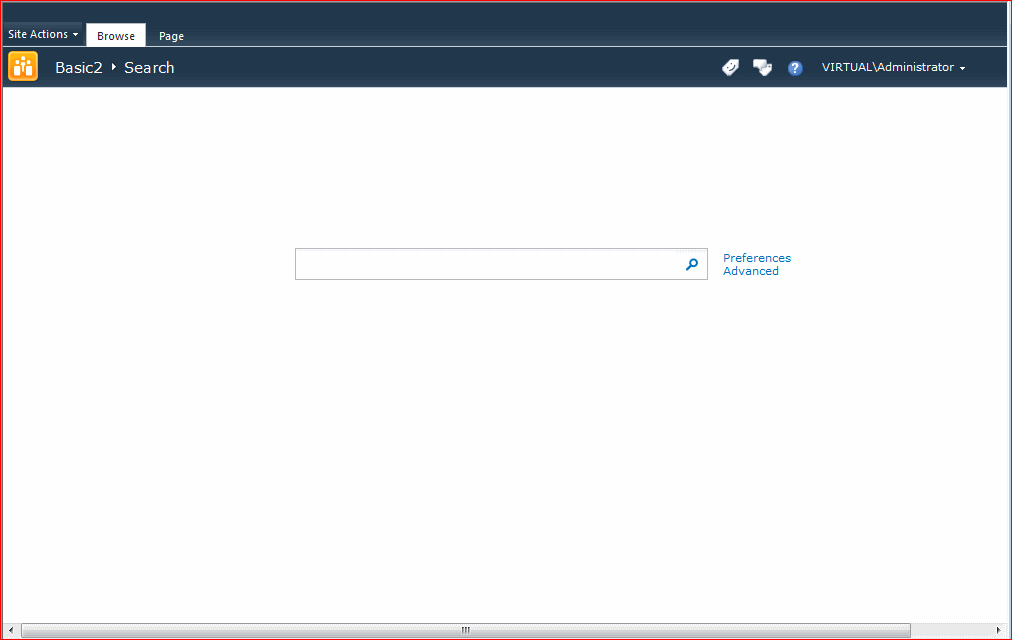
Annoying Navigation in Search Centers

I had two of my colleagues come to me with the same complaint – that the Basic Search Center site template in SharePoint 2010 doesn’t have any navigation to get ‘back’ to the rest of the site collection:

I pointed out to them that there are good reasons to consider having the Search Center separated from the rest of your content. I’d even suggest a separate Site Collection if using the Enterprise Search Center. (This uses the publishing features, and you might not want them turned on in your existing site collection).

However, my colleagues didn’t need all that, and really did just want a simple search center in the same site collection as their content. For example, a departmental site collection needed its own search center and search experience. But they’d really like users to be able to navigate back to the rest of the site collection.

So, I set forth to fix this dire state of affairs for them. Continue reading “Annoying Navigation in Search Centers”

Annoying Navigation in Search Centers

Further notes on SmartAssembly Obfuscation

Some further notes on things I’ve learnt using SmartAssembly on some of our products.

  • Constants do not get obfuscated. Use static readonly variables in their place if the constant contains sensitive information.
  • Run Reflector (or reflection tool of your choice) against your assembly after obfuscation, to check what is visible. Then go back and make the bits you accidentally left public internal or private.
  • Make as many classes and methods as you can Internal
  • Do read the instructions on the attributes you can apply to control obfuscation.
  • Do use Pruning if you want to remove parameter names for methods. That can leak a lot of information about what a class is doing.


Further notes on SmartAssembly Obfuscation

Obfuscation, Code Analysis, and Check-In policies

As mentioned before, we’ve started to use SmartAssembly to obfuscate some of our products. We also use Team Foundation Server (TFS) as source control and build server. Using obfuscation with code analysis caused some issues, which were compounded by our check-in policies. Continue reading “Obfuscation, Code Analysis, and Check-In policies”

Obfuscation, Code Analysis, and Check-In policies

WSPBuilder 2010 and TFS2010

With SharePoint 2007, WSPBuilder became our standard packaging tool for SharePoint solutions. It was simple, powerful, and a damn site easier than trying to write your own manifest.

Well, SharePoint 2010 and Visual Studio 2010 followed later, and Microsoft introduced much better tooling of their own. However, we’ve still got a lot of code being packaged by WSPBuilder, and we didn’t want to have to refactor all those projects just to package them for 2010.

Fortunately, Carsten Keutmann wrote a 2010 version (still in ‘BETA’, but it works fine). It offers many of the same extensions to Visual Studio as the previous version did.

However, I recently had to automate (in Team Foundation Server 2010) the build of one of our WSPBuilder based solutions, and that’s where things got more interesting… Continue reading “WSPBuilder 2010 and TFS2010”

WSPBuilder 2010 and TFS2010

My Logging Diagnostics Service for SharePoint 2010

With SharePoint 2010, Microsoft gave us a better framework for logging that SharePoint 2007, which relied on writing most of your own. Sadly, though, the SPDiagnosticsServiceBase does lack in a couple of areas. Consequently, I’ve ended up writing my own Diagnostics service to try and address those issues. I am far from the only one (See the references below), but I’d like to present what I’ve written, not least ‘cos I’ve been meaning to blog about it for about 8 months.

First, though, let’s look at the limitations of the SPDiagnosticsServiceBase. Continue reading “My Logging Diagnostics Service for SharePoint 2010”

My Logging Diagnostics Service for SharePoint 2010