RSS Feed in Office 365

This is just a quick note – that annoyingly, there isn’t an RSS feed web part (that functions) in Office 365. Even more frustratingly, the RSS Viewer Web Part is available, it just doesn’t work. When you add it to a page, you get the warning:

Web Part or Web Form Control on this Page cannot be displayed or imported. The type is not registered as safe

This is discussed in KB2535012, the main thrust of it being:

This issue occurs because the RSS Viewer Web Part is not available in Office 365. This issue is scheduled to be resolved in a future version of Office 365.

In fairness, this restriction is mentioned in the SharePoint Online Release notes.

Alternatives? Continue reading “RSS Feed in Office 365”
RSS Feed in Office 365

SharePoint Theme Settings page and Enhanced Theming

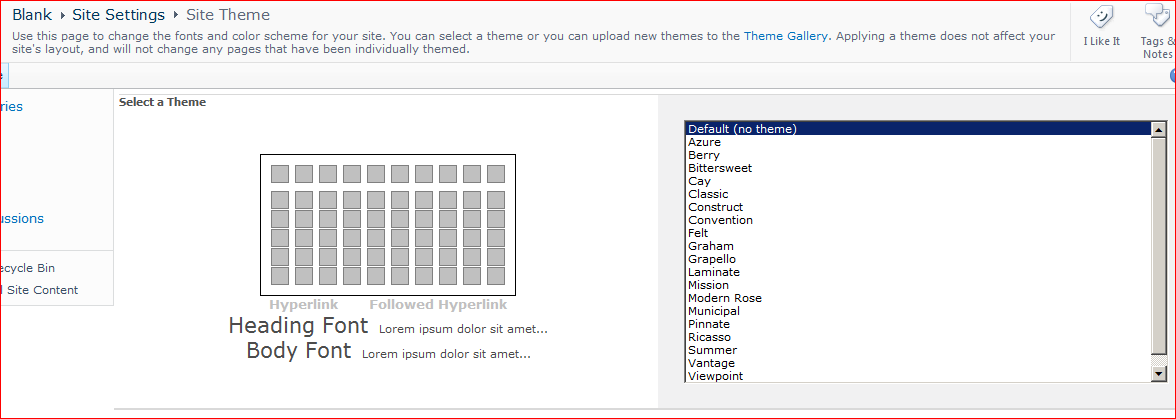
If you create a site using the Blank template and go to Settings > Site Theme you get a simple page that lets you set your site theme.

If you create a site using the Team Site template and go to Settings > Site Theme, you get a more advanced page.

Both these experiences are supported by the one page (/_layouts/themeweb.aspx). So what gives? Continue reading “SharePoint Theme Settings page and Enhanced Theming”

SharePoint Theme Settings page and Enhanced Theming

SPWeb.Properties serialization in the Sandbox

I was trying to store and retrieve some properties on an SPWeb object inside the sandbox. SPWeb has SetProperty() and GetProperty() methods, which accept and retrieve objects. I thought I’d use an enumeration to represent my value, and I’d cast my enumeration value when I retrieve it. However, when I tried this I got an exception of the form:

System.Runtime.Serialization.SerializationException was unhandled Message=Unable to find assembly ‘<my assembly strong name>’

Interesting. I tried similar code within a Console application using the full SharePoint API… Continue reading “SPWeb.Properties serialization in the Sandbox”

SPWeb.Properties serialization in the Sandbox

TFS, Versioning and Office 365 SharePoint

So, I am a big fan of putting build numbers or SVN revisions into the AssemblyFileVersion of my assemblies. I can then use a little bit of the System.Reflection API to get the AssemblyFileVersion, and display it to the user, write it to logs, etc..

However, I ran into a hitch when working with Office 365. Although reflection worked fine on my local machine’s sandbox, I got an error when I tried to run the same code on Office 365’s SharePoint system. It was pretty obviously and emphatically using System.Reflection that was the problem.

This was a shame, as my build process is (as usual) putting the AssemblyFileVersion in. Sadly, I don’t see any easy way to get the AssemblyFileVersion value from within Office 365 code. So, alternatives? Continue reading “TFS, Versioning and Office 365 SharePoint”

TFS, Versioning and Office 365 SharePoint

MissingMethodException when calling SPWeb.Recycle() in Sandbox solution

Service Pack 1 for SharePoint 2010 introduced a new method for the SPWeb object – Recycle(). This allows you to send a site to the recycle bin, rather than deleting it outright. I’ve used it before in Farm solutions without any issue.

However, I’m now working on a sandbox solution, and when I tried using it, I got the error:

MissingMethodException Method not found: ‘Void Microsoft.SharePoint.SPWeb_SubsetProxy.Recycle()’.
at Microsoft.SharePoint.SPWeb.Recycle__Inner()
at Microsoft.SharePoint.SPWeb.Recycle()

Hmm. That’s strange; my call to recycle seems fine, and the documentation says it’s available in the Sandbox, but internally there seems to be a missing method.

Out of curiousity, I tried using Delete() rather than Recycle(), and this worked correctly. So what gives? Continue reading “MissingMethodException when calling SPWeb.Recycle() in Sandbox solution”

MissingMethodException when calling SPWeb.Recycle() in Sandbox solution

TFS: Solution Explorer missing file status icons

I’ve just had a bit of a problem with Solution Explorer in Visual Studio not showing the ‘checkout status’ icons from TFS – you know, the red tick, the padlock, etc.. These things:

I couldn’t figure out what was causing this, but found the solution on MSDN forums:

In VS 2010, while you have the solution open in Solution Explorer, select File-> Source Control-> Change Source Control, could you click on Bind for each project/solution? Binding provides version control functionality. This includes various version control icons that indicate status in Solution Explorer.

This advice was correct – I went to the binding dialog, and the solution and projects weren’t bound. I added the bindings back – and presto. I’m not sure, however, how the project became unbound…


TFS: Solution Explorer missing file status icons

No CssRegistration control in Sandbox

Hmm – and interesting problem; in the Sandbox you don’t have any access to the CssRegistration class. It’s in the Microsoft.SharePoint.WebControls namespace, and you don’t have access to that.

So, what do you do to link to an external stylesheet? Um, well, there isn’t any pretty story. The best I’ve come across is by Ian Chivers, who uses JavaScript to add another <Link> tag into the <Head> of the page.

Clever, but yuck! Continue reading “No CssRegistration control in Sandbox”

No CssRegistration control in Sandbox

Sandbox Development – Reference the User Code DLL

Remarkably, I’ve only just started doing my first Sandboxed development in SharePoint 2010. (Most of our customers own their own servers, and want functionality you can’t easily build in the Sandbox alone).

Anyway, I knew that the API you could use in the sandbox was smaller than the full API, and I wanted my solution to warn me (e.g. fail to compile) if I tried to use something that wasn’t available in the sandbox. I found two approaches… Continue reading “Sandbox Development – Reference the User Code DLL”

Sandbox Development – Reference the User Code DLL

Using SPMonitoredScope, Counters and SPCriticalTraceCounter

Something that I don’t always remember – you can use the SPMonitoredScope class to monitor your SharePoint code as it executes. The results then get sent to the Developer Dashboard and ULS logs. There’s a decent description of it on MSDN.

using (new SPMonitoredScope(&quot;My Monitored Scope&quot;))
{
    // Do Stuff...
}

Continue reading “Using SPMonitoredScope, Counters and SPCriticalTraceCounter”

Using SPMonitoredScope, Counters and SPCriticalTraceCounter