Dealing with Large Lists Part 1 – What is throttling and how it causes difficulty

‘Large’ lists – lists with over a few thousand items – can cause problems when you’re developing for SharePoint, and the whole topic is kind of complicated. So what’s the problem?

Well, fundamentally the issue is inefficient queries being run against SharePoint lists. An inefficient query against a list with a small number of items isn’t a big deal, but with larger lists (over 5000 items) SQL server has to escalate from a row-level lock to a table-level lock. This can hold up other users while the table is locked.

So, what are the limits, what options are there with throttling, and what strategies are there for mitigating the effects of query throttling? Continue reading “Dealing with Large Lists Part 1 – What is throttling and how it causes difficulty”
Dealing with Large Lists Part 1 – What is throttling and how it causes difficulty

Working with the TaxonomyClientService: Part 4 – Populating Values with the Lists web service

So far I’ve discussed how to get information about getting the types of taxonomy field, working with those fields, and how to get term sets. What about setting values on list items?

It isn’t immediately obvious how to do that. For a start, we wouldn’t actually be using the TaxonomyClientService. To set values on items, you use the Lists web service, using the UpdateListItems() method. This accepts XML describing the field and values.

But what fields do we submit, and what values? After all, as mentioned in part 1, there are two fields – one for the displayed value, and a hidden ‘notes’ field that contains the actual data!

There was no documentation about how to set these values, and limited and contradictory information in blog posts, so I investigated…

Continue reading “Working with the TaxonomyClientService: Part 4 – Populating Values with the Lists web service”

Working with the TaxonomyClientService: Part 4 – Populating Values with the Lists web service

Working with the TaxonomyClientService: Part 3 – Caching

In Part 2 of this series I described how to retrieve a TermSet, and interpret the results. I suggested using code:

string clientTimestamps = string.Format("<timeStamp>{0}</timeStamp>", lastClientCacheTime );
string clientVersion = "<version>1</version>";
string termStoreIds = string.Format("<termStoreId>{0}</termStoreId>", termStoreId.ToString("D"));
string termSetIds = string.Format("<termSetId>{0}</termSetId>", termSetId.ToString("D"));
string serverTermSetTimestampXml;
string result = _wssTax.GetTermSets(termStoreIds, termSetIds, 1033, clientTimestamps, clientVersion, out serverTermSetTimestampXml);

Fine, but what are these properties we’re passing into GetTermSets()? Continue reading “Working with the TaxonomyClientService: Part 3 – Caching”

Working with the TaxonomyClientService: Part 3 – Caching

Reminders on customising the RichTextField control in Publishing

Right, so, again I’m looking at the problem of consistent formatting of client authored text in SharePoint. (Incredibly, it’s 4 years since I first looked at this).

Anyway, as a note to myself… Continue reading “Reminders on customising the RichTextField control in Publishing”

Reminders on customising the RichTextField control in Publishing

RSS Feed in Office 365

This is just a quick note – that annoyingly, there isn’t an RSS feed web part (that functions) in Office 365. Even more frustratingly, the RSS Viewer Web Part is available, it just doesn’t work. When you add it to a page, you get the warning:

Web Part or Web Form Control on this Page cannot be displayed or imported. The type is not registered as safe

This is discussed in KB2535012, the main thrust of it being:

This issue occurs because the RSS Viewer Web Part is not available in Office 365. This issue is scheduled to be resolved in a future version of Office 365.

In fairness, this restriction is mentioned in the SharePoint Online Release notes.

Alternatives? Continue reading “RSS Feed in Office 365”

RSS Feed in Office 365

SharePoint Theme Settings page and Enhanced Theming

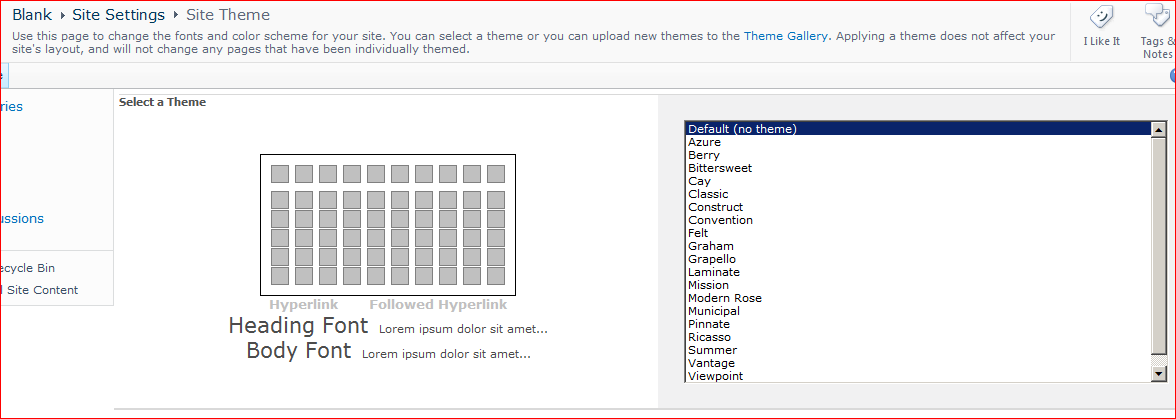
If you create a site using the Blank template and go to Settings > Site Theme you get a simple page that lets you set your site theme.

If you create a site using the Team Site template and go to Settings > Site Theme, you get a more advanced page.

Both these experiences are supported by the one page (/_layouts/themeweb.aspx). So what gives? Continue reading “SharePoint Theme Settings page and Enhanced Theming”

SharePoint Theme Settings page and Enhanced Theming

SPWeb.Properties serialization in the Sandbox

I was trying to store and retrieve some properties on an SPWeb object inside the sandbox. SPWeb has SetProperty() and GetProperty() methods, which accept and retrieve objects. I thought I’d use an enumeration to represent my value, and I’d cast my enumeration value when I retrieve it. However, when I tried this I got an exception of the form:

System.Runtime.Serialization.SerializationException was unhandled Message=Unable to find assembly ‘<my assembly strong name>’

Interesting. I tried similar code within a Console application using the full SharePoint API… Continue reading “SPWeb.Properties serialization in the Sandbox”

SPWeb.Properties serialization in the Sandbox

TFS, Versioning and Office 365 SharePoint

So, I am a big fan of putting build numbers or SVN revisions into the AssemblyFileVersion of my assemblies. I can then use a little bit of the System.Reflection API to get the AssemblyFileVersion, and display it to the user, write it to logs, etc..

However, I ran into a hitch when working with Office 365. Although reflection worked fine on my local machine’s sandbox, I got an error when I tried to run the same code on Office 365’s SharePoint system. It was pretty obviously and emphatically using System.Reflection that was the problem.

This was a shame, as my build process is (as usual) putting the AssemblyFileVersion in. Sadly, I don’t see any easy way to get the AssemblyFileVersion value from within Office 365 code. So, alternatives? Continue reading “TFS, Versioning and Office 365 SharePoint”

TFS, Versioning and Office 365 SharePoint

MissingMethodException when calling SPWeb.Recycle() in Sandbox solution

Service Pack 1 for SharePoint 2010 introduced a new method for the SPWeb object – Recycle(). This allows you to send a site to the recycle bin, rather than deleting it outright. I’ve used it before in Farm solutions without any issue.

However, I’m now working on a sandbox solution, and when I tried using it, I got the error:

MissingMethodException Method not found: ‘Void Microsoft.SharePoint.SPWeb_SubsetProxy.Recycle()’.
at Microsoft.SharePoint.SPWeb.Recycle__Inner()
at Microsoft.SharePoint.SPWeb.Recycle()

Hmm. That’s strange; my call to recycle seems fine, and the documentation says it’s available in the Sandbox, but internally there seems to be a missing method.

Out of curiousity, I tried using Delete() rather than Recycle(), and this worked correctly. So what gives? Continue reading “MissingMethodException when calling SPWeb.Recycle() in Sandbox solution”

MissingMethodException when calling SPWeb.Recycle() in Sandbox solution

No CssRegistration control in Sandbox

Hmm – and interesting problem; in the Sandbox you don’t have any access to the CssRegistration class. It’s in the Microsoft.SharePoint.WebControls namespace, and you don’t have access to that.

So, what do you do to link to an external stylesheet? Um, well, there isn’t any pretty story. The best I’ve come across is by Ian Chivers, who uses JavaScript to add another <Link> tag into the <Head> of the page.

Clever, but yuck! Continue reading “No CssRegistration control in Sandbox”

No CssRegistration control in Sandbox