Content Types – Who's your daddy?

Content Types are great, but can cause a little confusion. Because you normally define a content type at a site level, that’s pretty much how we think of them – as centrally defined types of item. Often, we actually create these content types on the root site of a site collection, because all subsites will be able to use them then.

However, this isn’t really the case. We do have site content types – but we also have list content types. These are the content types that are actually used on the lists themselves, and they are children of those site content types. This can be most easily seen by clicking on a content type on the List Settings page.

List Content Type

Notice that our ‘Example Travel Expenses’ content type says it has a parent of… …’Example Travel Expenses’! This is our List Content Type telling us that it’s parent is the Site Content Type of the same name. Click on it, and it’ll take you to the Site content type description, and you can work on up the chain of content types until you reach Item.
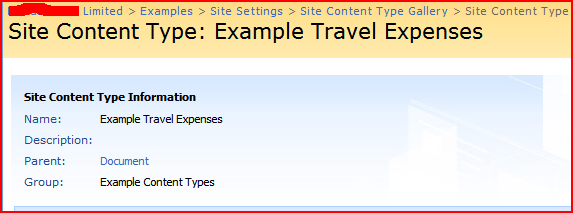
Site Content type

A consequence of this is that, as our content types are actually used by lists, I can’t think of a way to use a Site Content Type directly (though I may be wrong about that).

That are also issues related to this in terms of modifying content types, but that’s the subject for another post…

Content Types – Who's your daddy?

What happens to content types when you add a column to a list in SharePoint?

This is sort of relevant to an earlier post on the Document Information Panel, and showing fields in it.

The behaviour depends on if you’ve enabled ‘Allow management of content types’ on the Document Library Settings > Advanced Settings page.

If you’ve not allowed management of content types, well, you just add the column and it’ll appear in the document information panel. That’s great! The new column will not show as belonging to any content types, as the ‘Test‘ column is in the screenshot below:

Extra List Columns

However, if you have allowed management of content types for the library, things get a little more complicated. When you add a new column, in the ‘Additional Column Settings’, there will be an option for ‘Add to all content types’. If you check this, well, it’ll add that column to all the content types currently on that list. This will make it appear on the document information panel. This is what I did with the ‘Test2′ column above (but before I added the Picture content type to the library).

(As a side note, the content types on the list are actually ‘children’ of your Site content type rather than instances of it. This means that if you update the content type on that list, it won’t update the parent content type, or other lists that use that content type. Similarly, it mean that if you update the parent content type – say, you edit the site content type – you need to update child content types with those changes to affect lists that are using them already. But that really should be another post, sometime.)

If you don’t check that ‘Add to all content types’ option, well, it doesn’t add it to the document information panel. Finally, what if you have added a column all content types, and you add a new content type to the list? Well, your new content type will not have that new column applied to it – and the only way I can see of applying it to the new content type is actually to delete and recreate it. Of course, that means deleting a column that contains data, so that is less than ideal. This is what happened with the Picture content type – I added it afterwards, and you can see that it doesn’t use the ‘Test2‘ content type.

For that reason, be very careful when adding columns to library that is allowing management of content types. If possible, keep the columns in the Site Content Type (i.e. the parent).

What happens to content types when you add a column to a list in SharePoint?

Missing Content Type fields in the Document Information Panel

The Document Information Panel is great – it allows you to surface metadata to be filled in about a Word 2007 document in the client.

Document Information Panel Correct

This is great, but I had a bit of a puzzling problem. I’ve set Libraries up to use this features many times now, and it’s pretty straight forward – I’ve added columns to the library, and then the template document for the library has included those columns. Thus, you just go into your document library, click new, and you get a blank word document with the correct document information panel thing. Sometimes I’ve modified that template, but that’s pretty straight forward through the Library Settings pages (Document Library Settings > Advanced Settings > Edit Template).

This time, though, I was using content types (i.e. setting up the library properly), rather than just adding columns directly to a list. Content Types encapsulate (amongst other things) their own set of metadata to be captured – so in other words, they define columns to be added to a list. That’s fine (and very useful).

However, when I went to my document library, clicked ‘New’ and selected my Content Type, I got a blank word document with only one field in the document information panel – title. The blankness was expected (I’d not defined my own template) but none of the other bits of metadata I’d defined for my content type were there. This was a bit of a puzzle. What was different?

Well, after much thinking, I realised something – Content Types ‘inherit’ from each other. My Content Type derived from the Document content type, which specified just one field of metadata – Title. Then it hit me – content types themselves have document templates. My new content type was inheriting from Document, and it was still using the Document content type’s template document. I specified my own template document for my content type and suddenly I had all of my fields available in the document information panel.

It is interesting that there is this difference between the document information panel fields being defined by the library when just using the default ‘Document‘ content type and no others, and the fields being defined by the content type you’ve created if you’re using other types (I.e. you’ve enabled ‘Allow management of content types’ on the Document Library Settings > Advanced Settings page).

Related to this, then, is the question of what happen if you add a column to a list. However, I’ll cover this in another post.

Missing Content Type fields in the Document Information Panel

Error: "The document information panel was unable to load"

I was building a demo where I was wanting to show the document information panel in Word 2007 (which I think is one of the neatest features about it!) . It should look like:

Document Information Panel Correct

But instead I was getting “The document information panel was unable to load“.

Document Information Panel Error

I couldn’t see a reason for this, but investigation found this post which shows the same error, and a solution in the comments:

The System Event Nofication Service (SENS) uses the same communication “channels” (not the correct word, but works) as does office products do in communicating with the server.
Stop and disable the SENS service on the server and everything will work perfectly.

So, open a command prompt and type:
net stop sens

Bit strange, but that fixed it for me. Also note the comment at the bottom that the Document Conversions service doesn’t work on a single server demo system like this.

Error: "The document information panel was unable to load"

The default locale of DateTime columns in the Dataview web part

More bugs in the dataview webpart – this time not being able to set the default locale for the page’s dates to being UK. When you add a datetime column to the view, if you look at the code, I can see the locale of 1033 (en-us), and the date formats available are only US format.

On my system, however, while the date formats appear to be US format in SharePoint designer, the code for a datatime column that I add to the view contains the 2057 locale (en-gb) , and the date formats display correctly in the page itself.

So it’s almost like SharePoint designer thinks it is working with US date formats, despite the settings of the Page Editor settings page, the Regional settings on the machine, and the Regional settings on the site all being set to UK date formats. I don’t know if I’m missing a setting somewhere, but if I am, I really don’t see it!

This problem can be fixed by resetting the locale by hand in the code, but really, you shouldn’t have to.

The default locale of DateTime columns in the Dataview web part

Fixing the comparison operators on the DataView web part filter dialog (maybe)

As mentioned previously, I was having some problems with not having the right operators in the Filter Criteria dialog of a DataForm Web Part. Although the field I was trying to filter by was a date, I was only being shown the options as if it was a string:

Broken DataForm Filter Criteria Dialog

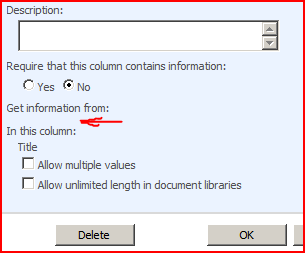
Well, proving that invention is 99% perspiration, I managed to find a solution. On the list on my customer’s system there was a Lookup column which referred to a list that no longer existed. Note the lack of List name for where it’s getting information:

Broken Lookup Column Details on a List

When I removed that column from the list, I could filter correctly again:

Working DataForm Filter Criteria Dialog

This is despite the fact that the broken lookup column is not used either in the display on the DataForm webpart, or in it’s filter. Merely its presence is enough to screw things up. Note that this is a different solution to other ideas that have been suggested elsewhere.

Fixing the comparison operators on the DataView web part filter dialog (maybe)

Replacement Content Editors

I mentioned before about looking at other content editors for SharePoint 2007. Well, it came as a bit of a surprise for one of my colleagues to discover that you could do this!

Anyway… so I had a look at other content editors. Well, the one replacement that I could find. Telerik make a variety of controls that can be used in MOSS, including a free ‘RadEditor Lite‘ and then the full ‘RadEditor‘ (which has a free trial). A comparison is available. I’ve used their controls before – they’re pretty good, and their forums and support are very good (which is probably more important when you’re developing). Some of their controls I’ve used before had their quirks – but that’s true of all ‘rich’ controls in web applications, in my experience. The Telerik ones were better than most.

I must actually give it a go sometime. There are extensive instructions on the Telerik site.

Replacement Content Editors

Wrong comparison operators on datetime field with Dataview WebPart

This was a weird error – but I’m not the first one to see it. When using a dataview web part, and trying to do a comparison with a date column, the filter dialog wouldn’t let me choose certain comparisons. The ‘Less than’, ‘Less than or equal to’, ‘Greater than’ and ‘Greater than or equal to’ options were all unavailable, and options like ‘begins with’ were available. It’s very strange, as it’s almost like the date was a text column – except that isn’t, and that another user did get those options.

I’m not sure if this is a security related issue as the linked post seems to suggest, but it’s really weird that the two users with the same permissions looking at the same system see this field in such different ways. I don’t have a resolution, I’m afraid.

Wrong comparison operators on datetime field with Dataview WebPart

Forms Based Authentication in SharePoint

As mentioned recently, I set up an FBA SharePoint site following the instructions from Dan Attis and Andrew Connell. I tried Dan Attis’ instructions first, but they didn’t actually work – for some reason, when I’d try to log in, I’d just be returned to the “Sign in” page. I repeated setting everything up using Andrew Connell’s instructions, which worked! The only differences I could see were Andrew’s instructions to add the alternate authentication provider to both the intranet and internet IIS web sites, and that Andrew’s set up started with the intranet site. I believe that second difference a red herring – either I made a mistake following Dan’s instructions and couldn’t figure out what (most likely), or the alternate authentication provider really does need to be in both sites’ (and the central admin site’s ) setups.

Andrew’s instructions also go into the question of allowing annonymous access to parts of the site. As a big note for myself though:

You must be logged in as an administrator via Forms authentication to set the annonymous access settings.

I keep forgetting that.

I also have been having a look at the Community Kit for SharePoint. This is sort of a bunch of ‘bits’ that are useful in creating an online community of one sort or another, and the part I’ve been looking at is the Intranet/Extranet Edition. This provides a number of features for giving you web parts for login, membership creation, password reset, and so on. They’re very neat, but the whole thing seems to be stuck at a pre-beta stage, and I have had some issues with them. I’m hoping that they’re still under development – if all else fails and I have to, I’d look at fixing/debugging myself. It’d be good to get this to a full release.

Forms Based Authentication in SharePoint

Can't open a new window in link format settings in Dataview WebPart

I’m using a dataview web part, and have set one of the columns to be a link using the formatting tools. This works just fine! However, when I try to set a target for the link of _blank (to create a new browser window and open the link in that), well, the page doesn’t save correctly. No _blank is put into the links, and you have to reload the page in SharePoint Designer ‘cos it’s gone funny.

Again, I’ve not got a solution to this – although the customer in question might not be using SP1 yet.

Can't open a new window in link format settings in Dataview WebPart