Build page layouts without Breadcrumbs or a Title

Right, so SharePoint uses pages and page layouts – I won’t talk about the different types, but ask a couple of questions that’ve come up a few times.

  • If I create a new page layout in SharePoint, how do I get rid of the breadcrumbs?
  • How can I get breadcrumbs, but like the home page?

Here’s how… Continue reading “Build page layouts without Breadcrumbs or a Title”

Build page layouts without Breadcrumbs or a Title

Automatic incrementing IDs

Neat tip from the SharePoint UK User Group (and thank you Dave Hunter) – if you want an automatic, incrementing column on a list…

Create a new calculated column, with =TEXT(ID,”000000″) as the formula and return data type a single line of text. It will give you 000001.

Neat. I didn’t know that ID was a valid command in a calculated column.

Automatic incrementing IDs

Make SharePoint open Excel files on a specific Worksheet

We’ve a customer who wants Excel Workbooks in one of their libraries to always open on a specific worksheet. Normally, Excel opens from SharePoint showing whatever the last selected tab was, but they’d like theirs to always open on the first worksheet.

I was curious, so I set up a document library with a template XSLX file. In it, the 4th worksheet was the active one when I saved the workbook as the template.

I created a new document in the library with that template. When Excel opened, it showed me the 4th tab, as expected. I saved the document, and downloaded a copy. I reopened the document from SharePoint, selected the first tab, saved the document and downloaded a second copy.

So, now I have 2 XLSX file for the same workbook, but with different tabs selected. I changed their extensions to .zip, and unzipped them. Next, I ran WinMerge on the folders they unzipped to to see what the differences were.

There weren’t many really – most were related to ‘last saved time’ and things like that. There were three XML files in the archive that seemed relevant – 2 for the worksheets (the one that was selected and the one that is now), and the Workbook xml.

Here are the differences for one of the WorkSheets:

Yup, the difference is the tabSelected=1 attribute. If it there, that’s the selected tab.

Or is it? The WorkBook xml also contains a difference:

This is a little more complicated – activeTab seems to be the index number into the Sheets node, if you treat it as a zero-based array. And if the first tab is selected, there doesn’t seem to be an activeTab element at all. Still, not too bad, I’m sure I could work with that.

So, how would this help? Well, if the customer is really keen that the first tab is always selected, then we could write an event receiver that captures a document uploaded to their library and then:

  • Checks it really is an Excel 2007 file
  • If it is, opens it up
  • Edits the XML we’ve just seen
  • Resaves the file.

Pretty straight forward, really.

Make SharePoint open Excel files on a specific Worksheet

Redirect OSSSearchResults.aspx to another page

As promised yesterday, here’s some prototype code to redirect calls to OSSSearchResults.aspx to another page:

namespace SearchRedirector
{
    public class HTTPModule : IHttpModule
    {
        public void Init(HttpApplication context)
        {
            context.PreRequestHandlerExecute += new EventHandler(RegisterPreInitRequestHandler);
        }

        void RegisterPreInitRequestHandler(object sender, EventArgs e)
        {
            Page page = HttpContext.Current.CurrentHandler as Page;
            if (page != null)
            {
                page.PreInit += new EventHandler(page_PreInit);
            }
        }

        void page_PreInit(object sender, EventArgs e)
        {
            Page page = sender as Page;
            if (page != null)
            {
                if (page.Request.Url.AbsolutePath.Contains("OSSSearchResults.aspx"))
                {
                    page.Response.Redirect("/SearchCenter/Pages/results.aspx" + page.Request.Url.Query , true);
                }
            }
        }
        public void Dispose()
        {
        }
    }
}

This seems to work pretty well, although for some reason it’s tricky getting the debugging in Visual Studio to break into the code working consistently.

The guts of this is in the page_PreInit function, where we’re checking to see if the page is the OSS Search results, and if so, we redirect, passing the appropriate query string params.

Obviously, for a production system you’ll need to add a lot more configuration around this – what page(s) we’re forwarding to, what context(s) we should forward for, and so on. There are probably more efficient ways of checking if the page is an OSS results page than a string Contains() too.

Redirect OSSSearchResults.aspx to another page

Search Scopes and Site/List Context…

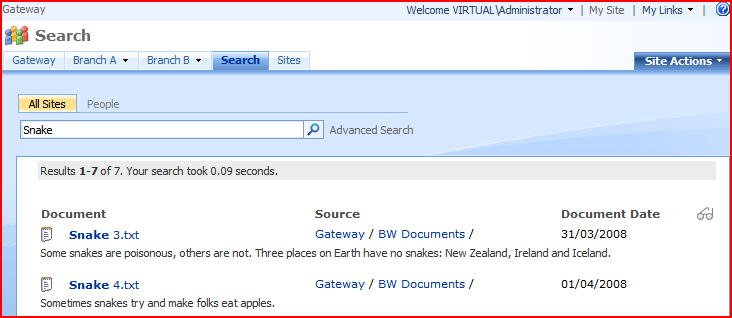
Came across an interesting problem from a customer – they’ve got a customised master page which doesn’t have ‘Site’ or ‘List’ level searches. They’ve got search scopes (such as ‘People’ or ‘Documents’ or ‘All Sites’), but across their entire SharePoint system. For example, this search:

will take us to our customised results page:

Note the Document Date column, and navigation breadcrumbs – these are custom.

The customer has added the search box web part to some pages, though, and this does display ‘Site’ or ‘List’ level scopes. Running a search against these scopes:

Takes us to this search page:

Yup, that’s the WSS3 standard search results page. You can see this in the So, can I change that?

Well… no. Proving that nothing is new under the sun, Mark Arend has a good post about this problem of contextual and custom search scopes. His explanation makes sense, too, but like he says, it doesn’t really justify the issue.

One option that he doesn’t mention is that you could use an HTTPModule to intercept the call to the OSSSearchResults page and forward it to our own custom results page. I might prototype that and post about it tomorrow.

Let’s hope that SharePoint vNext fixes this, ‘cos inconsistent search results depended upon contextual vs custom scopes will just confuse.

Search Scopes and Site/List Context…

Personalization Sites, Links, and Two Tabs

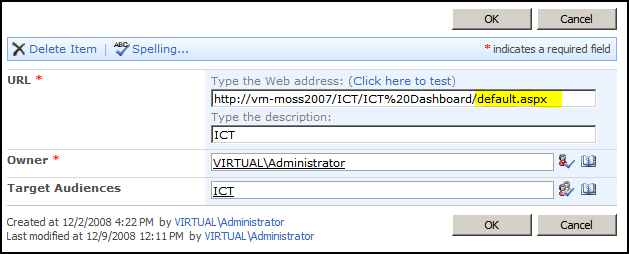
I came across an interesting problem today. I’m building a demo, and I wanted to use personalization site to ‘push’ a dashboard page to a certain set of users. I created a Personalization site (using the Personalization Site tempate), and then went to my SSP to set up a Personalization Link to it:

I then logged in as a user who belongs to the audience it was configured to show for:

Everything looked good – I had my ICT link that I’d just set up, so the audience was working correctly. However, when I clicked on it, things didn’t work so well…

Yup, two tabs were being shown. One was my Personalization Site link that I’d configured in the SSP, and the other was the navigation tab for the site itself. I only noticed ‘cos the name on the tab I’d added in the SSP (ICT) and the name of the site (ICT Dashboard) were different. Also, the Site’s own tab gave me the ‘Pin/Unpin Site’ option.

It’s a bit of a digression, but what’s the pin/unpin site stuff about then? Well, you don’t have to push personalization site links out to users (via the SSP). Instead, users can go to a personalization site and choose to add it to their My Site tabs; this is ‘pinning’ the site. After they’ve done this, they can remove the link (‘unpinning’).

However, that’s not what I wanted – I want the ICT audience to always have that link, and I don’t want another tab, or any pin/unpin options. So how do I get rid of that? There must be a way; it’s obvious that if I’m pushing a personalization site to a bunch of users that they shouldn’t get those options.

After much head scratching, I figured it out. My personalization site link in the SSP only pointed to the site, not to the actual page. I changed it to point to the page (default.aspx).

When I then navigated via that tab, I was shown only one tab – with no pin/unpin options:

Hurrah! What I think happens, then, is that the top navigation compares the URL of the current page in the personalization site with the URLs for the tabs in the user’s My Site. If none of them exactly match, then it adds a tab for the site itself, including the pin/unpin menu. Although my personalization site’s url did resolve to the same page (default.aspx) the URLs were not the same – and hence I was getting two tabs!

Personalization Sites, Links, and Two Tabs

WSS3 Pages – what's with all the sucky layouts?

Okay, so I’m not a huge fan of the out-of-box publishing layouts. I’ll be honest – I reckon that there should be about half of the layouts, and I don’t like the ‘Welcome Page’ as a description. ‘Generic Page’ perhaps?

Anyway, some of them have pretty cacky layouts, often with Summary Links built into the page (why? Can’t I just add a web part?) – but as a rule, they keep the left hand navigation for the site. This is good – users get confused when their navigation isn’t how they expect.

New WSS Pages, however, do not keep the left hand navigation.

This has led to more than one customer asking “where has my left hand nav gone?” Not an unreasonable question – after all, did someone think that users wouldn’t need standard navigation in team site pages? Don’t get me wrong, I like that you can get rid of the left navigation menu if you want – but I think this will be the exception, not the rule.

You can get the left navigation back using SharePoint Designer (and some cynics might suggest it’s a ploy to set SPD licenses, though I don’t think so). However, I shouldn’t have to! Can’t I have a couple of out-of-box layouts that are like, well, the one used in Default.aspx on my team sites? Is there a Codeplex project for such a thing, maybe?

Even better would be if Default.aspx existed inside a library like any newly created pages I build are. I don’t like that it is separate to the other pages in a WSS3 site.

WSS3 Pages – what's with all the sucky layouts?

Navigation from a 'My Site' back to a Site Collection

I don’t normally do much with My Sites to be honest – usually I’m building applications, and they’re not usually in My Sites. One of our customers asked me ‘How do users navigate back to the Intranet?’ and I’ve got to admit, I was baffled.

Well, SharePoint’s My Sites have a site-collection setting for ‘Portal Site Collection’. This setting modifies the Global Breadcrumb, and inserts another link there – so you can have a link back to your site-collection.

There a number of issues with that, though… Continue reading “Navigation from a 'My Site' back to a Site Collection”

Navigation from a 'My Site' back to a Site Collection

Merged Data Sources for the DataView web part

I’d a question from a reader (gee, I have readers!) about doing content rollup using the DataView web part. He was asking if he could use the DataView web part even though the things he was pulling into his Data Source didn’t all have the same columns. Would this work? Well, one way to find out… Continue reading “Merged Data Sources for the DataView web part”

Merged Data Sources for the DataView web part