Automatically add themes to the SPThemes.xml file

I’m not sure I’ll use themes again over the AlternateCssUrl again in a hurry, but I did decide to take a look at the 10 example themes Microsoft Released in March. I’ll blog about how they look – sometime! (The short answer – some good, some bad, some awful!)

Anyway, I was interested that the themes could all be activated as features. This rather kept with my feeling on how branding should be deployed.

However, some of the themes (though not all) were suddenly available in the ‘Site Themes’ page of my SharePoint system. I knew from experience that this isn’t something that ‘just happens’ – previously, I’ve done it by hand.

EDIT: See the comments – they describe an possible pit fall, but both have articles about how to do the same thing… Continue reading “Automatically add themes to the SPThemes.xml file”
Automatically add themes to the SPThemes.xml file

Be selective about how you get items from an SPList

Just read an interesting article from Waldek Mastykarz called ‘Performance of various methods to retrieve one list item’. It’s well worth a look – go and read it.

So, the interesting thing I took away from it was just how slow the GetItemById() method was compared to an SPQuery. Why? Wouldn’t it make sense to use and SPQuery within the GetItemById() method?

Well a bit of Reflector digging (again) shows that it does! But it isn’t just a query for the item with that Id – it also specifies that the

SPQuery.ViewAttributes = "Scope="RecursiveAll" ModerationType="Moderator" ";

Hmm. So it’s probably a more complicated query. Depending on your solution, you might not need “RecursiveAll” – I try to avoid folders in lists, preferring views to break down my content.

So, the lesson that I took away was that if you are doing a LOT of getting items from lists, it is worth considering how you want to. There isn’t a right answer, unfortunately, and testing is key. The problem is, there are many factors:

  • Can you use caching?
  • Do you know the list you’re getting items from?
  • Are you getting items from more than one list?
  • Do you have folders?
  • What other parameters might your query have?

It’s difficult to know, hence I think Waldek is right – give it a test so you have some idea!

Be selective about how you get items from an SPList

Create New Document Web Part

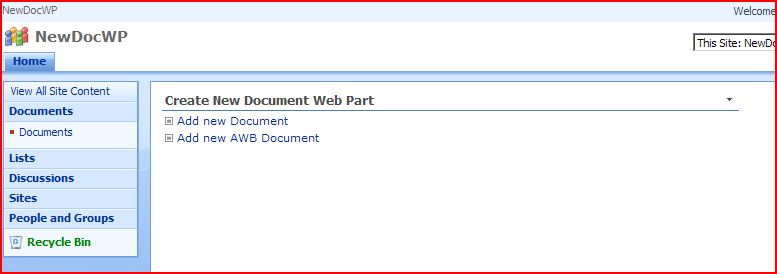
Ages ago I observed that the ‘Add New Document’ link in a summary toolbar takes you to an ‘Upload’ page, rather than creating a new document based on that template, and suggested doing something about that. That was a bit of a hack, though, so now I’ve written a web part to allow you to display ‘Add new…’ links and if you click on them, it opens up a new document based on that content type’s template. I’ve called it the ‘Create New Document Web Part’

CreateNewDocumentWebPart itself

Create New Document Web Part

'Edit Document' requires a Windows SharePoint Services-compatible application and Microsoft Internet Explorer 6.0 or greater

We test our applications often using ‘RunAs’ to run Internet Explorer under a different session. I know that SharePoint allows you to ‘Log in as a different user’ but it doesn’t always work that well for us (i.e. you log in repeatedly and it might let you in).

One of my colleagues was trying to edit a document logged into Windows as one user, but running his IE session at a different user. Clicking on the document opened it Word in IE – despite that the Library should try and open documents in their client application. Trying to edit the document he got the message:

‘Edit Document’ requires a Windows SharePoint Services-compatible application and Microsoft Internet Explorer 6.0 or greater.

This is the same message as mentioned in KB833714, but a different cause. When I tried editing the same action but as the user he was logged into Windows as it worked fine.

'Edit Document' requires a Windows SharePoint Services-compatible application and Microsoft Internet Explorer 6.0 or greater

Using jQuery to fix the removal of the Title column of a list

SharePoint List items all have a Title column (although it’s display name might be changed to something else). This Title column is a string, which is unfortunate as sometimes you really don’t need a string column on a list; this was the need I faced.

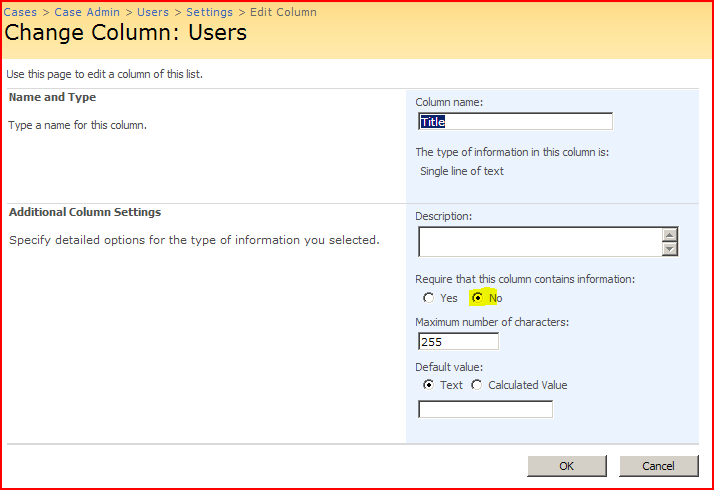
You can make a Title column not required:

turn-off-title-requirement

Also, if you go to the ‘Advanced Settings’ page of your list and ‘Allow management of Content Types’ you can then go into your content types and Hide the Title column. This is okay – but the Title column is still there – it’s just being displayed with “(no title)”… Continue reading “Using jQuery to fix the removal of the Title column of a list”

Using jQuery to fix the removal of the Title column of a list

Filter User Columns by Account

I needed to query an SPList by a User column. I wanted to query the list by account (DOMAINUser) and check that that user existed. Essentially, I’m validating the input of a PeopleEditor control against users in the SPList. Unfortunately, this didn’t look possible – examining my list items through the object model I seemed to get back a value like a lookup field – that is [number;#value]. For example:

1#;John Smith

Not very useful – accounts are unique, but John Smith’s aren’t. I was beginning to feel a bit frantic about not being able to do this sort of query when I found this very useful post by Karthikeyan Kasiviswanathan. The short of it – you have to set the column up to display the account if you want to query by the account.

Sort of makes sense – but is a bit weird too. I mean, isn’t the account the unique bit? Shouldn’t I always be able to query by that? Still, this should work for me.

Filter User Columns by Account

Webpart Titles not shown in WebPartZone…

Curious problem this – I had a web part zone where all web parts being put in it would be displayed without their titles. Didn’t matter if you manually went and turned on the chrome to show a title – that setting never saved, and the web parts didn’t ever have a title.

After tracking through all the page’s code, I found that when I set the WebPartZone’s ID to be ‘Main’ then my web parts ceased functioning correctly; their titles disappeared. If I set the ID back to ‘Left’, then all was fine.

I don’t know why this happens, but certainly using a different ID for my zone fixes it. If anyone knows why this actually happens, please let me know.

Webpart Titles not shown in WebPartZone…

Clean up SharePoint's UI with jQuery

So, the case management system I’m working on has a ‘Mailbox’ library. Really, it’s just an email enabled document library, with the address set to the name of the case. Anyway, when emails are received into this list, we’d like to show the subject, sender, cc, to addresses, and so on. It turns out that email enabling a document library does in fact add columns for those properties (but they’re not automatically added to the default view).

mailbox-page-default

Neat! Until you start looking at the code itself – then it sucks… Continue reading “Clean up SharePoint's UI with jQuery”

Clean up SharePoint's UI with jQuery

SharePoint can have Wildcard searching…

One of the most popular blog post on my site is, curiously, about the lack of wildcard searching in SharePoint out of the box. This, as it happens, is a bit of a simplification, and I’d like to be a bit clearer – even if it is more complicated.

  • Out of the box SharePoint does not have a way of searching for “App*” and getting all results such as “Apple”, “Application”, and so on. This is the wildcard search I was on about before.
  • You can do a wildcard search on a particular metadata property. “Title:App*” would return items with a title that contained “Apple”, “Application”, and so on. The down side is, you have to know the property you want to search on, and you have to know its name, which isn’t always easy or viable for users.
  • SharePoint Search service does actually support wildcard searching – just there is no way of using it with the out of the box controls. Essenially, it’s a problem of the user interface. The search service supports 3 different ways of querying it. This is why Corey Roth wrote his wildcard search webpart (on codeplex), and I’m sure there are others. He explains why he wrote it here, and what you give up by using Full Text SQL queries.

So, in short, if you’re able to do some custom development (or use Corey’s web part), and if you’re willing to trade off some other areas of functionality, you can get wildcard searching – but it’s not just out-of-the-box.

All of this is explained in ‘Inside the Index and Search Engines: Microsoft Office SharePoint Server’ by Tisseghem and Fastrup. I highly recommend it for developers working with Search.

SharePoint can have Wildcard searching…

Control the Content Types in the New menu via code

We’ve got a project with an interesting requirement for a Document Library. When the site it provisioned, it will have a number of documents already in it, of a specific content type. Users should not be able to create more documents of that content type. Further, we would be uploading documents via some custom screens which should also be stored as ‘hidden’ document content types.

No problem, I thought – in my Schema.xml for my custom Document library I can specify Hidden=”TRUE” in the ContentType node. Sadly, this doesn’t work entirely well… Continue reading “Control the Content Types in the New menu via code”

Control the Content Types in the New menu via code