Outlook 2003 to SharePoint 2007 Email Integration

So what has Andy been working on lately? Well, lately I’ve been writing an integration between Outlook 2003 and SharePoint 2007. It was all a bit fraught – some of the web services I was using are a bit dodgy, uploading files and metadata as one transaction doesn’t seem to be possible, and everyone always underestimates the effort involved in coping with the metadata about an email. I’ve written an integration between GroupWise 6.5 and Open Text Livelink before now, and again, dealing with the metadata was a bigger effort than browsing the system or uploading the document.

Now, email saving into SharePoint seems to be an overlooked thing. Microsoft have their Exchange 2007 Managed Folders, which can push emails into a SharePoint Records center. Liam Cleary has written his usual high-quality description of setting it up, and the MS Records management team blogged about it in parts I, II, III and IV.

However, a lot of our customers aren’t impressed with this solution. They want to be able to save emails into particular SharePoint Libraries within their usual collaboration environment, rather than just booting them off into a Record Center.

U2U built an Outlook 2007 addin which is very nice – though a bit of a different take. Their approach requires defining the save location up front and mapping to the data, but that then saving emails is dead easy – just drag them into the folder. Nice.

Anyway, this is what I built – I’ll contrast with the U2U offering lateer…

Continue reading “Outlook 2003 to SharePoint 2007 Email Integration”
Outlook 2003 to SharePoint 2007 Email Integration

PowerPoint Slideshows (.pps) open as PowerPoint Files

Hmm. One of our salesmen called up today with an interesting problem. We’d published some PowerPoint presentations as slide shows (.pps files). If you open one of these, it should just launch PowerPoint into the presentation. However, he was opening them from our website and they were opening as a normal PowerPoint (.ppt) file. That is they were opening ready for editing, not in presentation mode. Weird.

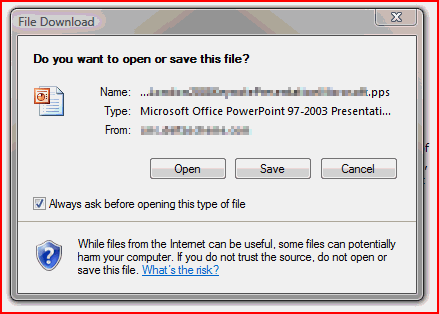
I remembered having seen this before, but a bit of poking around showed that my fix was still in place. Curious. When I clicked on the link to the presentation I got the ‘Download or Open’ dialog thingy:

Vista's File Open or Save Dialog in Internet Explorer

First off I noticed that the file extension was .pps – good. I tried opening the file – and it opened it as if it were a .ppt file. Weird. So then I tried the other option – I saved it to my local machine and opened it locally. This time it opened correctly – it opened as a slideshow.

Hmm. So, they’re the same file, but something different is happening when they open. I wondered if it was to do with the HTTP headers, but the same difference occurs when the file is being served with the application/vnd.ms-pps or just text/html (we run MCMS 2002 on a IIS webserver but publish as static content to an Apache server. They serve the file as different mime types, but have the same result – Open opens the file for editing and Save and open shows the slideshow).

Next up, I tried the same experiment using Firefox. If you choose to Open the file rather than save it, it opens the slideshow – correctly! And if you save it, well, it saves the .pps file which, again, opens correctly.

text/html mime-type application/vnd.ms-pps mimetype
“Open” “Save” and open “Open” “Save” and open
IE7 WRONG OK WRONG OK
Firefox OK OK OK OK

So it looks like Internet Explorer will not open a .pps file as a slideshow irrespective of the mime type sent by the server and the .pps extension (and it’s file association in windows). However, if you save the file locally, it will. Weird.

The only thing that I can think is that this is some sort of security feature, but it’s a bit odd – after all, shouldn’t Firefox do this then?

PowerPoint Slideshows (.pps) open as PowerPoint Files

Are SharePoint Breadcrumbs completely wrong?

I upgraded the version of WordPress I’m running recently and I enabled statistics on the blog. It’s been a bit of an eye-opener. My posts on ‘What the heck is going on with SharePoint Breadcrumbs‘ and ‘More SharePoint Breadcrumbs WTF‘ have together more hits that any of my other articles, and both are visited about evenly.

This is pretty interesting. Breadcrumbs should be pretty simple. I mean, we all use them on the web, probably every day, and often without noticing. So how come people are clearly looking up information about SharePoint breadcrumbs? Clearly something is wrong with them.

So this set me thinking – what’s wrong with them? And here’s what I could think of:

  • There are two breadcrumbs. You’ve got the Global breadcrumb, and then the PlaceholderTitle breadcrumb. Seriously, how many websites do you come across that have two?
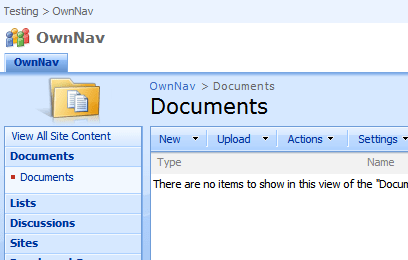
    Image showing the Global and Title Breadcrumbs
  • ‘Site’ levels of the hierarchy can appear in one or the other breadcrumb. Depending on whether or not your navigation inherits it’s navigation from it’s parent site, the ‘Site’ links can appear in the global or title breadcrumbs. Thus, there’s no consistency as to where a site appears – if it appears at all! I can see why it’s been built this way – essentially it allows us to ‘skip’ levels in the site hierarchy as shown on the global breadcrumb, and it shortens the title breadcrumb. I wonder if this wouldn’t be better facilitated by a ‘show in Global breadcrumb’ site setting. Or just show all sites in the path to the site?
  • Why is what is shown in the breadcrumbs tied to what is shown in the site’s top navigation? That’s just confusing.
  • Having some breadcrumbs in the Page Layout (i.e. in the main content area) and others coming from the master page is just plain confusing.

I don’t quite know what the answer to this is; after all, we need a way to navigate back up the site hierarchy, though we might not always want to allow that. And breadcrumbs could get very long, so yes, maybe we want to skip levels. But I think I’d be tempted by showing all sites in the Global navigation. This would also divorce the breadcrumb from the top navigation settings, and I think would be easier.

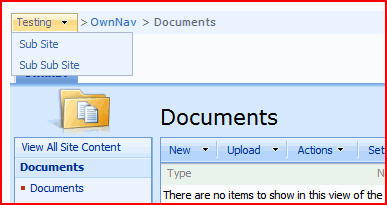
And if the Global navigation gets too long? Well, that seems quite possible. In that case, how about a setting on each site to ‘Display in Menu in the Breadcrumb’ to give something like this:

Concept of single breadcrumb using drop down menus

This way you can still have your ‘Main’ sites in the hierarchy, but all levels are still available. Of course, you might want to make it that all the subsites of last ‘Main’ site are always visible irrespective of that setting. I think that would work, and would require less getting used to.

It’s a bit like the Vista breadcrumb in Windows Explorer – but a bit different, which might count against it…

The breadcrumb in Windows Explorer in Vista

That said, I’m open to thoughts from others! Comment if you’ve got an idea of how breadcrumbs should work!

Are SharePoint Breadcrumbs completely wrong?

Styles in the Summary Links Web Part

So, I’d been asked to look at building a links menus something like this:

A Fake Menu with Big Buttons

I thought that this was quite nice. I wondered if I could make something similar to this using the Summary Links web part – curiously, it’s something I’ve never really used, and I though I remembered seeing that it could show images too. So, I set up some examples… Continue reading “Styles in the Summary Links Web Part”

Styles in the Summary Links Web Part

Self Referencing Lookup columns

Came across something I’d not considered – self referencing lookup columns! I was doing some testing, and this totally caught me out (and caused my Outlook plugin to crash and die).

Basically, this is a Lookup column where the List that it is looking up onto is the same as the list where the lookup column is in use. In our case we had a list called ‘Issues’, and the lookup was a multi-choice look-up called ‘Related Issues’. It would let a user select things from the Issues list. All in all, a perfectly sensible use of a multiple lookup, and one I’d not thought of!

However, this in itself wouldn’t cause my plug-in to suffer an error. The problem was with the data I was getting back from the Web Services I’m using. I use the List Webservice‘s GetListContentType method to get information about the Content Type, and I then read the information about the fields. Lookup fields normally come through with an attribute List ; this is the list that’s being looked up onto, and normally it is a GUID. However, for self-referencing lookup instead of a GUID, you get a string ‘Self’‘. Okay, I can’t argue that it’s wrong, but it’s a smidgen annoying that it is inconsistent. Couldn’t it just give me the GUID and let me figure out if that’s the same list? Or use another attribute to denote that it’s a self-reference?

I don’t get why this was built that way.

Self Referencing Lookup columns

Comparison of different ways of putting content into SharePoint 'Pages'

Previously I’ve looked at a couple of ways of entering your data into a Publishing Page. Well, it turns out that really there are 3 ways of putting content in:

  1. Writing content directly using the Content Editor control (the RichHTMLField control)
  2. Writing content in Word 2007 and using the Document Conversion service
  3. Writing content in Word 2007 and cutting and pasting(!)

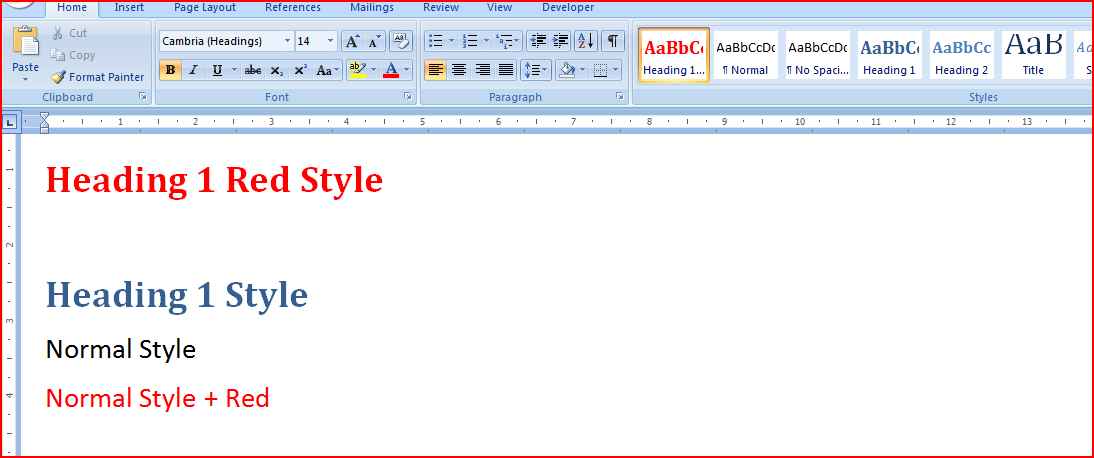
I decided to test and compare these techniques. For options 2. and 3. I used this document:

The Source Word 2007 Document

Let’s look at the results of this and the code that is behind each resulting page… Continue reading “Comparison of different ways of putting content into SharePoint 'Pages'”

Comparison of different ways of putting content into SharePoint 'Pages'

Why is Audit in SharePoint Workflows so hard?

Previously I’d pointed out an article about a problem with SharePoint workflows where the data gets ‘disconnected’ from the user interface after a number of days. Robert Bogue wrote a nice summary of it, explaining why it behaves this way and how to get around it. Anyway, I was catching up on my RSS feeds, and I came across a follow up post that I just had to respond to.

Read his post first; this is just my thoughts. Done? Good.

Robert Bogue makes some good points. I totally agree with him on the second point – Workflow History isn’t an Audit. However, this does sort of highlight the crux of the issue – that there is no Audit. One is mentioned in his previous post, but I’ve never managed to figure out what he meant by that, or to find a decent audit in Workflow that I didn’t have to build myself. And I just keep thinking that this is something that a plug-in tracking service ought to be able to provide…

I guess my ‘What were they thinking!’ isn’t that there is the auto-cleanup, but rather why didn’t Microsoft offer an audit mechanism out of the box. I asked Lawrence Liu about that once at a SUGUK meeting – he said that SharePoint Workflow “wasn’t intended to be an enterprise solution”. Fair enough, if that’s what they want to do (and to leave space for the likes of K2 and Skelta), but then stop advertising SharePoint as having user configurable workflows.

A number of our customers have gone through the logic of:

  1. SharePoint is an Enterprise level system
  2. It has workflow built into it
  3. Therefore we can use workflow to support our enterprise’s processes

They’re pretty disappointed to discover that it lacks pretty basic things like audit. I can’t say I blame them either. But I digress.

Regarding his first point about configuring the timeout – writing an application isn’t a good general option. I’ve no doubt it works, but SharePoint administrators are necessarily programmers. Even if they are, there’s no guarantee that they’re good SharePoint programmers. The setting in the manifest – that I like. Don’t depend on your users being able to code their own solutions. Further, I don’t know how this would apply to SharePoint Designer workflows, though personally I steer clear of them.

So yes, I’d agree with Robert – it’s not a ‘Huge Issue’, but it is a problem.

Why is Audit in SharePoint Workflows so hard?

List Items, Documents and Attached files

One of our customers is saving Outlook emails into SharePoint; I’ve written an Outlook plugin to do this. The emails themselves are being saved as .msg files within Document Libraries.

A Document Library containing .MSG files

However, they’d like a nice column with a little Paperclip icon if the Email has attachments. For normal Lists, there is a column like this (provided that the List allows attachments)… Continue reading “List Items, Documents and Attached files”

List Items, Documents and Attached files