Declaratively Point a Site Collection at a Search Center

Yesterday I wrote about the SmallSearchInputBox, how scopes only appear if you set a search center for the site collection, and how to set the Search Center in code.

Well, as is typically the way with CAML, I figured out how to do this declaratively later. Or, more specifically, I found that there is a feature I could call declaratively that would do what I want:

search-center-url-feature

<!-- SearchCenter Url feature -->
<Feature ID="7AC8CC56-D28E-41f5-AD04-D95109EB987A" >
<Properties xmlns="http://schemas.microsoft.com/sharepoint/">
<Property Key="SearchCenterUrl" Value="~SiteCollection/Search/" />
</Properties>
</Feature>

Yup, all I need to do is put that into my site definition…

Declaratively Point a Site Collection at a Search Center

Programmatically configure the Small Search Box to show scopes

Sharepoint’s ‘ordinary’ sites, such as Team Sites or Blank Sites, have a small search box (the SmallSearchInputBox) at the top which does not show search scopes, as we would be used to in a Collaboration Portal, for example…

search-blank-site-default

The reason for this is that they are not, by default, pointed at a particular Search Center – so they don’t have any idea what scopes to show. However, you can set this through the Site collection Search Settings…

search-site-collection-settings

And suddenly, your search scopes appear! Hurrah!

search-blank-site-now-with-scopespng

Now, what if we are creating a bunch of site collections? (Our current project could create quite a lot of site collections. And we need them created automatically, as required). Can we point them to a specific search center automatically? Continue reading “Programmatically configure the Small Search Box to show scopes”

Programmatically configure the Small Search Box to show scopes

Programmatically create and configure Mail Enabled lists

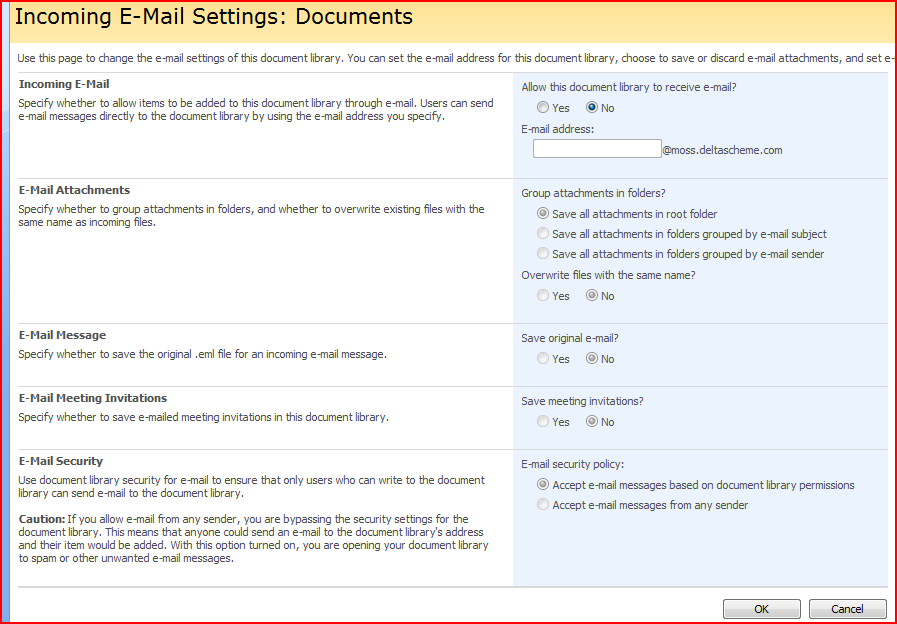
Being able to mail enable a sharepoint list is pretty cool; once enabled an email can receive email, save attachments, etc.. But what’s the address of the lists? How do you enable it? How are attachments stored, and how do we decide who to let email it?

emailsettings

Well, for a customer we wanted to email enable a list with an address based on the site’s title. This meant that the site would have to be created before we could enable the list. So, I stapled a feature to the site’s definition, and used a feature receiver to run my code. Continue reading “Programmatically create and configure Mail Enabled lists”

Programmatically create and configure Mail Enabled lists

Office 2003 and SharePoint

One of the main selling points of Office 2007 (to me, anyway) is it’s integration with SharePoint 2007. However, customers usually seem to still be using Office 2003, and this degrades the user experience. One of the main things that irritates is Check-out/check-in policy, and users just opening things in Read-only mode.

Well, again, Ton Stegeman has a solution. As one of my colleague’s comments ‘Smart man, that’.

Office 2003 and SharePoint

Mailing an Active Directory Group

This was something that I set up in our offices, and was trying to set up for a client – but it turned out that there were a few more components involved than I’d first realised.

We have an AD group of ‘All Staff’ which contains, um, all staff. We also have a ‘Company Announcements’ list, and we wanted to send any announcements added to that list to all our staff. As an administrator, I could add an alert for the ‘All Staff’ group ( on the list click List Settings > Alert Me and then enter the group we want to email)

The ‘All Staff group’ is a Mail enabled security group, with it’s own address – e.g. staff@example.com. The puzzle for me (not being an exchange or AD expert) was that in that case, what resolves the addresses? I’d thought that the group being mail enabled meant that you could resolve the email addresses of the users within the group – but what does that? Well, Exchange, as it happens, though I’m not sure how to configure that. The upshot of it is, though, that the AD group you want to mail needs to be mail enabled, and you may need to talk to your exchange guys too.

This is unfortunate, as in a lot of organizations making changes to AD can be a tortuous process. Still, if there is an appropriate group you can email then this is a quick win with things like Announcements lists.

Mailing an Active Directory Group

Roll up content by content-type

Pointed out to me by a colleague (ages ago!) – Ton Stegeman’s ‘Content by Type‘ web part. A good way of rolling up content of diverse types, without lots of XSL. If your content type structure is right, may well be other ways of doing this (the content query web part and data view may work) – but this is quite a nice looking tool, and simpler. Need to download and have a play sometime soon.

Roll up content by content-type

Highlighting tabs in the top navigation

We’ve got a customer who’s top navigation tabs aren’t being used as links to content in SharePoint. Instead, these tabs take users to other parts of their system, which is maybe fair enough given that the left navigation also gives them the same sort of access; indeed this duplication of navigation is often a source of consternation with clients.

Anyway, they’ve now added site that they do want linked from the top navigation bar. Therefore, if you click on this tab, they want it to appear highlighted – and it’s the only tab that would.

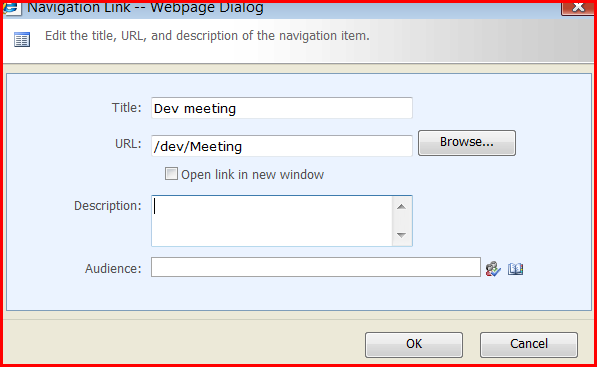
The site in question isn’t a subsite of the root site of the site collection, so I must confess, I didn’t think you could do this. They emailed and asked, though, and I suggested that the full URL that they were using (e.g. http://sharepoint/somesite/tabsite) wasn’t a good idea – as if they extend their web app for an extranet that link won’t work. As it transpired though, they’d thought to try a relative URL (e.g. /somesite/tabsite) and that worked nicely!

I had to check:

nav-link

showing:

highlighted-top-nav

There we go, a site 2 levels down, highlighted in the top nav correctly!

I suppose it makes sense that the relative URL might work – but I’d sort of assumed that the manual links wouldn’t undergo the same checks as the ‘show subsites’ links would.

Highlighting tabs in the top navigation

Custom Email Alert Templates for individual lists

Over time my inbox fills with notes of things I want to blog about – even if just as notes for myself in the future. This was one that I’d forgotten about – you can set an email alert template for an individual list! Really, it’s setting up the Alert Template (in a copy of AlertTemplates.xml), setting that that file can be used for alerts (via STSADM), and then setting that alert template to be used through the object model.

You also get to run a CAML query on the list, and access to the before and after values for items, when filtering what things to send emails about.

It’s all in this very good article.

Custom Email Alert Templates for individual lists

Programmatically disable page layouts

I’ve been meaning to write about this for a while – how to programmatically disable page layouts for a site in SharePoint, similar to how you’d do so with the ‘Page Layouts and Site Templates’ page in the site settings. You can also specify what page layouts are allowed, if you are defining your own Site Definition. But someday, maybe you’ll have to do it through code.

I’m pretty sure that I read something that set me going on this, but I’ve lost the link 😦 Continue reading “Programmatically disable page layouts”

Programmatically disable page layouts