Working with the TaxonomyClientService: Part 2 – Get the TermSet (and understand it!)

In Part 1 I looked at the structure of our Taxonomy field – which is in fact two fields. We also saw how the TaxonomyField definition has an array of properties related to it too. As a reminder, here’s a screenshot of the XML for it:
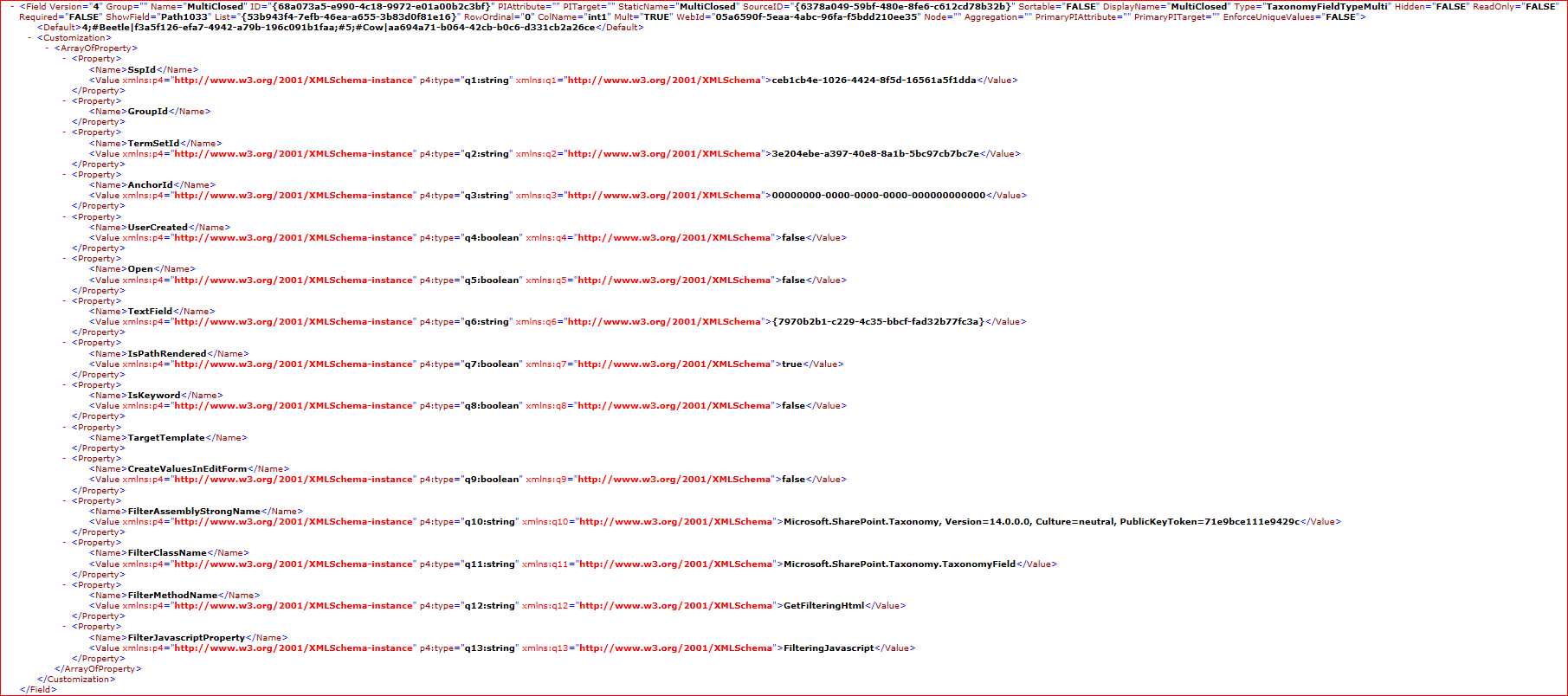
These properties are quite important, as they tell us what we need to know to get the correct TermSet for our field. Continue reading “Working with the TaxonomyClientService: Part 2 – Get the TermSet (and understand it!)”

Working with the TaxonomyClientService: Part 2 – Get the TermSet (and understand it!)

Working with the TaxonomyClientService: Part 1 – What fields are there?

I have been working on an integration that needs to read terms from SharePoint’s Managed Metadata service, for a particular field, and then populate that field with those values. All this has to be done via SharePoint’s web services – so the relevant ones here are the TaxonomyClientService, and Lists web service.

This has proved particularly bloody hard. Continue reading “Working with the TaxonomyClientService: Part 1 – What fields are there?”

Working with the TaxonomyClientService: Part 1 – What fields are there?

SafeControls Entries in Manifest can be changed during deployment

I had a slightly unusual situation. We’ve a customer who has using the Telerik RadEditor version 4.5.6 for SharePoint 2007. They’re upgrading to SharePoint 2010, and want their existing content to continue to work.

They’ve using the Telerik RadEditor web part quite a lot, so we had to keep that working. We’ve put in Assembly Binding Redirects using an SPWebConfigModification (more on that in a later post).

However, we also needed to put in the SafeControl entry for the old assembly. Continue reading “SafeControls Entries in Manifest can be changed during deployment”

SafeControls Entries in Manifest can be changed during deployment

Run SPDisposeCheck as part of your build process

As mentioned before, I’ve been automating the building and analysis of our SharePoint code, and this led me to ask, can you run SPDisposeCheck as part of a TFS build process?

Yes we can. Richard Fennell has a concise and simple description of how to do it. It’s best to read that, but in case that site goes down, the short of it is – use InvokeProcess to run SPDisposeCheck, and it’ll return a value that is the number of errors/warnings it finds. I find that that’s enough to choose whether to write a warning to the output of the build, and I don’t then parse and write the individual warnings into the build. These should be captured by the build log, and they’re pretty obvious, so it doesn’t seem worth the hassle. You could do it if you really wanted to.

Don’t forget you can use attributes to prevent false positives – though I still have issues with anonymous delegates that are false positives (how do you add the attributes?), and that’s what’s causing the two warnings above.

Run SPDisposeCheck as part of your build process

Error: 'b' is null or not an object

This error has caused me so much pain when trying to use SharePoint’s JavaScript client-side object model (CSOM), so, in case I have it again:

  1. Check that the function exists.
  2. Check that the function is named correctly.
  3. Make sure that you’re not using “this” in the call to createDelegate, as detailed here.
    • Right: Function.createDelegate(this, onSuccessMethod)
    • Wrong: Function.createDelegate(this, this.onSuccessMethod)

    I don’t know why this difference should cause this error, but I’ve proved it true.

If you know of other causes of this error, let me know, I’ll add it to the list. I love the experience of debugging JavaScript…

Error: 'b' is null or not an object

WSPBuilder 2010 and TFS2010

With SharePoint 2007, WSPBuilder became our standard packaging tool for SharePoint solutions. It was simple, powerful, and a damn site easier than trying to write your own manifest.

Well, SharePoint 2010 and Visual Studio 2010 followed later, and Microsoft introduced much better tooling of their own. However, we’ve still got a lot of code being packaged by WSPBuilder, and we didn’t want to have to refactor all those projects just to package them for 2010.

Fortunately, Carsten Keutmann wrote a 2010 version (still in ‘BETA’, but it works fine). It offers many of the same extensions to Visual Studio as the previous version did.

However, I recently had to automate (in Team Foundation Server 2010) the build of one of our WSPBuilder based solutions, and that’s where things got more interesting… Continue reading “WSPBuilder 2010 and TFS2010”

WSPBuilder 2010 and TFS2010

My Logging Diagnostics Service for SharePoint 2010

With SharePoint 2010, Microsoft gave us a better framework for logging that SharePoint 2007, which relied on writing most of your own. Sadly, though, the SPDiagnosticsServiceBase does lack in a couple of areas. Consequently, I’ve ended up writing my own Diagnostics service to try and address those issues. I am far from the only one (See the references below), but I’d like to present what I’ve written, not least ‘cos I’ve been meaning to blog about it for about 8 months.

First, though, let’s look at the limitations of the SPDiagnosticsServiceBase. Continue reading “My Logging Diagnostics Service for SharePoint 2010”

My Logging Diagnostics Service for SharePoint 2010

Set the Title of a ListViewWebPart

Something that has bothered me repeatedly in the past is that ListViewWebParts didn’t seem to allow their titles to be set via CAML. The View element for a site (i.e. in the ONET.xml file) doesn’t have a title element, and the ‘Name’ and ‘DisplayName’ elements don’t set the web part’s title. Instead, the ListViewWebPart always seemed to pick up the name of the list it referred to. This was a problem if you had a page that showed two ListViewWebParts refering to the same list. E.g.:

<View List="Lists/Tasks" BaseViewID="7" WebPartZoneID="Left" WebPartOrder="5" />
<View List="Lists/Tasks" BaseViewID="9" WebPartZoneID="Left" WebPartOrder="6" />

would result in:

How can we set those titles to be different? Continue reading “Set the Title of a ListViewWebPart”

Set the Title of a ListViewWebPart

The X-SharePointHealthScore header

A reminder to myself – there is a response header for SharePoint requests called the X-SharePointHealthScore. It indicates how stressed the server is with a score from zero (unstressed) to 10 (highly stressed). I first stumbled across it when debugging something in Fiddler, but others have written about it:

  • Andrew Connell has a brief write up
  • Mick Breeze dug into it with Reflector
  • Michel Barneveld seems to have found it the same way as I did – but looks at how it is calculated. He also describes how to force SharePoint to return a given value, in case you need to test something (like how your client code handles a stressed server)

So how do we test the loadbalancer if we set it up in this fashion? Do we need to DDoS a WFE? There is a better way 😉 There is a registry setting that will override the Health Score and it will return the value from the registry.

Create a DWORD with the name ServerHealthScore in the following location: HKLMSOFTWAREMicrosoftShared ToolsWeb Server Extensions14.0WSS and give it the value you want.

So what’s it useful for? Well, the main things that strike me would be:

  • Server Monitoring – Pretty obvious, really.
  • Client Applications – Can warn or take corrective actions if the server is loaded and may implement throttling.
  • Client Side scripts – Similar to above, though I haven’t yet been able to figure out who you’d get this value in the Client Object Model. I’m assuming there is a way to get the response headers in the Client Object Model – otherwise you may have to use normal XMLHttpRequests if you want to see the response headers.
The X-SharePointHealthScore header