Kusto to break down structured messages

We have our Sitecore instance writing it’s logs into Trace messages in App Insights. There is some filtering, but basically, the message written to the log file is put in the Message field of the Trace entries. So, an entry in the publishing log file would look like:

21192 14:23:07 INFO  ##Publish Item: Name=Home, Uri=sitecore://master/{110D559F-DEA5-42EA-9C1C-8A5DF7E70EF9}?lang=en&ver=1, Operation=Skipped, ChildAction=Allow, Explanation=The source and target items have the same revision number.

And in App Insights, it looks like:

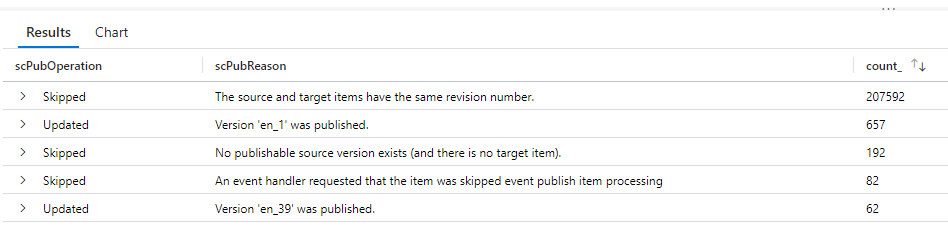
The problem was, I wanted to summarize details about these publishes, but the details are all part of one big string. Specifically, I wanted to see the count of the operation, and the reason for that operation. I was expecting to have to do some big regex to figure it out.

Boy, was I wrong. I give you the Kusto Parse() function.

traces 
| where message startswith "##Publish Item: "
| parse message with "##Publish Item: Name=" scName ", Uri=sitecore://master/" scID "?lang=en&ver=" scVersion ", Operation=" scPubOperation ", ChildAction=" scChildAction ", Explanation=" scPubReason
| summarize count() by scPubOperation, scPubReason

The parse function extracts the bits of the string I want into variables, and I can then use them to generate my summary.
Kusto to break down structured messages

Making Application Insights record 404s as successful

We’re using AppInsights with our Sitecore10 system, and one frustration we have is that our “Failures” report contains thousands of entries for 404 responses. Unfortunately, these days, just having a site means you’re going to get a tonne of requests for “potentially vulnerable paths” – such as the WordPress login, Drupal Login, PHP Info pages, etc.. None of these paths are ever going to be in our site, and conceptually, is it really an error if we respond to someone who is spamming our site with requests that a particular page doesn’t exist? It’s just making it harder to see the genuine issues we actually care about.

To that end, I wanted to set some of the 4xx responses from our site to be “Successful” in AppInsights. I came up with this TelemetryInitializer…

Continue reading “Making Application Insights record 404s as successful”
Making Application Insights record 404s as successful

Enriching AppInsights Telemetry with additional information

We are running Sitecore 10 in containers, and we have multiple environments. We’ve also got multiple server roles. We’d like our telemetry to App Insights to tell us a) what instance is this for, and b) what role is this for.

We can achieve this with a TelemetryInitializer…

Continue reading “Enriching AppInsights Telemetry with additional information”
Enriching AppInsights Telemetry with additional information

Appending Sitecore Logs into Application Insights

Sitecore uses log4net, which makes it relatively easy to set up new destinations for logs, etc.. One request we’d had was to log messages in the Sitecore logs into Application Insights.

I approached this by writing a custom appender, which would take our messages and write them to App Insights as Trace messages. This is what I came up with:

Continue reading “Appending Sitecore Logs into Application Insights”
Appending Sitecore Logs into Application Insights

Splitting “Sitecore/Index” requests into their actual pages

Application Insights records requests for all content pages in Sitecore as being for “Sitecore/Index”. That’s because this is the controller route under which those pages are processed – but it’s not that helpful if you want to see things like the performance of individual pages. Well, there is an answer, as detailed by Per Osbeck – Application Insights: GETing a fix for Sitecore/Index | by Per Osbeck | Medium .

The short form of this is he used a TelemetryProcessor to update the item.Context.Operation.Name and request.Name to the absoluteUrl being processed.

Continue reading “Splitting “Sitecore/Index” requests into their actual pages”
Splitting “Sitecore/Index” requests into their actual pages

Setting Application Insights connection string for Client JavaScript

So, if you’re using Application Insights, you may choose to use the client-side JavaScript API. This is a snippet that will allow you to use Application Insights in JavaScript – and conventiently it records lots useful error, dependency and trace data, allow with PageView data. It’s pretty nifty, and also supports filters and telemetry enrichment.

In that snippet, you’ll find lots of mention of a configuration setting “instrumentation key”. This is the ID of the app insights instance that your data will be sent to.

The thing is, it has been deprecated in favour of “connection string”. This is the same connection string as you use server-side (as described previously), and can be read from:

string aiConnection = TelemetryConfiguration.Active?.ConnectionString;

You should do this and render the connection string rather than hard-code it into your layout page.

Setting Application Insights connection string for Client JavaScript

Setting your Application Insights Connection String

If you’re adding Application Insights to your solution, you will need to specify a connection string. Usually, this is at the bottom of your applicationinsights.config file:

A nifty alternative is you can specify this connection as an Environment Variable – and App Insights will pick that up and use it…

Continue reading “Setting your Application Insights Connection String”
Setting your Application Insights Connection String

Filtering App Insights Server-side Trace messages

Previously I posted about using a Log4Net Appender to record Sitecore logs to Application Insights. That code will write Trace Messages to App Insights. I’m already filtering the messages to WARN or above using standard Log4Net <filter>s – but what if I need to filter more particular messages. Well, I wrote a telemetry processor to do this, just like Requests and Dependencies.

Continue reading “Filtering App Insights Server-side Trace messages”
Filtering App Insights Server-side Trace messages