The Importance of knowing Regular Expressions

It’s something that always mystifies me, it does seem that a lot of developers don’t know regular expression syntax very well. This came up when I was on some SharePoint 2013 training just before Christmas.

SharePoint 2013 introduces something called “Routing Rules”. These are rules that allow you to direct traffic to different front-end servers (or pools of servers), allowing you to isolate traffic, route to better health servers, etc.. Spence Harbar has a very good article about it.

Anyway, one some of the criteria that you can match rules on are Regular Expressions. However, SharePoint does warn you that Regex routing rules are slower – this is unsurprising. But how much slower than, say, a ‘Starts with’ or ‘Ends with’ rule? And on the Ignite training I did wonder about the efficiency of their example… Continue reading “The Importance of knowing Regular Expressions”
The Importance of knowing Regular Expressions

Annoying Exporting a list to Excel

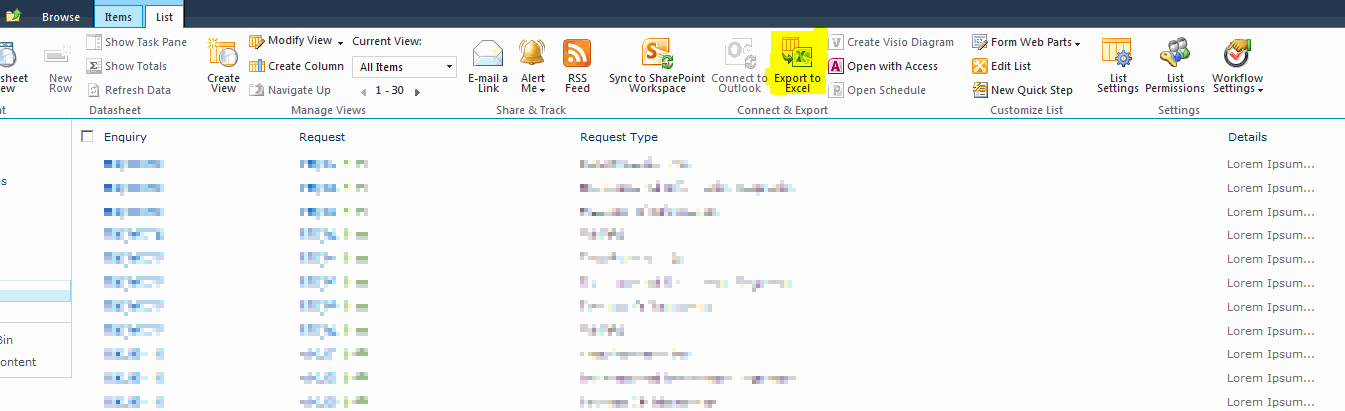
SharePoint lists have the ability to export their contents to an Excel Workbook.

This is quite cute – it gives the users a way to get the data out into something they’re familiar with, can manipulate and can print. However, I was having an issue. Using a list based on a Custom List (above), one of my columns (Enquiry) wasn’t exported:

I wondered at first if this was because of it’s column type (Hyperlink), or because I’d created the column programmatically. Then, on a hunch really, I tried changing the column order. I added another column before it in the list view. I used the ID column, but any should work. When I exported the list – all the columns I wanted came through (but the ID column didn’t).

What I think is going on here is that if you used the same export on a document library then typically – though not always – the first column is an icon for the type of file it is. My suspicion is that some muppet, when writing the export to excel, realised that they’d have these icons, and decided to avoid them by excluding the first column. This is unfortunate for two reasons:

  • Not all lists have icons – witness my Custom List
  • Not all document libraries have the file icon as the first column.

For now the resolution would be to have another column as the first on your list.

Annoying Exporting a list to Excel

BeforeProperties and AfterProperties

I am sick of having to hunt down the link to Synergy’s post on the BeforeProperties and AfterProperties available in different events on SPListItems. For my reference, here it is:

List:

List BeforeProperties AfterProperties properties.ListItem
ItemAdding No value New value Null
ItemAdded No value New value New value
ItemUpdating No value Changed value Original value
ItemUpdated No value Changed value Changed value
ItemDeleting No value No value Original value
ItemDeleted No value No value Null

Document Library:

Library BeforeProperties AfterProperties properties.ListItem
ItemAdding No value No value Null
ItemAdded No value No value New value
ItemUpdating Original value Changed value Original value
ItemUpdated Original value Changed value Changed value
ItemDeleting No value No value Original value
ItemDeleted No value No value Null

Note: Allegedly, this does change if the event receiver is synchronous – the before properties are available. I’ve not checked this out yet.

Obviously, for SharePoint 2007 systems that doesn’t apply – as ‘*ed’ event receivers are always asynchronous.

BeforeProperties and AfterProperties

ContentIterator – Curious Behaviour, and Infinite looping

I like the ContentIterator control – it’s a nice way of being able to process a lot of items in SharePoint. However, sometimes it’s behaviour is … strange.

I had been using it to loop over some (but not all) the items in a list. Some changes meant that I was now going to loop over all the items. I had a list with 500 items that I was testing with. My code was:

ContentIterator ci = new ContentIterator("example");
SPQuery qry = new SPQuery();
qry.Query = ContentIterator.ItemEnumerationOrderByNVPField;
ci.ProcessListItems(list,qry, ProcessItem, ProcessItemError);

This would process the first 200 items, over and over. It never reached an end. Hmm. Continue reading “ContentIterator – Curious Behaviour, and Infinite looping”

ContentIterator – Curious Behaviour, and Infinite looping

Delete Event Receiver from a Content Type with Code

SharePoint allows you to attach event receivers to content types. That’s pretty handy. Unfortunately, deleting event receivers from those content types is much more hard. Perhaps this is why the Document ID feature fails to remove the content types that it adds. However, here is one possible approach.

SPContentType ctype = site.RootWeb.ContentTypes[SPBuiltInContentTypeId.Document];
if (ctype != null)
{
 if (ctype.EventReceivers != null)
 {
   bool bContinueDelete = true;
   while (bContinueDelete)
   {
     if (ctype.EventReceivers.Count < 1)
     {
       bContinueDelete = false;
     }
     else
     {
     bool bFoundOne = false;
     foreach (SPEventReceiverDefinition d in ctype.EventReceivers)
     {
         //Could match on the Type of the event receiver, but for this example, let's use name
         if (d.Name.Contains("Document ID"))
         {
           d.Delete();
           ctype.Update(true, false);
           bFoundOne = true;
           break;
         }
     }
     if (!bFoundOne)
     {
       bContinueDelete = false;
     }
   }
 }
}

More on why this is important in a later post.

Delete Event Receiver from a Content Type with Code

Slow Site Creation in SharePoint 2010

I have a development machine that I was creating a number of sites within. I wanted to create about 10,000 sites or so (and have done more than that in testing before without a problem). When I started the process that was creating these running on my machine it was taking about 20 seconds per site. After a mere 2000 sites, it was then talking 30 minutes per site. Something isn’t right.

I did a bit of digging and found that others have had the same problem – but no solution.

I then spoke to one of our administrators, and he suggest clearing out the ‘event cache’ table. I’d never heard of that (and I’ve no idea how he found out about it), but his advice was:

Minimise the amount of rows in the EventCache SQL table:

  • set ChangeLogRetentionPeriod to 1 day (1.00:00:00) on web application
  • set EventLogRetentionPeriod to 1 day (1.00:00:00) on web application
  • set ‘Change Log’ timer job to run daily (default is weekly)

Okay, so I did this using STSADM:

stsadm -o setproperty -pn change-log-retention-period -pv 1
stsadm -o setproperty -pn event-log-retention-period -pv 1

…and I then changed the Change Log timer job’ schedule in central admin, and set it running right away.

The timer job took about 8 minutes to run. That was a surprisingly long time.

When I then tried creating a site, it took 7 minutes. Clearly, this is still an unwell system, but that’s a lot better than 30 minutes. I’ll update if I find more.

Slow Site Creation in SharePoint 2010

Strange issue with Application Page and Two Button Presses

Okay, this one was weird. The symptom is this – I had a custom Application page that was being used as the New and Edit forms for a particular custom list in my solution. One of the customisations was that it had an ‘Address Search’ button that, when you pressed, searched for an address based on the first line of the address, or the postcode.

That’s fine, but here’s where things got weird.

  • If you were using the form as a New form, then search worked just fine the first time you clicked it.
  • If you were using the form as an Edit form, the the search button didn’t work the first time you use it – but did the second time you clicked on it.

Bizarre, and I had to fix it… Continue reading “Strange issue with Application Page and Two Button Presses”

Strange issue with Application Page and Two Button Presses

Programmatically evaluate SPWebApplication Policies

An interesting question came up on StackOverflow – how do you get the web application level policies for a Web app? In other words, the rights that you can grant to an entire web application (via central administration) – how do you get those in code?

Continue reading “Programmatically evaluate SPWebApplication Policies”

Programmatically evaluate SPWebApplication Policies