Visual Studio always upgrade my solution

I’m upgrading a Visual Studio 2010 solution to a Visual Studio 2012 one. It’s part of a migration of a solution from SharePoint 2010 to 2013 (and there are good details about this here). Annoyingly, though, every time I open the project it says that it has ben upgraded and shows an Upgrade Report. Nothing appears to be modified, but still, it’s shown.

Google didn’t show a lot of help on this, but in the end I decided to simply open the .csproj file and look for some sort of flag about being upgraded. I found the element:

<FileUpgradeFlags>0</FileUpgradeFlags>

so I tried deleting the ‘0’ and reloading the project – and it didn’t show an Upgrade Report. Hurrah. Not sure why I needed to so this, though.

Visual Studio always upgrade my solution

Issues with getting the SP.ClientContext in SharePoint 2013

So, I’m migrating a solution from SP2010 to 2013. In the JavaScript for part of the solution, I use the JavaScript client-side object model (JSOM). This involves getting the current ClientContext for the site:

var clientContext = new SP.ClientContext.get_current();

Unfortunately, ClientContext was null, so I kept getting Null Reference exceptions.

“Weird”, I thought, “This worked in 2010”. Now, my solution has a very similar piece of code elsewhere in it, so I went and tested it – and it worked. Even weirder.

Next up, I tried using a SP.SOD.executeOrDelayUntilScriptLoaded() call around the code where I got the ClientContext. Surely it was just a matter of waiting for the JavaScript file ‘sp.js’ to load? Well, it never loaded. With these two lines…

SP.SOD.executeOrDelayUntilScriptLoaded(function () { alert('SP.Runtme.js Loaded'); }, 'SP.Runtime.js');
SP.SOD.executeOrDelayUntilScriptLoaded(function () { alert('SP.js Loaded'); }, 'SP.js');

…no alerts were shown. On the page that works, they both get shown nearly instantly.

Okay, so it’s not my code then, it’s that the JSOM isn’t initializing, but only on one particular page. That sucks. What can I do to initialise it? Well, I found this post describing the same problem, but for publishing pages. Mine isn’t – it’s an application page – but I suspected it might be the same issue. And I checked MSDN which describes initialising sp.js.

I added this line:

SP.SOD.executeFunc('sp.js', 'SP.ClientContext', function () { });

And my code began working again on this page. So it seems that for some pages in SharePoint 2013 the Client Object Model isn’t necessarily initialized.

Issues with getting the SP.ClientContext in SharePoint 2013

Tabular Search Results with Column Filters

The customer I was with last week, like many others, wanted their search results to appear in a table form – like a List View, in fact.

List View Search Results

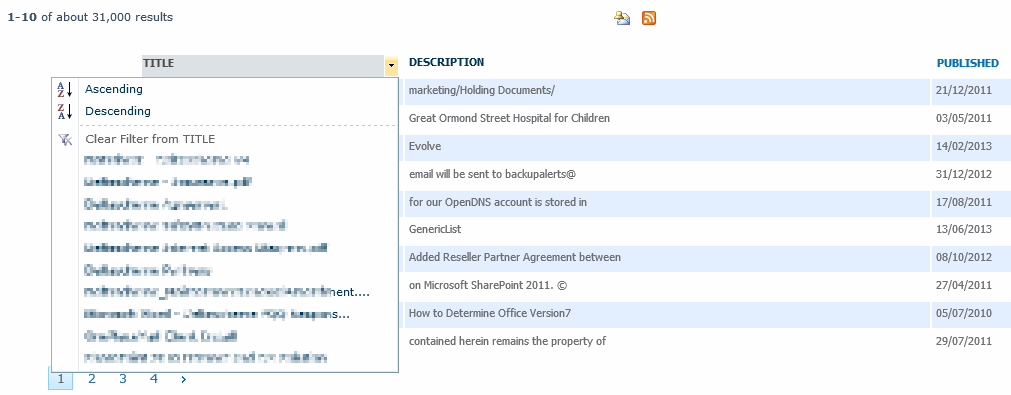
Now, I’ve written the XSL to do this for various solutions over the years, but they had found a CodePlex project for this – SharePoint 2010 Search Results in Tabular Format. This project has a feature I’d not managed to write, or had seen working before – column titles that were sortable and filterable:

Sorting and Filtering on Columns

That’s pretty neat. And it’s all XSL. You can, if you edit the XSL and the Columns you get back from search, show, sort, and filter other columns of data.

One observation I would make is that this XSL does not format Hit Highlighting – that is, matches aren’t shown as strong, and the summary doesn’t contain any ellipsises [ … ] characters. However, you could easily add these from the ‘standard’ XSL to get hit highlighting working again.

Tabular Search Results with Column Filters

WSP Not Deployed to a SharePoint App Server

As much as anything, this is a reminder for me. We had a customer who were trying to run a PowerShell script that, ultimately, relied on an assembly that was contained in a WSP we’d written. The script wouldn’t work, however, and it transpired that the WSP had not been deployed to the server that they were running the script on. Continue reading “WSP Not Deployed to a SharePoint App Server”

WSP Not Deployed to a SharePoint App Server

Content Type Hubs and the Blank Site Template – Fixing them

So, I’ve somehow managed to get through most of the SP2010 cycle without having to use the Enterprise Content Type hub – until last week. This was my opportunity to stumble across one of the gotchas of the ECT hub – it doesn’t work with blank sites. We had a number of site collections based on the Blank site template, and content types would not replicated to it. Other site collections based on other templates – such as Team sites – worked fine.

Interesting. And this tickled a neuron. Continue reading “Content Type Hubs and the Blank Site Template – Fixing them”

Content Type Hubs and the Blank Site Template – Fixing them

Deleting the Search Service Application hangs

So, related to my previous post, we had problems initially deleting the Search Service Application. The Search Content Application’s Database had become ‘Suspect’. I’ve had this happen a few times before (I’m not sure why – I ain’t a DB Admin) and I have a little script that I run that seems to fix this, mostly.

EXEC sp_resetstatus 'PROBLEM_DB_NAME'
GO
ALTER DATABASE PROBLEM_DB_NAME SET EMERGENCY
DBCC checkdb('PROBLEM_DB_NAME')
ALTER DATABASE PROBLEM_DB_NAME SET SINGLE_USER WITH ROLLBACK IMMEDIATE
DBCC CheckDB ('PROBLEM_DB_NAME', REPAIR_ALLOW_DATA_LOSS)
ALTER DATABASE PROBLEM_DB_NAME SET MULTI_USER
GO

No, I’m not entirely sure of the logic of how it works, and I’m pretty sure I can here DB Admins across the world screaming, but for my dev systems that I can afford to trash, it seems adequate.

Anyway, on this occasion it didn’t work, so I decided to simply delete the Search Service Application. I tried this through the UI – but it just seemed to hang. I tried again – and it seemed to hang. It wasn’t going away. I tried PowerShell – which took me a while as I’m still a fan of STSADM – and that didn’t work.

In the end I found the solution – on Donal Conlon’s blog – use STSADM -o deleteconfigurationobject

Yes, there’s a certain irony in that.

Deleting the Search Service Application hangs

Setting the Title field for Content Types

This is one I’ve been meaning to blog about for a while. I was using a Content Type where I was trying to set the display name of ‘Title’ field. I was happy to have a Title column, but I wanted it to have a different name.

I tried doing this declaratively:

<FieldRef ID="{fa564e0f-0c70-4ab9-b863-0177e6ddd247}" Name="Title" DisplayName="Request" Required="FALSE" />

However, I found this didn’t work in SP2010 – the field still appeared as ‘Title’. This was frustrating.

Instead, I had to set the Title’s display name in code:

foreach (SPFieldLink fldLnk in contentType.FieldLinks)
{
if (fldLnk.Id == SPBuiltInFieldId.Title)
{
fldLnk.DisplayName = "Request";
}
}
contentType.Update(false);

This was a bit strange – other fields can have a DisplayName set in CAML quite happily. This seems to just be a feature of the Title column.

EDIT: I also had to use a similar approach on setting the Title column for a content type used on a list – but using:

private void SetTitleField(SPWeb web, string listname, string contentTypeName, string newTitleName)
{
SPList list = web.Lists[listname];
SPContentType ct = list.ContentTypes[contentTypeName];

foreach (SPFieldLink fldLnk in ct.FieldLinks)
{
//Necessary to set title field - when using content types, this seems to set it to "Title" irrespective of what is set in the Content type or list's XML.
if (fldLnk.Id == SPBuiltInFieldId.Title)
{
	fldLnk.DisplayName = newTitleName;
	ct.Update(false);
	break;
}
}
foreach (SPField fld in list.Fields)
{
if (fld.Id == SPBuiltInFieldId.Title)
{
	fld.Title = newTitleName;
	fld.Update();
	break;
}
}
}
Setting the Title field for Content Types

Refinements panel and Custom Search Box web parts

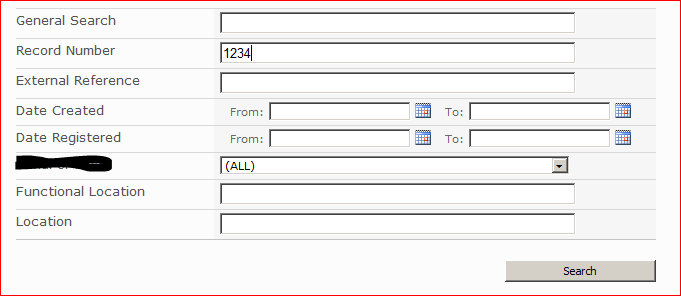
So I’m doing some work for a customer where they want a custom Search Box web part. Essentially, they want to be able to search by particular managed properties, which is a pretty common scenario:

CaptureNaturally, I added this to my search results page, and removed the existing Search Box web part.

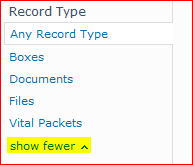
During test, the customer noticed that the ‘Show More’ links on the refinement panel had stopped working:

Capture2Interesting – although showing some different metadata properties, this was all pretty standard stuff. A bit of a check on Google found this interesting post by Chris Coulson. The short if it is that the Refinements panel uses JavaScript that is loaded by the Search Box web part – so you have to have a Search Box web part on the results page, even if it is hidden. Add that and the Refinement panel works again.

You can hide the web part via the web part properties > Layout > Hidden.

Refinements panel and Custom Search Box web parts