SharePoint 2010 Certifications

A bit of a glory post, but I’m now SharePoint 2010 Certified:


Regarding the certifications, I was, to be honest, a little disappointed. I felt that the 2010 exams were actually easier than the 2007 ones. I suspect that this is due to the significant expansion of ways of developing with SharePoint 2010; the exams did feel like they were ‘shallow but wide’ rather than ‘focused but deep’. Certainly it seems like a big jump from this to Certified Master.

I do like the new two tier certification structure (Technical Specialist, then Professional developer), and the streaming into Admin/configuration and Development makes sense too. I just wonder if there needs to be further breakdown in these aspects, perhaps so a greater depth of knowledge can be tested.

Still, I’m offically not a total muppet.

SharePoint 2010 Certifications

Icons for SharePoint 2010's ribbon

Came across something interesting today – I went looking for an icon in SharePoint 2010’s ribbon, and came to a file called formatmap32x32.png. Interestingly, it contains:

So, it actually holds lots of icons, but the image is cropped using CSS at display time to only show one of those icons. Nice to be able to see a bunch of the icons in one place easily.

(Though not all buttons come from this file – other icons are ‘stand alone’)

Icons for SharePoint 2010's ribbon

New Ribbon Tab Groups and their Templates

I had a curious problem today. I was registering Custom Actions to create a TabGroup with a single Button control on SharePoint’s ribbon:

I did this following Chris O’Brien’s post about “Adding ribbon items to existing tabs/groups“. It worked well, except that as we’re not registering the custom action against a particular list type (e.g. “101”), this button will appear on any list using the tab specified in the CommandUIDefinition‘s Location. Continue reading “New Ribbon Tab Groups and their Templates”

New Ribbon Tab Groups and their Templates

Programmatically making a Field Required in SharePoint 2007

One of my colleagues asked an interesting question – programmatically, he’d just added a Site Column to a list, and now he wanted to make that column required on that list. The SPField class had a Required property, and on MSDN this is described as

Gets or sets a Boolean value that determines whether users must enter a value for the field on New and Edit forms.

However, this wasn’t what seemed to happen – although he’d set this to true and update the field, it didn’t make the field required.

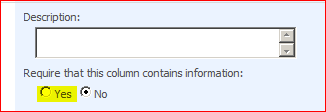
He came and asked me why – and I didn’t really know. We knew that the radio button on the column settings did what we wanted …

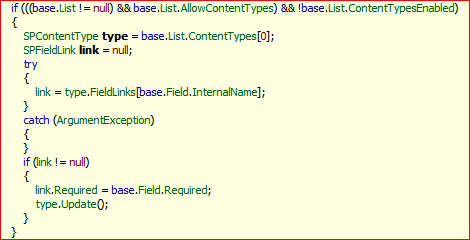
… so we cracked open reflector to take a look. And this is what we found:

Yup, that’s right – if the field is on a list, the list uses content types, and “Advanced Management of Content Types” isn’t set, then the code gets the first (i.e. Default) content type, and sets the SPFieldLink that relates to that field to be required. Finally, it saves changes to the content type.

So, on a list that doesn’t use content types, to make a field required, you have to update the content type. Interesting…

Programmatically making a Field Required in SharePoint 2007

Getting levels of the SharePoint Heirarchy and their Exceptions

Something that I have to do time and again is get some element of SharePoint’s heirarchy, such as a site collection, site, list or item. This is pretty typical – that’s why we all use USING to ensure proper disposal of SPSites and SPWebs, right? But what happens if the thing you’re after isn’t there? What exception get’s thrown? Well, this should be pretty clear:

try
{
    //FileNotFoundException if doesn't exist
    using (SPSite site = new SPSite(siteGuid))
    {
        //FileNotFoundException if doesn't exist
        using (SPWeb web = site.OpenWeb(webGuid))
        {
            //SPException if doesn't exist
            SPList list = web.Lists[listGuid];

            //ArgumentException if doesn't exist
            SPListItem item = list.GetItemByUniqueId(itemGuid);
        }
    }
}
catch (System.IO.FileNotFoundException fileEx2)
{
    // Site or Site Collection Not Found
}
catch (SPException spEx2)
{
    // List not found
}
catch (ArgumentException argEx2)
{
    // Item not found
}

Hopefully that might prove useful to someone – and a good reminder for me.

Getting levels of the SharePoint Heirarchy and their Exceptions

Hide Column type from Lists

So, you’ve created a new custom Field (or column) type, but you don’t want it to be available to add directly to Lists and Libraries – that is, you want to force users to create columns as Site Columns, and add those to the list. Conversely, maybe you want to prevent a column being created as a Site column, and only available to add directly to lists (though I can’t thinik why).

Well, it turns out that that is possible. In the CAML defining your field in fldtypes_???.xml, you can have something like the following:

<FieldTypes>
    <FieldType>
        <Field Name="TypeName">MyCustomField</Field>
        <Field Name="ParentType">MultiChoice</Field>
        <Field Name="TypeDisplayName">My Custom Field</Field>
        <Field Name="ShowOnColumnTemplateCreate">TRUE</Field>
        <Field Name="ShowOnListCreate">FALSE</Field>
        <Field Name="ShowOnDocumentLibraryCreate">FALSE</Field>
        <Field Name="ShowOnSurveyCreate">FALSE</Field>
        <Field Name="Sortable">FALSE</Field>
        <Field Name="Filterable">TRUE</Field>
        <Field Name="ShowInEditForm">FALSE</Field>
        <Field Name="UserCreatable">TRUE</Field>

ShowOnColumnTemplateCreate controls visibility as a Site Column type. The other ‘Show On X’ values control visibility as a List Column Type for different types of List. You could, therefore, have a Column Type that can only be used on, say, Document Libraries. Hope that helps.

Hide Column type from Lists

Get the URL of a list

This is a seemingly simple task – given a List or Library in SharePoint, how do I get it’s URL? The difficulty here is that a List has multiple URLs – one for each View on the list. We can get those URLs, but sometimes you really just want the URL to the list, without the /forms/something.aspx bit too.

For example, you might want http://server/siteCollection/site/lists/somelist . If you entered this URL, you’d be taken to the default View for the list, so you don’t really need the extra /forms/… bit to identify the list – that’s all about identifying the view.

Sadly, though, there is no SPList.Url property or equivalent on the SPList object. So, how can I get a list’s URL? Continue reading “Get the URL of a list”

Get the URL of a list

Events on Adding/Deleting Fields from Content types

One of the things that’s driven me nuts in SharePoint 2007 is that there are no events to capture when a Field is added to a Content Type. There is an OnAdded event – which sometimes gets used to save Custom Properties of the field (though I prefer Gunnar Peipman’s approach)

Well, no more! In SharePoint 2010, there are now OnAddingToContentType() and OnDeletingFromContentType() methods. We can override this in our custom fields, and this lets us do lots of useful things – like register event handlers, add workflows, or set properties on the content type, which are things that I’ve wanted to do a few times now. So, good news!

Events on Adding/Deleting Fields from Content types

Rendering List Fields from other sites

I had a requirement recently to display the fields of a SharePoint item in another SharePoint site. Now, you can do this with things like the Content Query Web Part, or Data View Web Part, but I was doing a few other things, and specifically, I needed to pull the fields to display from a particular View on the list.

This turned out to be quite an interesting problem. All fields use a subclass of BaseFieldControl, and this is what renders the field – so it appeared to be fairly straight forward. As always, though, there was a little kink to it – you need an SPContext for the site the item comes from, and you need to use this as the contexts for the SPField‘s rendering control:

SPContext ctx = SPContext.GetContext(HttpContext.Current, item.ID, relatedList.ID, relatedWeb);

SPView relatedView = list.DefaultView;

foreach (string vf in relatedView.ViewFields)
{
    SPField fld = relatedList.Fields.GetFieldByInternalName(vf);

    HtmlGenericControl titleLabel = new HtmlGenericControl("H3");
    titleLabel.InnerText = fld.Title;
    this.Controls.Add( titleLabel );

    BaseFieldControl ctl = fld.FieldRenderingControl;
    ctl.ControlMode = SPControlMode.Display;
    ctl.ListId = relatedList.ID;
    ctl.ItemId = item.ID;
    ctl.RenderContext = ctx;
    ctl.ItemContext = ctx;
    ctl.FieldName = fld.Title;
    ctl.ID = Guid.NewGuid().ToString();

    this.Controls.Add( ctl );
}

Groovy!

Rendering List Fields from other sites

Silverlight in SharePoint 'Hello World' demo

I’ve not used Silverlight, and I though it might be interesting to try the Silverlight Web Part from SharePoint 2010, so I came up with a little ‘hello world’ project. Using Silverlight, I wanted to:

  • Query a SharePoint List for data
  • Display that data

Not exactly complicated stuff, but I figured it would be a start. I decided to query a Picture Library, and display the pictures in my web part, changing the displayed image every few seconds. All of this is very achievable with JavaScript or jQuery and the Content Query Web Part (as some sort of variant on the CQTWP I built), so I thought this would be a good comparison. Continue reading “Silverlight in SharePoint 'Hello World' demo”

Silverlight in SharePoint 'Hello World' demo