Kusto is great, but one problem is that, if you’re summarizing and creating a time chart, and some of those time bins don’t have any results, then rather than your graph’s line going to zero, it skips those times. This results in a weird graph. Consider this:
This graph never goes to zero – because the groups don’t exist if their value is zero. It can also lead to weird lines that “skip” to the next value. Eg. the peak at 0000h on Apr 4 – it’s joined to a point at about 0145h. The intermediate points are skipped.
We’re looking to introduce whitelisting of Query String parameters on one of our customer’s sites. But that begs the question – what query strings parameters are in use? What are the most popular?
Well, I should be able to get this from the Application Gateway logs in Azure. But of course, the trick is in the right query. It took a bit of figuring out, but I got this:
AzureDiagnostics
| where Category == 'ApplicationGatewayAccessLog'
| where TimeGenerated > ago(7d)
| where isnotempty( requestQuery_s )
| extend qp = parse_urlquery(requestQuery_s)["Query Parameters"]
| extend keys = bag_keys(qp)
| mv-expand keys
| summarize count() by tostring(keys)
| order by count_ desc
This get the query string parameters for each query that has a query string, parses them, gets the keys (i.e. the parameters) and summarizes by them. Nifty.
We have our Sitecore instance writing it’s logs into Trace messages in App Insights. There is some filtering, but basically, the message written to the log file is put in the Message field of the Trace entries. So, an entry in the publishing log file would look like:
21192 14:23:07 INFO ##Publish Item: Name=Home, Uri=sitecore://master/{110D559F-DEA5-42EA-9C1C-8A5DF7E70EF9}?lang=en&ver=1, Operation=Skipped, ChildAction=Allow, Explanation=The source and target items have the same revision number.
And in App Insights, it looks like:
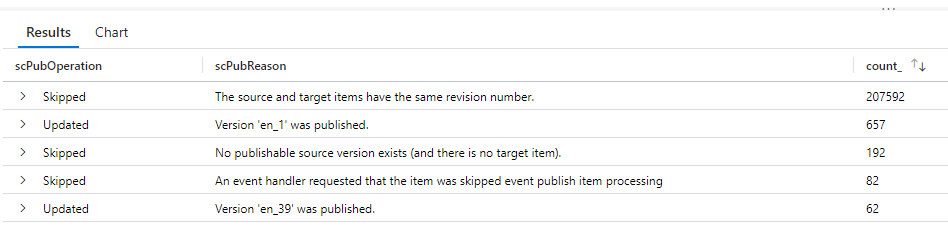
The problem was, I wanted to summarize details about these publishes, but the details are all part of one big string. Specifically, I wanted to see the count of the operation, and the reason for that operation. I was expecting to have to do some big regex to figure it out.
We’re using AppInsights with our Sitecore10 system, and one frustration we have is that our “Failures” report contains thousands of entries for 404 responses. Unfortunately, these days, just having a site means you’re going to get a tonne of requests for “potentially vulnerable paths” – such as the WordPress login, Drupal Login, PHP Info pages, etc.. None of these paths are ever going to be in our site, and conceptually, is it really an error if we respond to someone who is spamming our site with requests that a particular page doesn’t exist? It’s just making it harder to see the genuine issues we actually care about.
To that end, I wanted to set some of the 4xx responses from our site to be “Successful” in AppInsights. I came up with this TelemetryInitializer…
We are running Sitecore 10 in containers, and we have multiple environments. We’ve also got multiple server roles. We’d like our telemetry to App Insights to tell us a) what instance is this for, and b) what role is this for.
Recently I’ve been working on a Sitecore site that is using Azure App Gateway, and it is using the Web Application Firewall (WAF) features of that too. Broadly, I’ve been quite impressed, but I did come across a few problems.
OWASP publish a set of rules used in ModSecurity to try to identify anomalous traffic. These rules then total into a score of “how anomalous this request is”. Finally, there is one rule that checks that score, and potentially blocks traffic based on it.
We found we were getting traffic blocked. Here’s what we found.
In that snippet, you’ll find lots of mention of a configuration setting “instrumentation key”. This is the ID of the app insights instance that your data will be sent to.



 Andy Burns' Blog