I’m working with a Nintex workflow at the moment, and trying to do a simple thing – format a date. Unfortunately, the function fn-FormatDate does not work correctly. Continue reading “Nintex fn-FormatDate inline function failure”
SharePoint
Making Managed Metadata Navigation work well
In SharePoint 2007 and 2010, if you wanted a neat hierarchy of publishing pages, you had two options. Either, you structured your SharePoint site so that you got the navigation you wanted, or you built custom navigation providers. Unfortunately, customers typically want everything to be ‘out of the box’, even if that means some absurd structures just to get the navigation right. Developing custom navigation providers is a really tough sell, but I’ve also seen site structures 7 levels deep to try to avoid this – and a 7 level deep site structure is a really bad idea.
SharePoint 2013 gives us a standard alternative to structural navigation. Instead, we can use ‘Managed Navigation’. This is a Managed Metadata termset that define’s our site’s hierarchy.
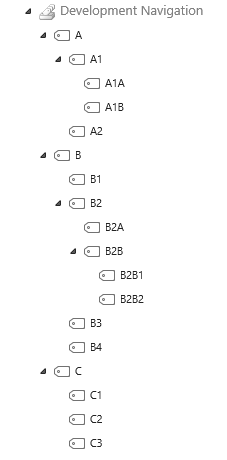
That’s great, but there are some problems with this still. Continue reading “Making Managed Metadata Navigation work well”
Add Breadcrumbs back into SharePoint 2013
SharePoint 2013’s master pages do not, by default, show breadcrumbs. SharePoint 2010 had reduced them to a fly-out menu (which was nice, as it used up less page space):
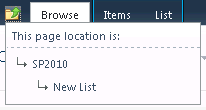
SharePoint 2013 doesn’t have them at all:

However, they can be restored… Continue reading “Add Breadcrumbs back into SharePoint 2013”
SharePoint vs (?) ASP.NET MVC
I’ve been studying ASP.NET MVC 4 over the last while; this is the subject of second of the 4 exams required for the SharePoint Developer MCSD, and I really need to spend some time on that.
The idea of an MVC (Model-View-Controller) framework is to separate the different concerns of your code, and that usually this allows you to design a data model, and then let your tools create a scaffolding of your site. Such things aren’t new; I implemented a Chinese Chess web site in Ruby on Rails which uses this approach in 2005. I loved the MVC approach. Continue reading “SharePoint vs (?) ASP.NET MVC”
On the 70-488 – SharePoint Core Solutions Exam
No brain-dumps or anything here; if you want the answers, go and study. However, it’s worth knowing about the structure of the exam.
Right, so this is one of the 4 exams you’ll need for the MCSD SharePoint Applications. We decided to fling me at this one without preparation – I’m a SharePoint developer, so shouldn’t I be good at this one without lots of learning?
Continue reading “On the 70-488 – SharePoint Core Solutions Exam”
Observations on Office 365 – Part 2
Following on from customer related issues in Office 365, there are a number of technology issues that give me concern. I will caveat this that this is based on my last project, and by the time I write this the Office 365 SharePoint platform could have changed to address some of these problems. Continue reading “Observations on Office 365 – Part 2”
Observations on Office 365 – Part 1
We recently completed another Office 365 project, and I must confess, I’m still not sure about it. The project was reasonably successful – but there were a lot of tears shed, and we still have issues that are proving alarming difficult to deal with.
Broadly, I think, these issues can be broken down in to two categories – problems with the customer, and problems with the technology. Continue reading “Observations on Office 365 – Part 1”
My Remote Event Receiver works in Debug, but not when published
Okay, I had exactly this issue – that my SharePoint App supporting my Remote Event Receivers would work when run under an F5 – debug deploy, but not when published properly. Annoyingly, I’ve found that I have to make a number of changes when moving between a ‘proper’ build, and an F5-deploy; I’ve mentioned those before, but they were turning off the AppUninstalling event, and replacing the ClientId in the app manifest with a *.
However, I’d checked these things, and my code still didn’t work. Continue reading “My Remote Event Receiver works in Debug, but not when published”
Turn off the Minimum Download Strategy feature in CSOM
I have found that the Minimum Download Strategy can cause issues with some of the JavaScript/JQuery I used in some of my pages – particularly when using Display Templates. I’m not the only person to have problems with it, either. Well, here’s the CSOM to turn it off:
private static void RemoveMinimalDownload(ClientContext clientContext, Web web)
{
 Guid MDSfeature = new Guid("87294C72-F260-42f3-A41B-981A2FFCE37A");
 FeatureCollection features = web.Features;
 clientContext.Load(features);
 clientContext.ExecuteQuery();
 features.Remove(MDSfeature, true);
 clientContext.ExecuteQuery();
}
Working with fields in CSOM
I’ve already detailed how to create a new Taxonomy Field in CSOM – here’s the more generic how to create a general field on a list.:
internal static void CreateFields(ClientContext clientContext, List targetList, string xmlDef)
{
 targetList.Fields.AddFieldAsXml(xmlDef, true, AddFieldOptions.AddFieldInternalNameHint);
 clientContext.ExecuteQuery();
}
And as a bonus, here’s how to set a field to be indexed in the client side object model:
internal static void SetIndex(ClientContext clientContext, List list, string fieldName)
{
	Field f = list.Fields.GetByInternalNameOrTitle(fieldName);
	clientContext.Load(f);
	clientContext.ExecuteQuery();
	f.Indexed = true;
	f.Update();
	list.Update();
	clientContext.ExecuteQuery();
}

