Portal Site Connection and Publishing Sites in SharePoint 2010

The Portal Site Connection can be a useful way of making your breadcrumbs link to a site collection that is ‘above’ them in the logical architecture of a site. It’s also a good way of navigating out of Search Sites and My Sites – which are kind of navigational black holes.

Unfortunately, they don’t work in Publishing sites. I investigated why. Continue reading “Portal Site Connection and Publishing Sites in SharePoint 2010”

Portal Site Connection and Publishing Sites in SharePoint 2010

FAIL: SPCriticalTraceCounter and TraceLevels

I’ve been looking at how to use the SPCriticalTraceCounter class for outputting messages in the Developer Dashboard. I came across a good post about how to do this by Frode Aarebrot, but it left me puzzled – what was the traceLevel integer about? Why wasn’t it an enumeration – like the Microsoft.SharePoint.Administration.TraceSeverity enum? Why those magic values? What happened if I used a wrong value?

Continue reading “FAIL: SPCriticalTraceCounter and TraceLevels”

FAIL: SPCriticalTraceCounter and TraceLevels

Hiding a Tab Group from a custom list type in SharePoint 2010's Ribbon

I have a custom list definition that I’ve been writing. The ribbon on it looks something like this:

Unfortunately, I don’t want some of the groups shown on this tab. For example, I don’t want any of the ‘Connect & Export’ group, or ‘Customize List’ – these things could actually break my solution. So, how to hide?

Initially, I looked at the HideCustomAction Feature element. This what you’d use for hiding links to settings pages, etc., and it seems a natural choice. Unfortunately, it doesn’t allow a RegistrationId in the same way that a CustomAction element does – so there was no way to restrict this to my list only. Damn.

Continue reading “Hiding a Tab Group from a custom list type in SharePoint 2010's Ribbon”

Hiding a Tab Group from a custom list type in SharePoint 2010's Ribbon

How DisableEventFiring / EventFiringEnabled works

I’ve got an event handler on a SharePoint list that’s fairly long running, and this then raised a question in the office – do these settings control event firing for the currently running event handler, or for the entire list?

Very often you see lines of code like this…

this.EventFiringEnabled = false;
item.Update();
this.EventFiringEnabled = true;

… but was this really necessary? Are people worried about events not being handled ‘cos firing is disabled, or is this just a convenient way of tracking whether events are enabled or not? Continue reading “How DisableEventFiring / EventFiringEnabled works”

How DisableEventFiring / EventFiringEnabled works

Hidden fields, and controlling them with the Object Model

SharePoint’s fields can be ‘hidden’ or shown, by setting the SPField.Hidden property. That’s great, but sadly it isn’t that simple. You might want a field hidden, but allow administrators, etc., to ‘unhide’ the field. Then again, sometimes you might want your hidden field to be really hidden, and never ‘unhidden’.

That is actually what SharePoint allows. The SPField.Hidden property also relies on a second property ‘CanToggleHidden’. You can see this in the CAML definition of a field. So you could define a field like:

<Field Type="Text" ID="{449cf8bc-88ce-445a-ac55-11ea0cb71fed}" Hidden="TRUE" CanToggleHidden="TRUE" ... >

Okay, that’s fine – that’d give us a field which is hidden, but we can unhide. Note that by default CanToggleHidden is false, and this led to my problem. Continue reading “Hidden fields, and controlling them with the Object Model”

Hidden fields, and controlling them with the Object Model

Determine if a user is a farm administrator

Sometimes you just need to know if a user is a farm admin; conveniently SharePoint provides a couple of static methods on the SPFarm object to check this:

if( SPFarm.CurrentUserIsAdministrator() ) { ... }

Neat, but one tip – it’s not obvious but it seems that if you want to check this within a content web application, you have to use the method that accepts a boolean and that bool needs to be true:

if( SPFarm.CurrentUserIsAdministrator(true) ) { ... }

Otherwise you will only ever get a ‘false’ response.

Determine if a user is a farm administrator

Tokenisation and the Ribbon

A useful post on the MS SharePoint developer blog – “Tokenization in the SharePoint 2010 Server Ribbon“. I always find it a little tricky remembering what token works in which place; this explains it.

In general, and as a reference for myself:

Location ListUrlDir ItemId ItemUrl RecurrenceId SiteUrl ListId Source SelectedListId SelectedItemId
List View Yes No No No Yes Yes Yes Yes Yes
List Form Yes Yes Yes Yes Yes Yes Yes No No
Tokenisation and the Ribbon

Annoyance: GUIDs for Views must be upper case

So, I have a list where I’m using one of the views for my own nefarious purposes; I don’t want users to be able to see it normally, so I set it to hidden in my List Schema. That was fine, and worked.

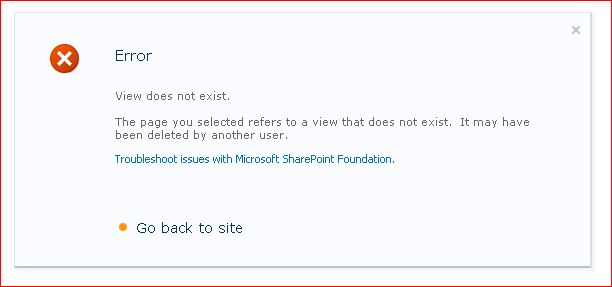
However, I do need administrators to be able to edit that view – so I gave them a link that would take the to the ViewEdit.aspx page. This worked, except that whenever you tried to save any changes to the view, all you got was an error:

This seemed spurious – “View does not exist” – we’d just looked at the view, so how can it not exist? I tried unhiding the view, and testing, and I found that if I went by my link then I couldn’t save changes, but if I went by the standard UI, everything worked.

Great.

In the end I started comparing differences between the pages you got by my link and the UI. What I found was that some of the GUIDs in the page were, like my link, in lower case.

And that was the problem – the GUIDs in the URL needed to be upper case.

I surmise that someone is comparing strings during the ViewEdit save, rather than the GUIDs that they actually are. #FAIL.


Annoyance: GUIDs for Views must be upper case

Bloody Stupid SPWeb properties

So, like many SharePoint objects, the SPWeb object has a property bag. Unlike many, it has two – Properties and AllProperties.

The problem I encountered with this was that I was trying to set some Search Center settings on a newly created Site Collection, and their capitalization was being persisted wrongly:

newRootWeb.AllProperties["SRCH_ENH_FTR_URL"] = settings.SearchCenterUrl;

This would be persisted as lower case – which was wrong. Lower case capitalisation isn’t the same upper. Nice. Continue reading “Bloody Stupid SPWeb properties”

Bloody Stupid SPWeb properties