Set the Title of a ListViewWebPart

Something that has bothered me repeatedly in the past is that ListViewWebParts didn’t seem to allow their titles to be set via CAML. The View element for a site (i.e. in the ONET.xml file) doesn’t have a title element, and the ‘Name’ and ‘DisplayName’ elements don’t set the web part’s title. Instead, the ListViewWebPart always seemed to pick up the name of the list it referred to. This was a problem if you had a page that showed two ListViewWebParts refering to the same list. E.g.:

<View List="Lists/Tasks" BaseViewID="7" WebPartZoneID="Left" WebPartOrder="5" />
<View List="Lists/Tasks" BaseViewID="9" WebPartZoneID="Left" WebPartOrder="6" />

would result in:

How can we set those titles to be different? Continue reading “Set the Title of a ListViewWebPart”

Set the Title of a ListViewWebPart

The X-SharePointHealthScore header

A reminder to myself – there is a response header for SharePoint requests called the X-SharePointHealthScore. It indicates how stressed the server is with a score from zero (unstressed) to 10 (highly stressed). I first stumbled across it when debugging something in Fiddler, but others have written about it:

  • Andrew Connell has a brief write up
  • Mick Breeze dug into it with Reflector
  • Michel Barneveld seems to have found it the same way as I did – but looks at how it is calculated. He also describes how to force SharePoint to return a given value, in case you need to test something (like how your client code handles a stressed server)

So how do we test the loadbalancer if we set it up in this fashion? Do we need to DDoS a WFE? There is a better way 😉 There is a registry setting that will override the Health Score and it will return the value from the registry.

Create a DWORD with the name ServerHealthScore in the following location: HKLMSOFTWAREMicrosoftShared ToolsWeb Server Extensions14.0WSS and give it the value you want.

So what’s it useful for? Well, the main things that strike me would be:

  • Server Monitoring – Pretty obvious, really.
  • Client Applications – Can warn or take corrective actions if the server is loaded and may implement throttling.
  • Client Side scripts – Similar to above, though I haven’t yet been able to figure out who you’d get this value in the Client Object Model. I’m assuming there is a way to get the response headers in the Client Object Model – otherwise you may have to use normal XMLHttpRequests if you want to see the response headers.
The X-SharePointHealthScore header

CAML queries of Lookup columns support query by ID

When you run a CAML query, you have to specifiy a value you’re searching for:

query.Query = "<Where><Eq><FieldRef Name='MyField' /><Value Type='Text'>WhatILookFor</Value></Eq></Where>";

Well, that’s fine, but what about lookup columns? They actually have 2 elements – the text, and an ID.

E.g. You might have a lookup to a ‘Country’ list, and “United Kingdom” might be ID 45.

If I wanted to find items on my list that referenced the “United Kingdom” value, my query would be:

query.Query = "<Where><Eq><FieldRef Name='MyField' /><Value Type='Lookup'>United Kingdom</Value></Eq></Where>";

However, this doesn’t make much sense. The ID is our primary key to the ‘country’ list. Why are we querying by value? I mean, if the United Kingdom had a revolution and suddenly became, say, the ‘United Republic’, all of my CAML queries would break.

(That might be the least of my worries, but you get my point).

So, we’d like to query by ID. Well, you can – I’ve mentioned it before, and the MSDN documents neglect to mention it themselves. There is a property on the FieldRef of LookupId. Set that to True, and you can query by ID.

query.Query = "<Where><Eq><FieldRef Name='MyField' LookupId='TRUE' /><Value Type='Lookup'>43</Value></Eq></Where>";

Edit: One of my colleagues pointed out that in SharePoint 2010, if you update the text of a referenced item, it is updated within the items that reference it. This is different to SharePoint 2007, where the referencing items retained the original text value. He’s right – but I’d still prefer to query by ID as it’s indexed, unique, and simple.

CAML queries of Lookup columns support query by ID

Don't Reuse SPQuery objects!

For God’s sake, don’t reuse SPQuery objects!

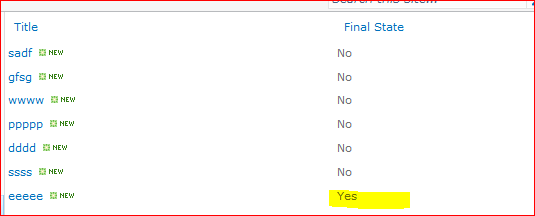
Now, with that out of the way, let me explain. I’ve inherited some code. In that code, it’s performing a couple of queries on a List, using an SPQuery object. It’s querying a boolean column, and only one item in the list should be true. It’s a long story why, but that’s the way it is. The list is something like this:

The code needs to query this list for true items (which should only be one) and false items (which you can see above, is more than one). However, these queries didn’t seem to be working. Continue reading “Don't Reuse SPQuery objects!”

Don't Reuse SPQuery objects!

Practical SPDisposeCheck – Namespaces, Delegates and RootWebs

SPDisposeCheck is a great utility for checking the disposal patterns you’re using in your SharePoint solution. Believe me, even experienced practitioners make mistakes; object disposal in SharePoint is hard.

Now, every time someone says that SPDisposeCheck is great, someone posts back that it isn’t perfect. They’re right; it won’t pick up every invalid disposal pattern – but it’s pretty good. Given the choice of it or no check, it’s a clear winner.

I’m not going to describe it much – there are good articles already out there about the problem, and how to use SPDisposeCheck. It’s also well worth installing the latest version, which integrates with Visual Studio. That’s brilliant – you can run a test over your assemblies with each build.

However, recently I took over someone else’s code; SPDisposeCheck proved invaluable, but quirky too. This post will examine some of the practical issues that I found with using it.

Continue reading “Practical SPDisposeCheck – Namespaces, Delegates and RootWebs”

Practical SPDisposeCheck – Namespaces, Delegates and RootWebs

Assembly Versioning in SharePoint

Note: Although quite a lot of this post is about using SVN data in versioning, the idea of using the AssemblyFileVersion works with other systems too

Knowing what version of your code is running is important. Last year I was working on a product where the build process actually put the SVN revision number into a constant in a file – which was then compiled into the assembly – and then the product displayed that version on various configuration pages. This was cool, ‘cos it made it very easy to tie the version of a customer’s code that had a problem to a revision in SubVersion. It proved really bloody useful – the number of times that the ‘latest version, which had definitely been installed’ hadn’t been was … surprising. Thus, I promised that I would do similar in my solutions. However, putting the revision number into a file full of constants seemed … untidy. Continue reading “Assembly Versioning in SharePoint”

Assembly Versioning in SharePoint

How many sub-sites can a site have?

Last year I was working on a system where we were creating a lot of sites. I mean, tens of thousands of sites, and all within one site collection (they’d all have a few documents and tasks, but not many). Anyway, we were told by a partner’s developer that:

  • A Site Collection’s Root Site could only have 127 subsites before performance issues would start
  • Each of those subsites could have up to 2000 subsites before performance issues would start

This seemed a bit suspicious to me. I had read on MSDN about the capacity boundaries and limits, and knew about the 2000 subsites per site note:

Subsite
2,000 per site view
The interface for enumerating subsites of a given Web site does not perform well as the number of subsites surpasses 2,000. Similarly, the All Site Content page and the Tree View Control performance will decrease significantly as the number of subsites grows.

Okay, that’s fine. And I knew that the limit on the number of Sites per Site Collection is 250,000. But I couldn’t find anything about this ‘127’ subsites under the root site thing, and I couldn’t help but wonder if this was where the ‘127’ value had come from (125 x 2000 = 250,000) as I simply didn’t see why a root site should be any different to any other type of site. Thus, I decided to test it. Continue reading “How many sub-sites can a site have?”

How many sub-sites can a site have?

Site Template Descriptions and Site Descriptions

When you save a Site Template in SharePoint you can specify a Description. That’s fine – but doesn’t really seem to be used anywhere, other than a little note on the ‘Create new Site’ form (see below). I’d always assumed that it was. Well, I was wrong. Continue reading “Site Template Descriptions and Site Descriptions”

Site Template Descriptions and Site Descriptions

SharePoint Search – AuthzInitializeContextFromSid failed

I’d a really, really weird problem with a customer yesterday. We’d set up their SharePoint search. Indexing seemed to be working correctly, and when I logged in as an administrator, I was getting search results correctly. However, logged in as a normal – though very highly privileged – user my search results were missing! This was some thing of a surprise. It felt like security trimming, but the user was a Site Collection admin, and had Full Control throughout the entire main content web application. Also, we were indexing content off the network file share, and we knew he could access both the SharePoint Content.

However, when he ran a search, he didn’t get any search results. That sucked. I tried another user account – and had the same problem.

Eventually, I looked in the logs and found the following message:

AuthzInitializeContextFromSid failed with ERROR_ACCESS_DENIED. This error indicates that the account under which this process is executing may not have read access to the tokenGroupsGlobalAndUniversal attribute on the querying user’s Active Directory object. Query results which require non-Claims Windows authorization will not be returned to this querying user.

Continue reading “SharePoint Search – AuthzInitializeContextFromSid failed”

SharePoint Search – AuthzInitializeContextFromSid failed