TL;DR – Due to strange functionality and a poorly chosen default, Sitecore’s log4net.Filter.LevelRangeFilter may unexpectly terminate the chain of log4net filters you’ve configured, without later filters even being considered. This can be fixed by setting the “AcceptsOnMatch” attribute to false.
Sitecore uses log4net to process its log messages. This is nifty; it’s relatively easy to add different destinations for log messages, and to control what gets written where by the use of log4net IFilters. An appender can have a number of filters configured against it, and these are processed in a chain. For example, this appender will exclude “INFO” log messages, and then messages about redirects to the 404 page:
<appender name="AppInsightsAppenderLog" type="Sitecore.Foundation.AppInsights.Appenders.AppInsightsAppender, Sitecore.Foundation.AppInsights">
	<filter type="log4net.Filter.LevelRangeFilter">
		<levelMin value="WARN" />
	</filter>
	<!-- Eliminate Warnings about every redirect to 404 -->
	<filter type="log4net.Filter.StringMatchFilter" name="DocNotFoundFilter">
		<stringToMatch value="Request is redirected to document not found page" />
		<acceptOnMatch value="false" />
	</filter>
	....
</appender>
Each filter, when it is processed, returns one of three values:
- Deny – Immediately deny logging of this message, and do not evaluate any later filters.
- Accept – Immediately accept logging of this message, and do not evaluate any later filters.
- Neutral – Neither accept or deny; continue on to process the next filter in the chain.
If the end of the chain is reached and the result is still Neutral, then your message will be logged. There is a “Deny All” filter that you can use to change this so any result getting past the other filters then is denied.
This system is quite powerful, and it’s not as simple as “AND” or “OR” of all the filter rules (as I’ve seen some people writing about). In fact, this is rather better than that; you can build more complex logic. However, this requires another property to tell a filter what to do on finding a match. Should it immediately accept the match – terminating the chain and recording the message – or should it simply pass processing on to the next filter? To this end, we have the configuration element “AcceptsOnMatch”. If that element is true, then a match on the message will accept the message, and a non-match will deny. If it’s false, then a match will deny the message, and a non-match will return neutral.
Fine. What’s this got to do with the LevelRangeFilter? Well, it has similar logic:
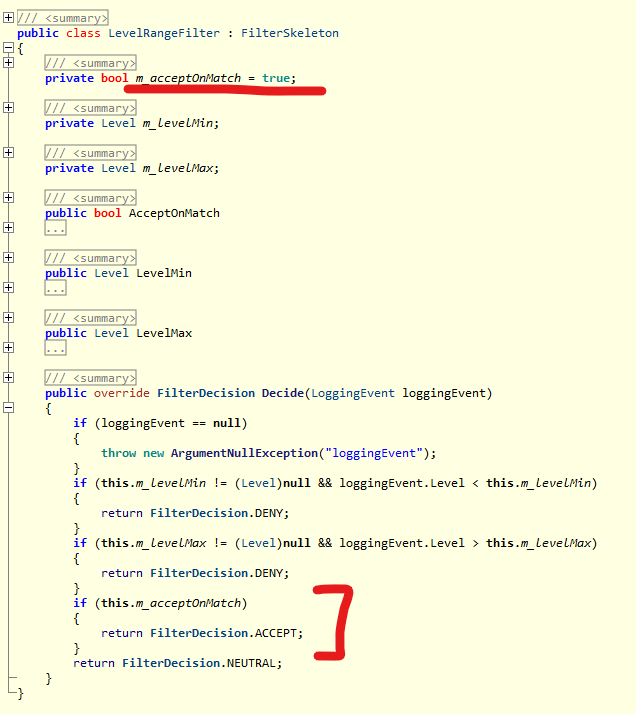
- If the message is outside the configured level range, the message will be denied and later filters ignored. Fine!
- If AcceptsOnMatch is false, and the message is in the right range, the message will be handed on to the next filter in the chain.
- If AcceptsOnMatch is true, and the message is in the right range, the message will be accepted and the later filters ignored.
And AcceptsOnMatch is true by default. Therefore, this little bit of config:
<filter type="log4net.Filter.LevelRangeFilter">
    <levelMin value="WARN" />
</filter>
… will cause the rest of your filter chain to be ignored. And I can’t honestly see a reason for this functionality on the LevelRangeFilter. I find it a bit non-intuitive for StringMatchFilters, but I get that you might want to filter by accepting (though I bet 90% of the time that isn’t the case). However, for the LevelRangeFilter, which is a filter you probably near the start of your chain, why would you ever want it to Accept like that?
Surely this is better logic:
- If you did want the filter to cause acceptance, just make it the last filter in the chain, where a Neutral response will cause the message to be recorded.
- If you did want the filter to pass on to later filters, it needs to return a Neutral response.
Anyway, if you change your config to:
<filter type="log4net.Filter.LevelRangeFilter">
	<levelMin value="WARN" />
	<acceptOnMatch value="false" />
</filter>
… then your later filters will be evaluated.
I suppose a wider point is that I think it odd that the StringMatchFilter and LevelMatchFilter also “AcceptsOnMatch” by default, also terminating processing – but I can see that there may be times that’s useful. I just think it will be rare that that is preferred over handing on to the next filter in the chain.
 Andy Burns' Blog